Hey friends,
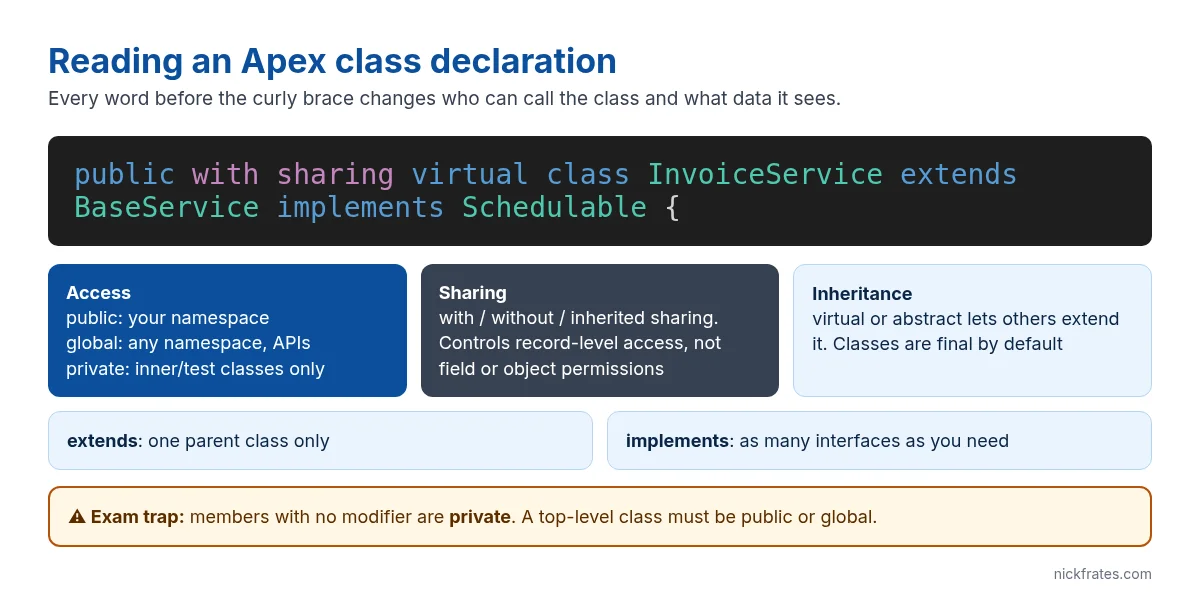
An Apex class is a blueprint: the variables it holds and the methods that act on them. If you’ve seen Java, the syntax looks familiar, but several defaults are different, and those differences are exactly what the Platform Developer I exam tests. This post walks through a class declaration word by word, then the members inside it, with code you can paste into a Developer Edition org.
A complete small class
And calling it from Anonymous Apex (Developer Console > Debug > Open Execute Anonymous Window):
Access modifiers: who can call what
| Modifier | Visible to | Notes |
|---|---|---|
| private | Code in the same class | The default for members. Top-level classes can’t be private unless they’re @IsTest. |
| protected | The class, its inner classes and classes that extend it | Instance methods and variables only. |
| public | Any Apex in the same namespace | Not like Java’s public: other namespaces (managed packages) can’t see it. |
| global | Any Apex anywhere, plus SOAP API and managed package subscribers | A global member needs a global class. Use rarely; you can’t easily take it back in a package. |
Source: Apex Developer Guide: Access Modifiers. The two exam favourites: members without a modifier are private, and public means “public within your namespace”, not public to the world.
with sharing, without sharing, inherited sharing
The sharing keyword decides whether the class respects the running user’s record access (org-wide defaults, role hierarchy, sharing rules):
- with sharing: only records the user can see. Use it by default.
- without sharing: all records. Use it for targeted elevation, such as letting an Experience Cloud user read a record they don’t own.
- inherited sharing: takes the caller’s mode, and runs as with sharing when it’s the entry point.
Two details trip people up. First, sharing keywords control record access only, not object permissions or field-level security; use WITH USER_MODE on queries for those. Second, the default for a class with no keyword changed: from API version 67.0 a class without a declaration runs with sharing, while classes saved at 66.0 or earlier generally ran without sharing when they were the entry point (Apex Developer Guide: sharing keywords). Always declare it explicitly so nobody has to remember which version applies.
Static vs instance members
A static variable or method belongs to the class, not an object, so you call it as DiscountCalculator.MAX_DISCOUNT without new. A static variable lasts for the whole transaction, which is why trigger recursion guards use one:
Static values reset at the end of each transaction; they don’t persist between requests the way a Java static would in a long-running server.
Inheritance and interfaces
Apex classes and methods are final by default. To let another class extend yours, mark the class virtual (can be used as-is) or abstract (must be extended), and mark the methods you allow to be replaced as virtual or abstract. The child uses override. A class can extend only one parent but implement many interfaces.
Interfaces are how Salesforce plugs your code into the platform: Schedulable, Queueable, Database.Batchable. The Future vs Queueable vs Batch Apex post shows those in action.
Cert Lab by Nick Frates
Practise Apex class questions
The Platform Developer I Cert Lab ($9.99) drills access modifiers, sharing, static members and inheritance with scenario questions and explanations for every wrong option.
See the Platform Developer I Cert Lab – $9.99 →Every class needs a test class
To deploy Apex to production, your tests must cover at least 75% of your Apex code overall. A test for the calculator:
FAQ
What is the default access modifier in Apex?
private, for methods and variables. A top-level class must be declared public or global (or be an @IsTest class).
Can an Apex class extend more than one class?
No. One parent class, but as many interfaces as you like.
Does with sharing enforce field-level security?
No. It enforces record sharing only. Use WITH USER_MODE in SOQL, or Security.stripInaccessible, for object and field permissions.
What’s the difference between public and global?
public is visible within your namespace. global is visible everywhere, including other namespaces and web services.
Hope this helps!
Best,
Nick


