Hey friends,
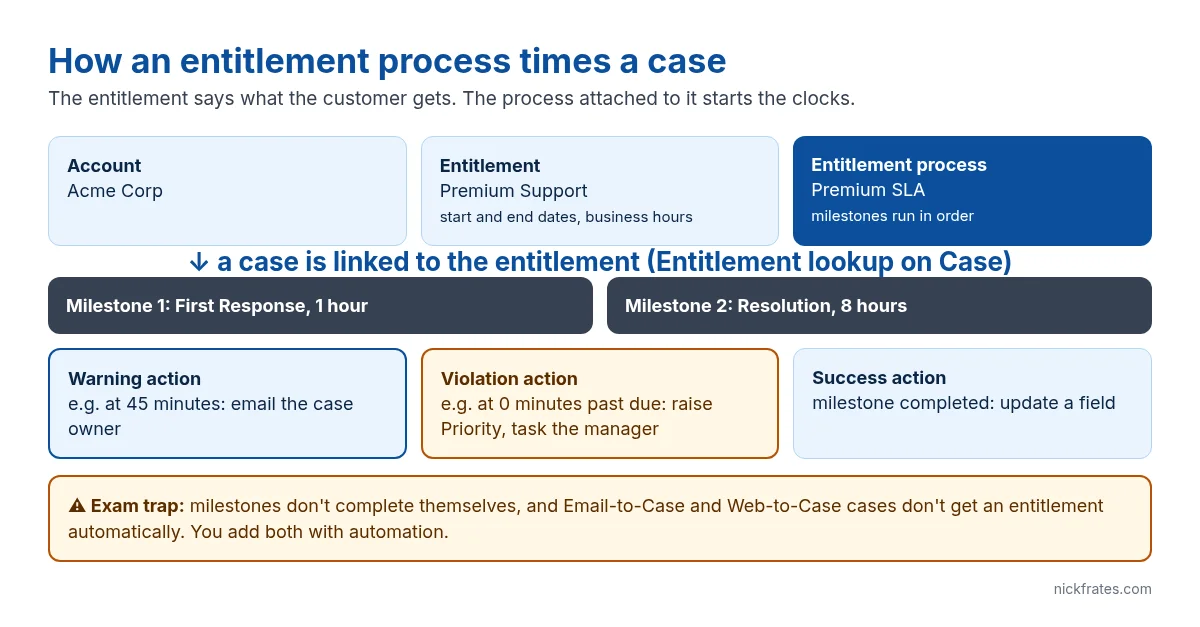
Entitlements are how Salesforce answers two questions on every case: is this customer allowed support, and how fast do we owe them a response. The first part is the entitlement record. The second part is the entitlement process with its milestones, which is where most setups (and most exam questions) go wrong. Here is how the pieces fit, the setup order that works, and the gotchas I see most.
The four records that make up entitlement management
| Record | What it holds | Example |
|---|---|---|
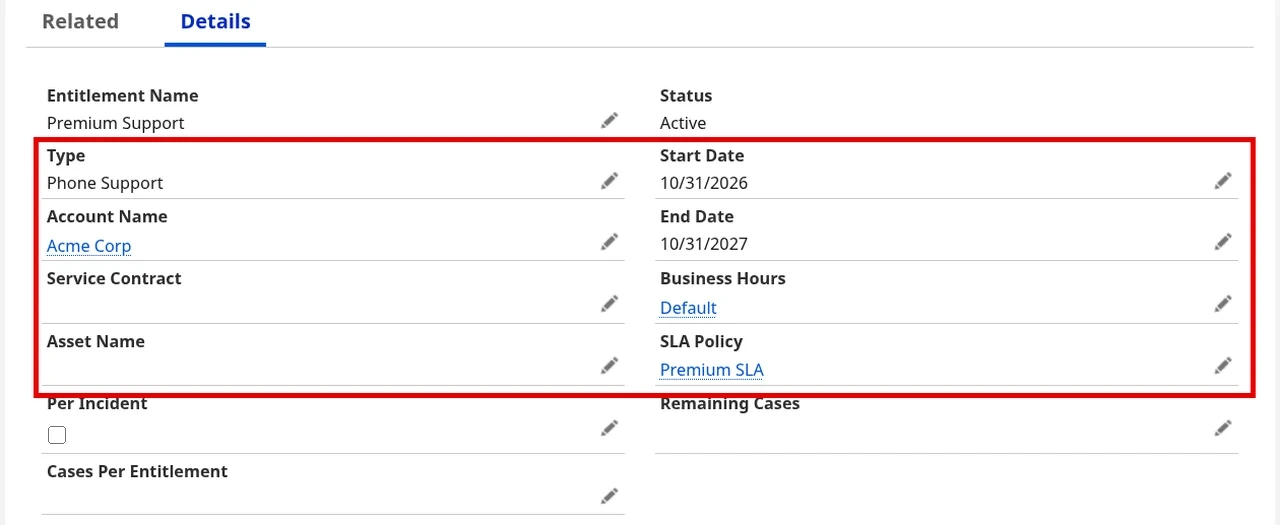
| Entitlement | A unit of support a customer is owed, with dates and optional business hours | Premium Support for Acme, Jan 1 to Dec 31 |
| Entitlement process | A timeline of milestones a case must hit | Premium SLA: respond in 1 hour, resolve in 8 |
| Milestone | One required step with a time limit, plus warning, violation and success actions | First Response |
| Service contract (optional) | The agreement itself, with contract line items, for renewals and multiple service levels | Acme 2-year support contract |
Entitlements hang off accounts, assets, contacts and service contracts (Salesforce Help: Entitlements). A case picks one up through the Entitlement lookup on the case, and from that moment the entitlement’s process starts running milestones on it.
Setup order that avoids rework
- Turn on Entitlement Management (Setup > Entitlement Settings) and add the Entitlements tab and related list where reps need it.
- Create business hours first if your SLAs only count working time. Milestone clocks and time-triggered actions follow business hours.
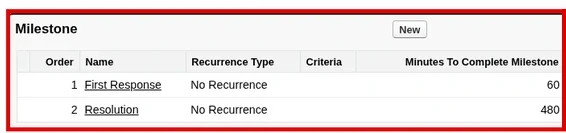
- Create milestones (Setup > Milestones): just a name and a recurrence type at this stage.
- Create the entitlement process, add the milestones to it, and set each milestone’s time and criteria (for example Priority = High gets 60 minutes).
- Add milestone actions: warning, violation and success.
- Activate the process, then create entitlements that point to it.
- Add the Milestones component to the case Lightning page so reps see the countdown.
- Automate adding entitlements to new cases and completing milestones (next sections).
Order matters because of one rule: once an entitlement process is active, you can’t delete its milestones or create new milestone actions on it. You create a new version of the process instead (Entitlement Management limits and limitations). Build and test in a sandbox before you activate.
Milestone actions: warning, violation and success
Each milestone can fire three kinds of time-dependent actions:
- Warning: before the milestone is due, for example email the owner 15 minutes before First Response runs out.
- Violation: when the milestone is missed. Set the time trigger to 0 minutes to act the moment it’s violated.
- Success: when the milestone is completed. Success actions use the milestone’s own trigger, so you don’t add one.
Warning and violation actions need a time trigger before you can add an action. The action itself can be a task, an email alert, a field update, an autolaunched flow or an outbound message. You can add up to 10 actions and 10 time triggers to each action type, and time-triggered actions only fire during business hours (Add a Milestone Action).
Three things Salesforce won’t do for you
1. Milestones don’t complete themselves
A rep replying to the customer doesn’t mark First Response complete. You complete milestones by setting CompletionDate on the CaseMilestone record, usually from a record-triggered flow or Apex. A common pattern: when the first outbound email is sent on the case, complete its First Response milestone.
2. Email-to-Case and Web-to-Case cases arrive without an entitlement
Entitlements don’t apply automatically to cases created by Email-to-Case, Web-to-Case or an Experience Cloud site. Add a before-save record-triggered flow on Case that finds the account’s active entitlement and fills the Entitlement lookup. No entitlement on the case means no milestones and no SLA tracking.
3. You can’t share entitlements
Entitlements have no sharing of their own. They inherit the parent account’s sharing, and users need Read access on the account to update them. Also, an entitlement process only runs on records of its type, so keep cases and work orders on separate entitlements.
Cert Lab by Nick Frates
Practise entitlement scenarios
The Agentforce Service Consultant Cert Lab ($9.99) covers entitlements, milestones, Email-to-Case and the Service Console with scenario questions and explanations for every wrong answer.
See the Service Consultant Cert Lab – $9.99 →How exams ask about this
- “Support must respond to platinum customers within one hour during business hours”: entitlement process + milestone + business hours.
- “Notify the manager when a case is about to breach its SLA”: warning action on the milestone.
- “The SLA changed, but existing cases must keep the old one”: new version of the entitlement process.
- “Cases from email have no milestones”: nothing populated the Entitlement lookup.
FAQ
Do I need Service Cloud for entitlements?
Entitlement Management comes with Service Cloud and is available in Developer Edition, so you can practise all of this for free.
How many milestones can one entitlement process have?
Up to 10 milestones per process, and up to 1,000 entitlement processes per org (older orgs can have lower limits).
What is the difference between an entitlement and a service contract?
An entitlement is one unit of support. A service contract is the customer agreement that can hold several entitlements and line items, used when you need renewals and multiple service levels.
Why didn’t my violation action fire at night?
Time-triggered actions follow business hours. If the process uses 9-to-5 hours, the clock stops outside them.
Hope this helps!
Best,
Nick


