Hey friends,
Salesforce gives you three main ways to run Apex later instead of right now: future methods, Queueable Apex and Batch Apex. (Scheduled Apex is the fourth, and it decides when work starts rather than how.) They overlap enough to be confusing, and Platform Developer II loves to ask which one fits a scenario. Here is what each does, what it can’t do, and a quick way to choose.
Why go async at all
Async Apex runs in its own transaction when resources are free, with higher governor limits than synchronous code: 200 SOQL queries instead of 100, 25 MB heap instead of 10 MB, and 60 seconds of CPU time instead of 10. You reach for it for three reasons: callouts from a trigger (not allowed synchronously), work that’s too heavy for one transaction, and work the user shouldn’t wait on.
Future methods: the simplest, and the most limited
A future method is a static method marked @future. Calling it queues it and returns immediately.
- Must be static and return void.
- Parameters must be primitives, or arrays and collections of primitives. You can’t pass sObjects, so pass IDs and query inside, which also gets you current data.
- No job ID is returned, so you can’t monitor it from code.
- A future method can’t call another future method, so you can’t chain them.
- Up to 50 future calls per transaction. Add
callout=trueto make callouts.
Queueable Apex: the default choice now
Queueable Apex is a class that implements Queueable. You enqueue an instance, so it can hold any member variables you like, sObjects and custom types included.
- Non-primitive state: pass sObjects or your own classes through the constructor.
- Job ID:
System.enqueueJobreturns the AsyncApexJob ID, so you can query its status. - Chaining: a running Queueable can enqueue one child job. Use it for step-by-step work.
- Up to 50 jobs enqueued per synchronous transaction; implement
Database.AllowsCalloutsfor callouts.
Anything you’d write as a future method can be written as a Queueable, with monitoring and chaining on top. That’s why most new code uses Queueable.
Batch Apex: for big data volumes
Batch Apex implements Database.Batchable with three methods. start returns the records (a Database.QueryLocator can return up to 50 million), execute runs once per chunk, and finish runs once at the end.
- Each
executecall is its own transaction with fresh governor limits. A failed chunk rolls back alone; the others keep their changes. - Default scope is 200 records per chunk; you can set 1 to 2,000.
- Member variables reset between chunks unless the class implements
Database.Stateful. - Up to 5 batch jobs can be queued or active at once, with up to 100 more waiting in the Apex flex queue.
- Chain batches by calling
Database.executeBatchfromfinish.
Cert Lab by Nick Frates
Practise the async scenarios
The Platform Developer II Cert Lab ($9.99) drills async Apex, trigger frameworks and governor limits with scenario questions, and explains why each wrong option is wrong.
See the Platform Developer II Cert Lab – $9.99 →Side by side
| Future | Queueable | Batch | |
|---|---|---|---|
| How you start it | Call the @future method | System.enqueueJob | Database.executeBatch |
| Parameters | Primitives only | Any type (via class state) | Any type (via class state) |
| Returns a job ID | No | Yes | Yes |
| Chaining | No | One child job per execution | From finish() |
| Volume | Small | Small to medium | Up to 50 million records |
| Limits | One async transaction | One async transaction per job | Fresh limits per chunk |
| Callouts | callout=true | Database.AllowsCallouts | Database.AllowsCallouts |
Testing async code
Async jobs don’t run in a test until you call Test.stopTest(). Everything queued after Test.startTest() runs synchronously at stopTest, so you can assert on the results right after it.
In a test, a batch class runs only one execute call, so keep test data to 200 records or fewer.
Quick way to pick
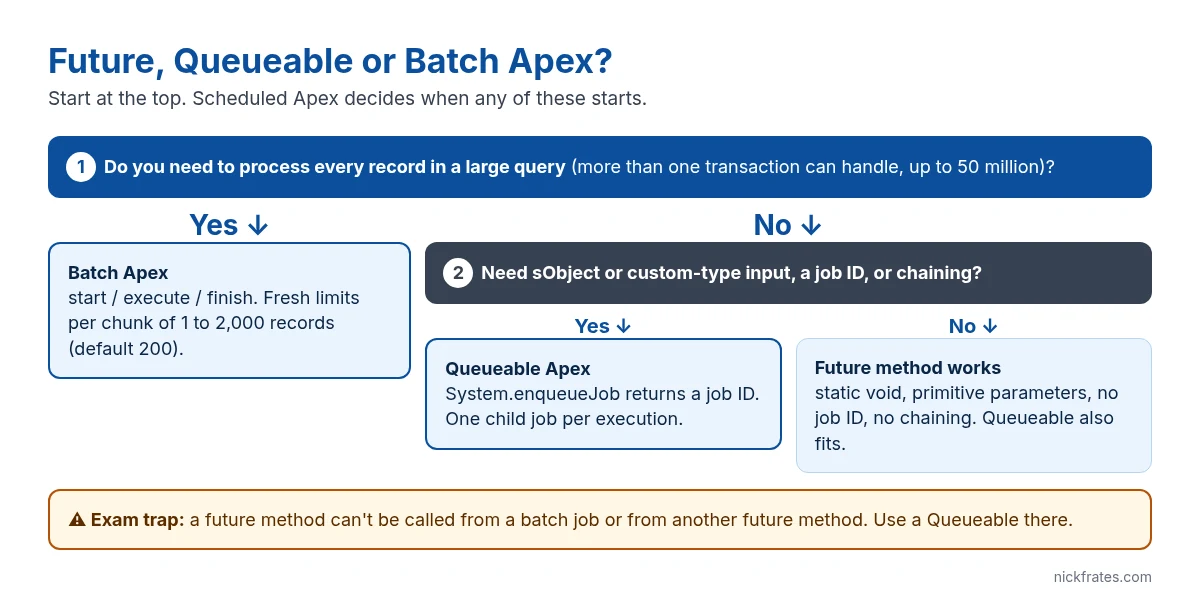
- Processing every record in a large query, or more than one transaction can hold: Batch.
- Need sObjects as input, a job ID, or step-by-step chaining: Queueable.
- Tiny fire-and-forget call with IDs, in older code you’re maintaining: future is fine, though Queueable does it too.
- Need it to run nightly or on a set time: Scheduled Apex that starts one of the three.
FAQ
Can I call a future method from a batch job?
No. Future methods can’t be called from a batch job or from another future method. Use a Queueable instead.
Can a Queueable start a batch job?
Yes. Database.executeBatch can be called from a Queueable’s execute method.
How many records can Batch Apex process?
A Database.QueryLocator in start() can return up to 50 million records. An Iterable start() is held to the normal query row limit.
Do async jobs share governor limits with the code that queued them?
No. Each job runs in its own transaction with the async limits, and each batch execute call gets its own fresh limits.
Hope this helps!
Best,
Nick


