Hey friends,
Every Apex trigger runs either before or after the record is saved, and picking the wrong one is the most common trigger bug I see in code reviews. The rule is short: change the record that fired the trigger in a before trigger; touch anything else (other records, IDs, callouts) in an after trigger. Here is why, with the save order, the context variables and code you can paste into a Developer Edition org.
Where before and after triggers sit in the save
When a record is saved, Salesforce runs a fixed sequence called the order of execution. The simplified version that matters for triggers:
- Load the record and run system validation (required fields, field formats).
- Run before-save record-triggered flows, then before triggers.
- Run most system validation again plus custom validation rules and duplicate rules.
- Save the record to the database, but don’t commit yet. It now has an ID.
- Run after triggers, then assignment, auto-response and escalation rules, after-save flows and roll-up summary updates.
- Commit everything. Post-commit work (emails, async jobs) runs after this.
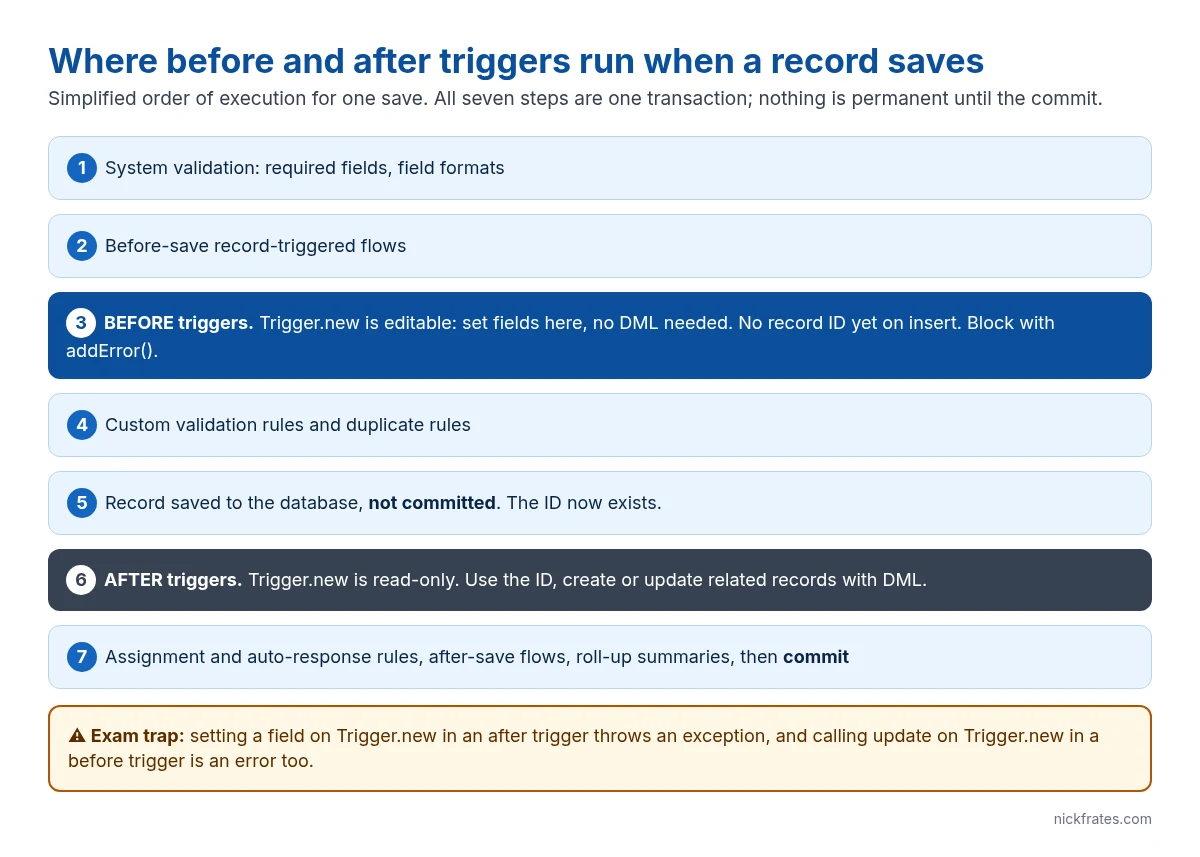
Two consequences fall straight out of that order. A before trigger runs before the save, so any field you set on the record is saved with no extra DML. And a before insert trigger runs before the record has an ID, so anything that needs the ID (creating a child record, writing a lookup to it) has to wait for the after trigger.
Before triggers: change the record itself
In a before trigger, the records in Trigger.new are editable. Set a field and you’re done; don’t call update on them, because the save that fired the trigger already writes your changes.
Before triggers are also where you block a save with your own logic. Call addError() on the record and the save stops with your message, like a validation rule that can look at other data:
After triggers: work with other records
In an after trigger the record is saved (not committed), so it has an ID and system fields such as CreatedDate. Trigger.new is now read-only: assigning a field throws a runtime exception. Use after triggers to create or update related records, which do need DML.
Notice the pattern: collect in a list inside the loop, then one insert after it. A trigger receives up to 200 records per batch, and a synchronous transaction allows 150 DML statements and 100 SOQL queries (governor limits), so DML or SOQL inside the loop fails under a data load.
If you really need to change the triggering record from an after trigger, query it fresh and update the copy. That fires the trigger again, so you need a recursion guard. Nine times out of ten the right fix is to move the logic to a before trigger.
Context variables, and when each one exists
Every trigger gets context variables on the Trigger class. The ones that trip people up are the ones that are null in some events:
| Event | Trigger.new | Trigger.newMap | Trigger.old / oldMap | Edit Trigger.new? |
|---|---|---|---|---|
| before insert | Yes | No (no IDs yet) | No | Yes |
| after insert | Yes | Yes | No | No |
| before update | Yes | Yes | Yes | Yes |
| after update | Yes | Yes | Yes | No |
| before delete | No | No | Yes | n/a |
| after delete | No | No | Yes | n/a |
| after undelete | Yes | Yes | No | No |
There is no before undelete event. Booleans such as Trigger.isBefore, Trigger.isInsert and Trigger.isUpdate, or the single Trigger.operationType enum, tell one trigger which event it’s in. To react only when a field changes, compare new against old:
Cert Lab by Nick Frates
Get the trigger questions right on exam day
The Platform Developer I Cert Lab ($9.99) has lessons and exam-style questions on triggers, the order of execution and governor limits, with an explanation for every wrong option.
See the Platform Developer I Cert Lab – $9.99 →One trigger per object, logic in a handler
Salesforce doesn’t guarantee the order in which multiple triggers on the same object and event run. The standard answer is one trigger per object that routes every event to a handler class:
The handler methods take lists and maps, so they’re easy to unit test and easy to keep bulk-safe.
Quick way to pick
- Setting or defaulting a field on the same record: before.
- Validating and blocking the save with custom logic: before, with
addError(). - Needs the record ID or system fields: after.
- Creating or updating other records: after.
- Callouts or slow work: after, handed off to async Apex (a trigger can’t make a synchronous callout).
If it’s a simple field update with no code needs, a before-save record-triggered flow does the same job as a before trigger and is often faster to maintain.
FAQ
Can I update Trigger.new in an after trigger?
No. In after triggers the records in Trigger.new are read-only and assigning a field throws an exception. Query the records and update the copies, or move the logic to a before trigger.
Why is the Id null in my before insert trigger?
The record hasn’t been saved yet. IDs are assigned during the save, which is between the before and after triggers. Use an after insert trigger when you need the ID.
Do I need DML to save changes in a before trigger?
No. Field changes on Trigger.new in a before trigger are saved by the operation that fired the trigger. Adding an update statement on those records causes an error.
Is Trigger.old available on insert?
No. Trigger.old and Trigger.oldMap exist only in update and delete triggers.
Hope this helps!
Best,
Nick


