Hey friends,
If you’ve never written code, plan on about 10 weeks for Platform Developer I: two weeks of plain programming basics in Apex before you touch any exam topic, then six weeks on the exam sections, then two weeks of practice exams. The basics are where non-programmers usually stall, so this plan front-loads them.
The exam itself: 60 multiple-choice questions plus up to 5 unscored, 105 minutes, a 68% passing score and no prerequisite (exam guide). Sections: Developer Fundamentals 27%, Process Automation and Logic 28%, User Interface 25%, Testing, Debugging and Deployment 20%.
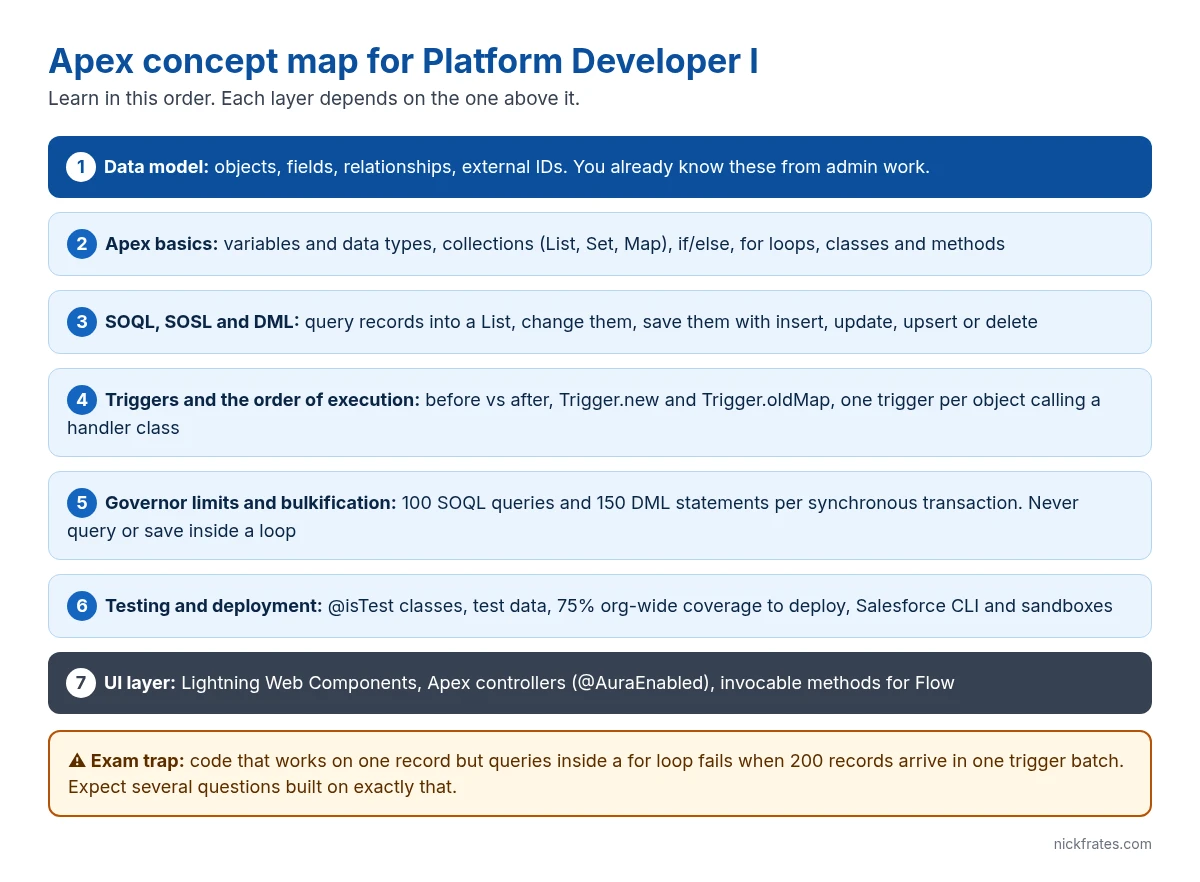
What you already know as an admin
Non-programmers coming from admin work start with more than they think. The data model, relationships, external IDs, Flow, formula fields and roll-up summaries are all in the Developer Fundamentals and automation objectives. What’s new is the code itself, and how Salesforce limits it.
The 10-week plan
| Week | Focus | Do this | You’re ready to move on when |
|---|---|---|---|
| 1 | Programming basics | Variables, data types (String, Integer, Decimal, Boolean, Id), if/else, for loops. Write them in Anonymous Apex in the Developer Console. | You can write a loop that adds up numbers in a List and prints the total with System.debug |
| 2 | Collections and classes | List, Set and Map; classes, methods, parameters, return values, static vs instance, access modifiers | You can build a Map of Id to Account from a List and explain why you’d want one |
| 3 | SOQL and DML | Query into a List, filter with WHERE and bind variables, parent-to-child subqueries, insert, update, upsert, delete; SOSL basics | You can predict what a given query returns, including relationship fields |
| 4 | Triggers | Before vs after, Trigger.new, Trigger.old, Trigger.newMap, Trigger.oldMap, context variables, one trigger per object with a handler class | You can say which context variables exist in a before insert vs an after update |
| 5 | Governor limits and bulkification | 100 SOQL and 150 DML per synchronous transaction; no queries or DML inside loops; the save order of execution; recursion | You can spot the bug in a trigger that queries inside a for loop |
| 6 | Exceptions, security, declarative vs code | try/catch, custom exceptions, with sharing, CRUD and field-level security checks, when Flow is the better answer | You can explain why “use Apex” is wrong for a simple same-record field update |
| 7 | Testing | @isTest, creating test data, Test.startTest and Test.stopTest, System.assert methods, 75% coverage to deploy | You can write a test that inserts 200 records to prove a trigger is bulkified |
| 8 | User interface | Lightning Web Components basics, @AuraEnabled methods, invocable methods for Flow, where Visualforce still appears | You can describe how an LWC gets data from an Apex method |
| 9 | Debugging and deployment | Debug logs, Developer Console, Salesforce CLI and VS Code, sandboxes, change sets and packages | You can name the right tool for “find why this trigger fails for one user” |
| 10 | Practice exams | Timed practice sets, then rework every question you got wrong | You’re scoring well above 68% on unseen questions |
The one example to understand before week 5
This is the shape of almost every trigger question. It sets a field on contacts from their parent account, with one query for the whole batch:
Where non-programmers stall, and how to get past it
- Maps. Spend real time on them. Most bulkified code uses a Map to look up related records without a query inside a loop.
- Reading code you didn’t write. The exam shows you code and asks what happens. Practice by predicting output before you run it in Anonymous Apex.
- Order of execution. Learn where before triggers, validation rules, after triggers and flows sit in the save order. Several questions hinge on it.
- Trying to memorize instead of build. A free Developer Edition org and 30 minutes of typing beats an hour of reading every time.
Cert Lab by Nick Frates
Follow this plan with practice built in
The Platform Developer I Cert Lab ($9.99) gives you lessons and exam-style questions for every section, written for admins learning to code.
See the Platform Developer I Cert Lab – $9.99 →FAQ
Do I need to know Java or JavaScript first? No. Apex syntax is close to Java, but weeks 1 and 2 cover everything you need. JavaScript only matters for the LWC questions in week 8.
Do I need Platform Administrator first? No, the exam has no prerequisite. Admin experience helps a lot with the data model and automation questions, though.
Is 10 weeks realistic with a full-time job? At about 6 to 8 hours a week, yes. If you already code in another language, you can compress weeks 1 and 2 into a few days. For that pace, see the 8-week Platform Developer I study plan.
Hope this helps!
Best,
Nick


