Hey friends,
Queueable Apex lets you run a piece of Apex in the background. You write a class that implements the Queueable interface with an execute method, then call System.enqueueJob(new YourClass()). Salesforce returns a job ID, and the job runs when system resources become available. To chain jobs, call System.enqueueJob from inside execute. Salesforce recommends Queueable Apex instead of future methods.
Everything below comes from Salesforce's own pages, checked on October 28, 2026: the Queueable Apex page in the Apex Developer Guide, the AsyncApexJob object reference, the Test class reference and the testing page. The code was checked for syntax only, not run in an org, so test it in a Developer Edition org or sandbox before you rely on it.
Why use Queueable Apex
The Queueable page says queueables have the same use cases as future methods, plus three extra benefits:
- A job ID.
System.enqueueJobreturns the ID of the new job, which matches anAsyncApexJobrecord you can monitor. - Non-primitive types. Your class can hold member variables such as sObjects or your own Apex types, and read them when the job runs.
- Chaining. A running job can start a second job, which helps when a process depends on another one finishing first.
The page also says a queued job runs in the background in its own thread, so it does not delay your main logic, and that some governor limits are higher than for synchronous Apex, such as heap size. For how queueable compares with future, batch and scheduled Apex, see my post on asynchronous Apex.
Write a Queueable class
A queueable class implements Queueable and has one method, execute, which takes a QueueableContext. This one receives a list of accounts through its constructor and updates their description. Passing a list of sObjects works because queueable jobs can hold non-primitive member variables:
Call it and monitor the job
To add the job to the queue, call System.enqueueJob with an instance of your class. The page notes that actual execution can be delayed based on service availability. You can watch the job two ways: in Setup, enter Apex Jobs in the Quick Find box and open Apex Jobs, or query AsyncApexJob with the returned ID, as here:
The object reference lists a Status field with values such as Queued, Processing, Completed and Failed, and an ExtendedStatus field with a short description of the first error. It also says that if Apex is not running in system mode, users need the View Setup and Configuration permission to access this object and to enqueue jobs. The Queueable page adds one more detail: queueable jobs do not process batches, so the batch counts are always zero.
Step: in Setup, enter Apex Jobs in the Quick Find box and open Apex Jobs. Each queueable job shows Job Type Queueable and its Status, here Completed. These two rows are runs of my DemoQueueable demo class.
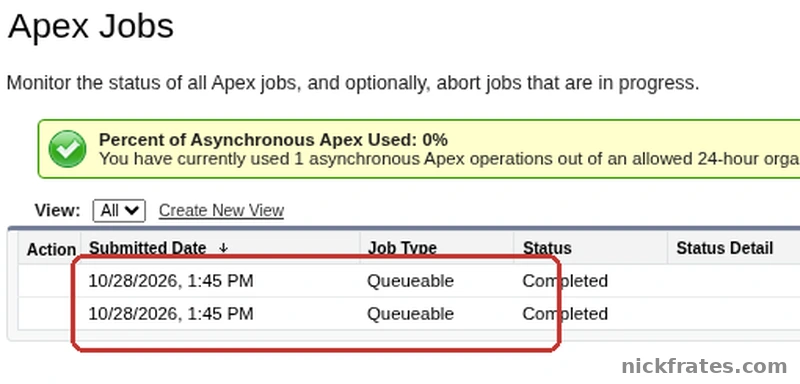
Setup > Apex Jobs.
Add a delay
You can also pass a minimum delay, from 0 to 10 minutes, as a second argument. The page says the delay is ignored during Apex testing, and warns that with a delay of 0, chained jobs run as fast as possible, so you can reach the daily async Apex limit quickly unless you add a way to slow down or stop the chain. Two cases where a delay helps: an external system that is rate-limited, and polling for results.
Chain jobs
To run a job after another one, start the second from the first one's execute method. In this example, StepTwoJob is another class that implements Queueable:
Step: each job in a chain writes its own debug log. Open the log in the Developer Console and tick Debug Only to see the debug line. This one is from my DemoQueueable demo class and reads Queueable step 1.
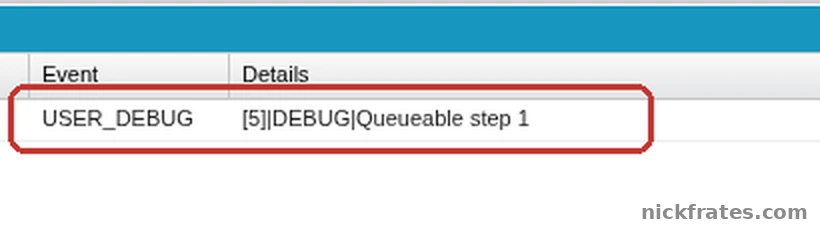
Execution Log in the Developer Console, one USER_DEBUG line.
The rules on chaining, from the Queueable page:
- A running job can add only one child job. Starting several child jobs from one queueable job is not supported.
- You can add up to 50 jobs with
System.enqueueJobin a single transaction. In an asynchronous transaction, such as a batch Apex job, you can add only one.Limits.getQueueableJobs()tells you how many you have added. - No limit is enforced on the depth of a chain, except in Developer Edition and Trial orgs, where the maximum stack depth is 5, which means the chain has at most five jobs including the first.
- Each execution counts once against the shared limit for asynchronous Apex method executions.
Because a chain can keep going, set a limit on how deep it can go. The page says you can use the System.enqueueJob(queueable, asyncOptions) method to set a maximum stack depth, and that the System.AsyncInfo class has methods to read the current and maximum depth. This version stops chaining at the maximum:
Callouts and failures
Queueable jobs can make HTTP and web service callouts if the class also implements the Database.AllowsCallouts marker interface, and callouts are then also allowed in chained jobs. For failures, the page lists Transaction Finalizers, which let you attach actions to a queueable job, a use case being recovery actions when the job fails. It also lists duplicate detection, where adding a second job with the same signature throws a DuplicateMessageException. I leave both for another post.
Test a queueable job
A queueable job is asynchronous, so put the System.enqueueJob call between Test.startTest() and Test.stopTest(). The page says the system runs all asynchronous processes started in a test method synchronously after Test.stopTest, and the Apex Reference says the same about stopTest. Then you can assert on the result:
Remember the deployment rule from the testing page: unit tests must cover at least 75% of your Apex code and pass before you can deploy.
Mistakes to avoid
- Expecting the job to run right away. Salesforce says execution can be delayed.
- Enqueueing and then rolling back. If the transaction rolls back, the jobs it queued are not processed.
- Starting two child jobs from one job. Only one child per parent is supported.
- A chain with no stop. Add a stack depth check or a delay so it cannot run away.
- Forgetting
Database.AllowsCallouts. Without it, callouts are not allowed in the job. - Relying on transient variables. They are ignored by serialization and are null when the job runs.
- Skipping the test block. Without startTest and stopTest, your test cannot see the job's result.
Cert Lab by Nick Frates
Preparing for Platform Developer II?
The Platform Developer II Cert Lab has lessons weighted like the exam, practice questions that explain every answer, flashcards and a section check for every section, and timed practice exams, including how to pick the right asynchronous Apex for the job.
Start the Cert Lab, $9.99 →Frequently asked questions
What is Queueable Apex?
Queueable Apex is a way to run Apex asynchronously by implementing the Queueable interface and adding the job to the queue with System.enqueueJob.
How do you call a Queueable class?
Call System.enqueueJob with a new instance of the class. It returns the job ID.
How do you chain Queueable jobs?
Call System.enqueueJob from the execute method of the running job. Only one child job can be started per parent job.
Is Queueable better than a future method?
Salesforce recommends Queueable Apex instead of future methods, because queueables offer job IDs, non-primitive types and chaining.
How many Queueable jobs can I enqueue in one transaction?
Up to 50 with System.enqueueJob in one transaction. In an asynchronous transaction, such as a batch Apex job, only one.
How do I check the status of a Queueable job?
Open Apex Jobs in Setup, or query AsyncApexJob with the ID that System.enqueueJob returned.
Can a Queueable job make callouts?
Yes, if the class implements Database.AllowsCallouts.
How do I test a Queueable job?
Call System.enqueueJob between Test.startTest and Test.stopTest. The job runs synchronously after stopTest, so you can assert on its results.
Hope this helps!
Best,
Nick