Hey friends,
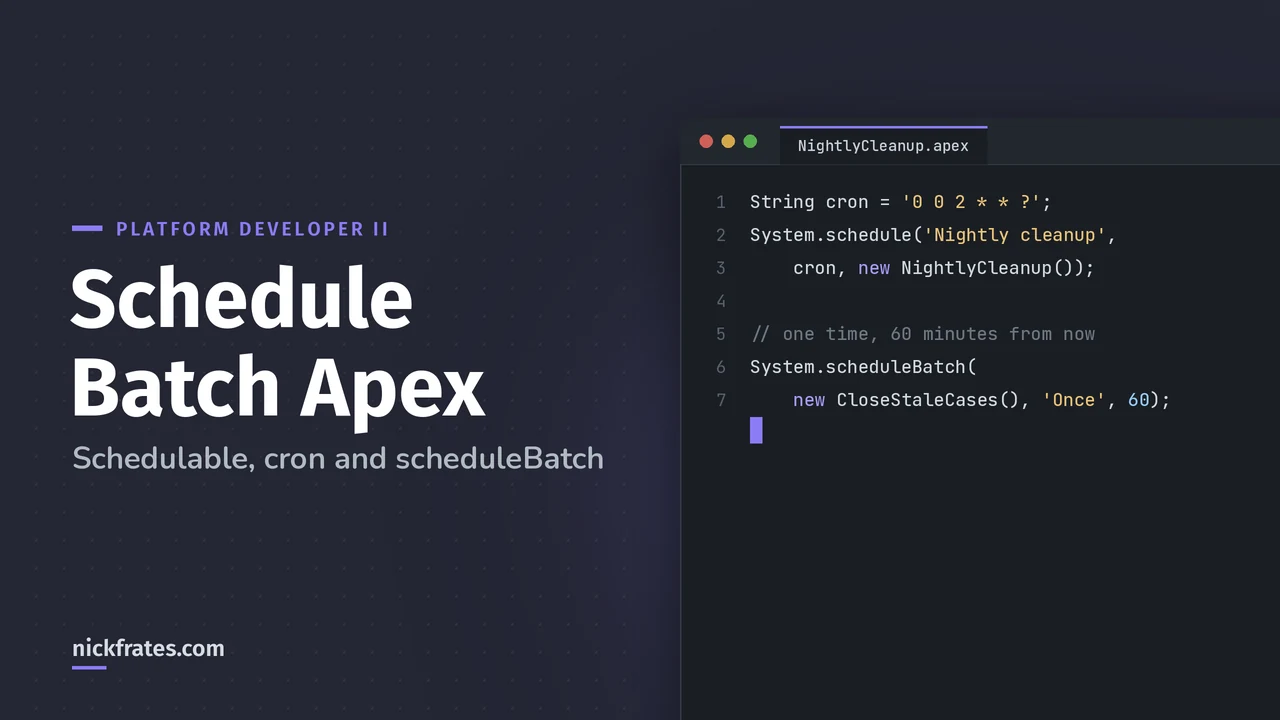
To schedule Batch Apex, write a class that implements Schedulable and calls Database.executeBatch in its execute method, then schedule it with System.schedule and a cron expression or from the Schedule Apex page in Setup. For a single future run, System.scheduleBatch schedules the batch class directly, no Schedulable class needed.
Everything below comes from the Apex Scheduler and Use Batch Apex pages of the Apex Developer Guide. Scheduling shows up on the Platform Developer II exam as part of asynchronous Apex. If you're new to batch classes, start with my Batch Apex guide.
What are the ways to schedule a batch job?
| Option | Repeats? | Needs a Schedulable class? | Best for |
|---|---|---|---|
| System.schedule with cron | Yes | Yes | Nightly or weekly jobs set from code |
| Schedule Apex page in Setup | Yes (weekly, monthly or a cron expression) | Yes | Setting a recurring time without code |
| System.scheduleBatch | No, runs once | No | One run in N minutes, or chaining with a delay |
How do you write the Schedulable class?
Schedulable has one method, execute, which must be public or global. Salesforce recommends keeping it thin: just start the job and put the real work in a separate class.
How do you schedule it with a cron expression?
Call System.schedule with a unique job name, the cron string and an instance of the class:
The method returns the CronTrigger ID. The job name must be unique, or you get System.AsyncException: The Apex job named ... is already scheduled for execution. Schedules use the running user's time zone.
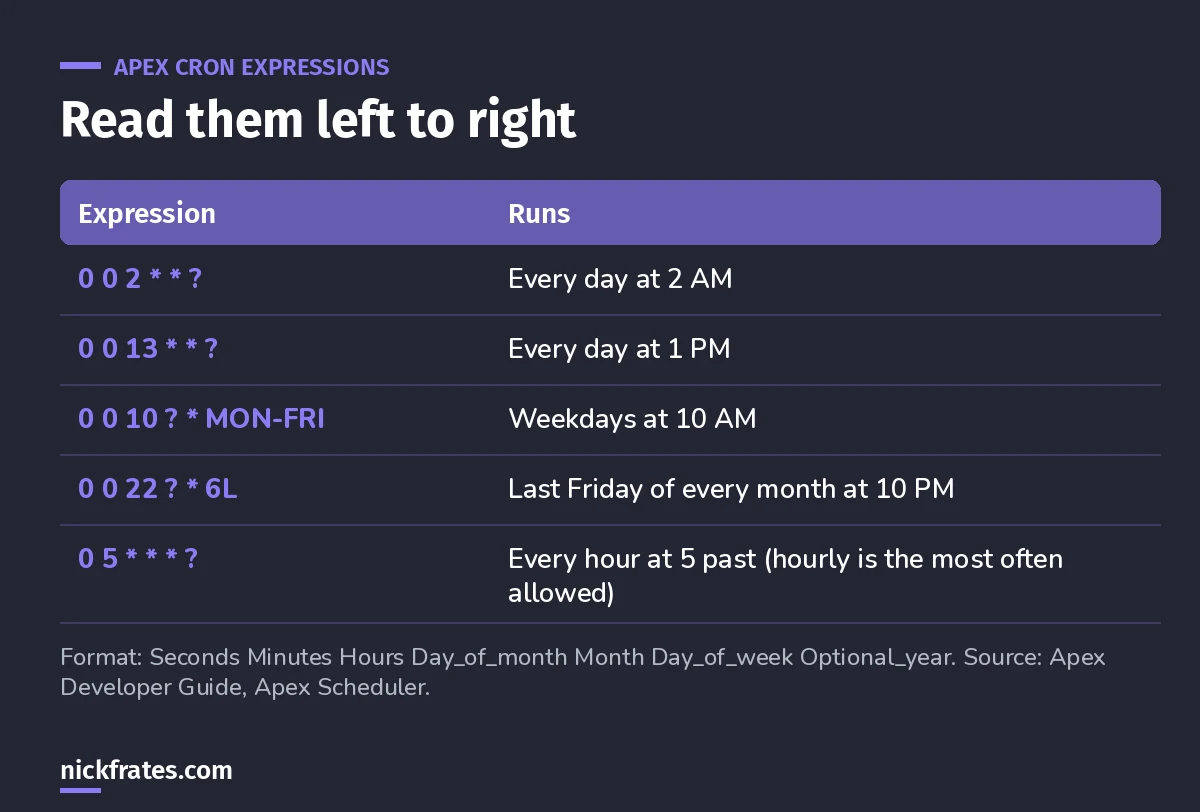
Seven fields: seconds, minutes, hours, day of month, month, day of week, optional year.
The ? rule: you can't set both day of month and day of week. Put ? in one of them. Other special characters: L for last, W for nearest weekday, and # for the nth weekday (2#1 is the first Monday). Salesforce doesn't allow a job to be scheduled more than once an hour with a single expression.
Can you schedule it without code?
Yes. Per Salesforce Help: from Setup, open Apex Classes and click Schedule Apex. Pick the Schedulable class, then choose Schedule Builder (weekly on chosen days, or monthly on a date or a day like the second Saturday) or enter a Cron Expression. Set start and end dates and a preferred start time, then save.
Afterward you can reschedule, pause, resume or delete the job from the All Scheduled Jobs page, and see run details like pass or fail and records processed on the Apex Jobs page.
When should you use System.scheduleBatch?
When you want a batch to run once, a set number of minutes from now. It takes the batch instance, a job name, the delay in minutes and an optional scope, and it returns the CronTrigger ID:
While it waits, scheduled Apex limits apply. Once it's queued (Holding or Queued), batch limits apply instead. You can cancel it before it starts with System.abortJob and the returned ID.
Cert Lab by Nick Frates
Let the Platform Developer II Cert Lab test you to success
Practice questions on async Apex choices, scheduling, limits and testing, each one explained.
Start the Platform Developer II Cert Lab for $9.99 →Not ready to buy? Try a free lesson and see how fast you learn.
What are the Apex Scheduler limits?
- 100 scheduled Apex jobs at one time (Developer Edition orgs allow 5 scheduled classes).
- Async executions per 24 hours: 250,000 or 200 times user licenses, whichever is greater, shared with batch, Queueable and future methods.
- While a class has active scheduled jobs, you can't edit it (or classes it references) in the Setup UI. Deploying through the Metadata API can be enabled to update it.
- Execution can be delayed based on service availability. The time you set is the earliest it runs.
How do you test a scheduled job?
Schedule it between Test.startTest and Test.stopTest. After stopTest, the scheduled execute runs, and you can query CronTrigger to check the expression and that it hasn't fired yet:
What scheduling mistakes should you avoid?
- Scheduling from a trigger. Bulk loads can add jobs past the 100 limit. Salesforce warns to use extreme care.
- Putting heavy logic in execute of the Schedulable class. Keep it to starting the batch.
- Setting both day fields. One of day of month or day of week must be
?. - Reusing a job name. Names must be unique among scheduled jobs.
- Fixed schedules for jobs with variable run time. Salesforce suggests chaining batch jobs to avoid overlaps.
A bit about how I study. Focus on Force was my favorite resource on the way to 17 Salesforce certs. I started the traditional way, reading the study guide first and testing second, but rapid-fire practice tests are what actually made things stick. That's the loop Cert Lab is built on: quick questions, then explanations with current links, then go again.
FAQ
Can you schedule Batch Apex every 15 minutes?
Not with a single cron expression. Apex doesn't allow a job to be scheduled more than once an hour that way. Teams either create several hourly jobs offset by 15 minutes or chain jobs with System.scheduleBatch from finish.
What does System.scheduleBatch return?
The scheduled job ID, a CronTrigger ID, which you can query or pass to System.abortJob.
Does the scheduler respect user permissions?
No. The scheduler runs as system, so all classes run whether or not the user has permission to run them.
What's the max number of scheduled jobs?
100 at one time in a production org.
Where should you go next?
- Database.Stateful to report totals when a scheduled job finishes.
- The Platform Developer II study guide for the full exam map.
- Asynchronous Apex for future, Queueable, batch and scheduled side by side.
Nick Frates, a senior Salesforce developer with 17 certifications, built the Platform Developer II Cert Lab at nickfrates.com: rapid-fire practice questions for every exam section, each answer explained.
Cert Lab by Nick Frates
Let the Platform Developer II Cert Lab test you to success
Lessons, flashcards, a quiz for each of the five exam sections and full practice exams, every answer explained.
Start the Platform Developer II Cert Lab for $9.99 →Not ready to buy? Try a free lesson and see how fast you learn.
Hope this helps!
Best,
Nick