Hey everyone,
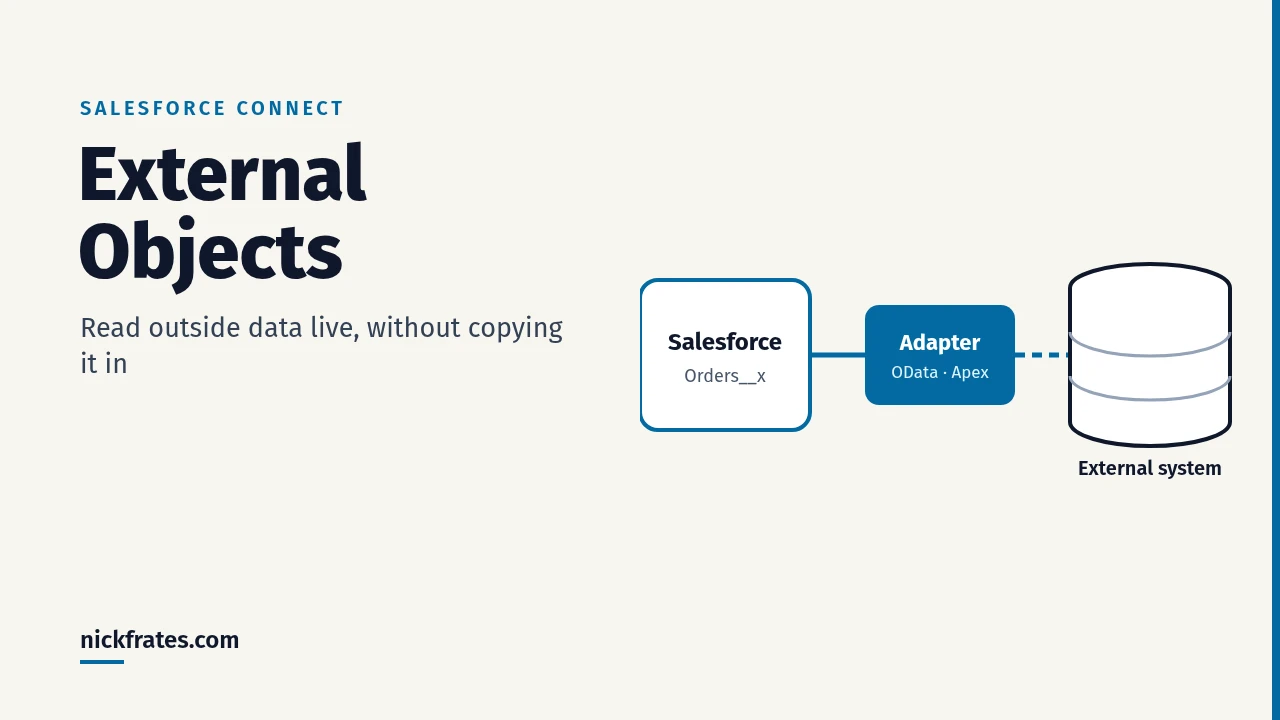
External objects and Salesforce Connect let you show data that lives outside Salesforce, such as orders in an ERP or records in another Salesforce org, without copying it in. An external object looks like a custom object, but its API name ends in __x, and Salesforce reads the current data from the outside system in real time when someone opens a record, list view or query.
Below is how it works, which adapter to pick, how to set it up, the limits that matter, and when you should copy the data instead.
What external objects and Salesforce Connect are
Per Salesforce’s External Objects reference, external objects are similar to custom objects, but the record data is stored outside your Salesforce org. Each external object is tied to an external data source, which tells Salesforce how to reach the outside system. Salesforce Connect is the feature that provides those connections.
- Always current: records are read on demand, so they reflect the external system’s current state.
- No copy to manage: you aren’t spending storage or building sync jobs to keep two copies in line.
- Familiar UI: users see the data in list views, record pages and related lists, and developers query it with SOQL.
- Naming: an external object named Order appears in the API as
Order__x. Object names must be unique across standard, custom and external objects.
Salesforce Connect adapters: which one to use
| Adapter | What it connects to | Use it when |
|---|---|---|
| Cross-org | Other Salesforce orgs, through the Lightning Platform REST API | You want one org to see records that live in another org |
| OData 2.0 / OData 4.0 | Any system that publishes an OData producer | Your ERP or database already exposes OData |
| Custom adapter (Apex Connector Framework) | Anything you can reach with Apex, such as a REST API | No other adapter fits |
If the outside system already speaks OData, start there; it’s the no-code path. Cross-org is the easy choice between Salesforce orgs. Write a custom Apex adapter only when neither works.
How to set up Salesforce Connect
- In Setup, enter External Data Sources in Quick Find and create a new one. Pick the adapter type, enter the service URL, and choose how Salesforce authenticates.
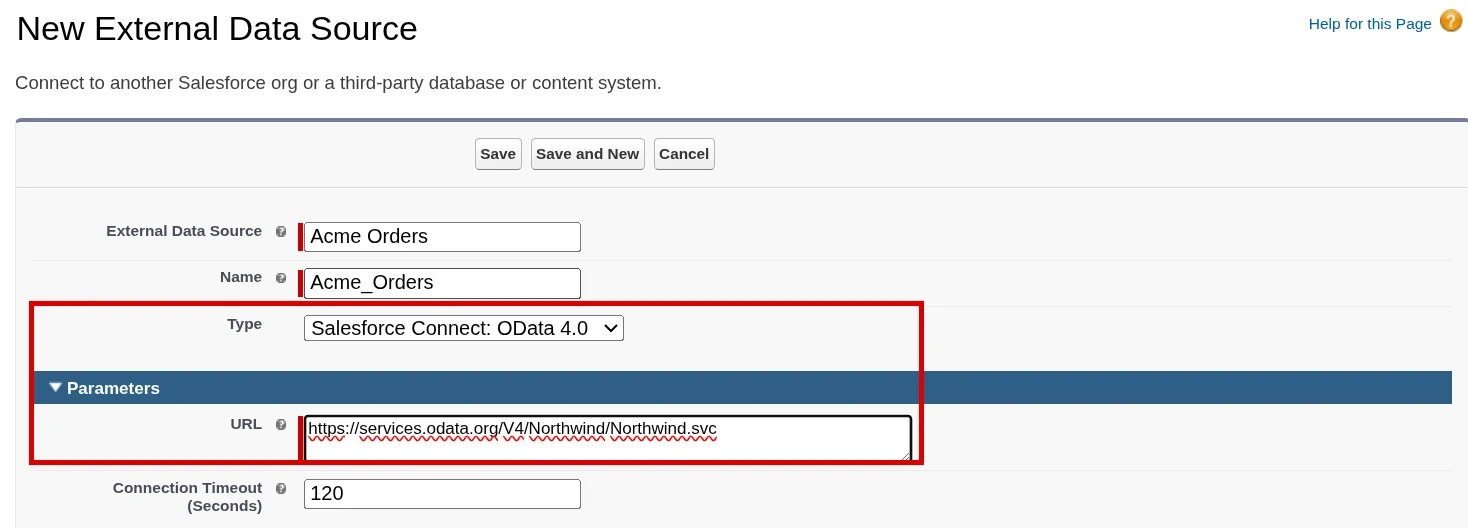
Setup > Quick Find "External Data Sources" > New External Data Source. Pick "Salesforce Connect: OData 4.0" as the Type and paste the service URL. - Save, then click Validate and Sync. Salesforce reads the external system’s metadata and lists the tables it found.
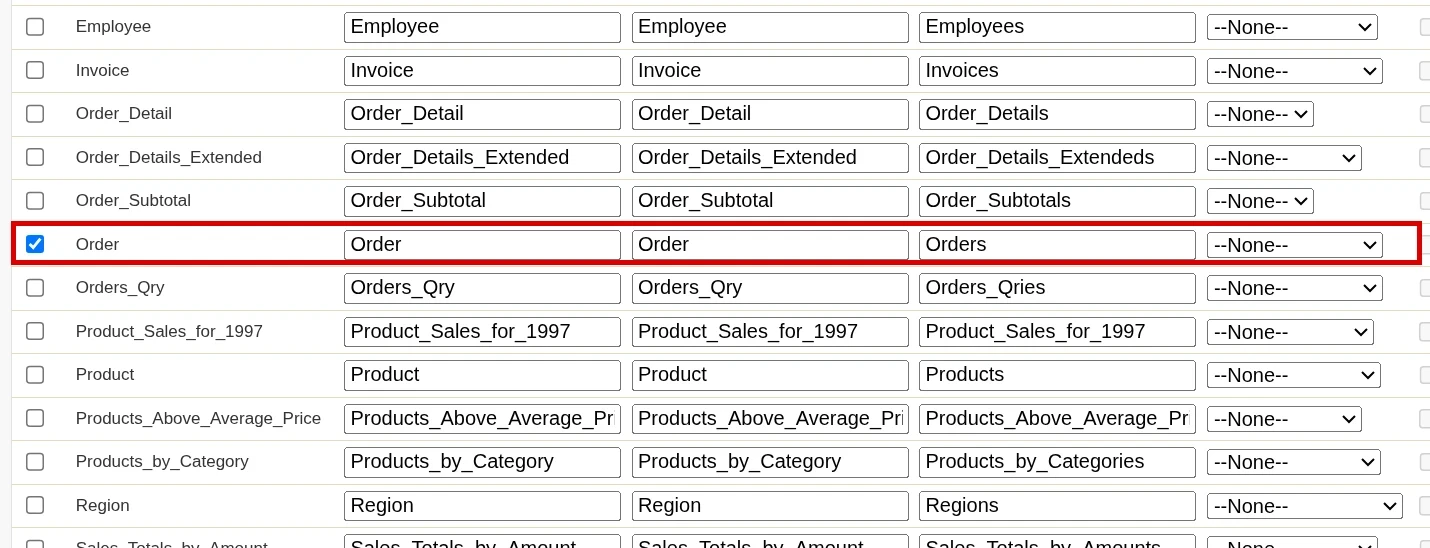
On the data source detail page, click Validate and Sync, check the tables you want (here Order, which becomes the Orders external object), then click Sync. - Select the tables you want and sync. Salesforce creates an external object (ending in
__x) for each one. - Give users access to the external object through permission sets, add a tab or related list, and check the page layout.
- Optionally, relate it to your data with an external lookup or indirect lookup relationship so the records show up on, for example, the Account page.
Querying external objects with SOQL and Apex
External objects work in SOQL and Apex much like custom objects. Every external object has an ExternalId field holding the record’s key in the outside system.
Remember that each query is a callout. Keep queries selective, and avoid running them inside loops.
Cert Lab by Nick Frates
External objects show up on the App Builder exam
The Platform App Builder Cert Lab covers data modeling, relationships and when to use which object type, with lessons, section checks and flashcards.
Start the Platform App Builder Cert Lab for $9.99 →Salesforce Connect limits to know
- 100 external objects per org by default. Salesforce Support can raise it to 200.
- OData callouts: 20,000 per hour per org, and 1,000 per hour in Developer Edition (Trailhead). Since Summer ’25, orgs on Hyperforce no longer have the new-row and callout limits for the OData, custom and several other adapters (release note).
- Cross-org callouts don’t use the OData limit, but they do count against API request limits.
- Joins: at most 4 external object joins per query, and each join is a separate round trip to the outside system.
- Licensing: Salesforce Connect is licensed per source you connect, so each new system can add cost.
When to use external objects (and when to copy the data)
Use external objects when the data set is large, you only need a small slice at a time, it changes often in the outside system, and you don’t want to pay to store or sync it.
Copy the data instead when you need reporting across lots of rows, heavy automation, or the outside system is slow or often down. External objects only work while the outside system is up and answering.
Common mistakes with external objects
- Treating an external object like a custom object for heavy reporting or bulk automation. Every read is a callout.
- Forgetting to grant object and field access in a permission set, so users see nothing.
- Running SOQL on external objects inside loops and running into callout limits.
- Picking a custom Apex adapter when the system already exposes OData.
- Not planning for the outside system being down: the records simply won’t load.
The Cert Lab gives you lessons and practice questions that make exam topics like this practical.
FAQ
What is an external object in Salesforce?
It’s an object whose records are stored outside Salesforce and read in real time through Salesforce Connect. Its API name ends in __x.
Does Salesforce Connect copy data into Salesforce?
No. Records are fetched on demand when users view or query them, so no copy is stored or synced.
What adapters does Salesforce Connect support?
Cross-org, OData 2.0, OData 4.0, and custom adapters written with the Apex Connector Framework.
How many external objects can an org have?
100 by default. Salesforce Support can raise it to 200.
Can I query external objects with SOQL?
Yes. SOQL and Apex work much like they do with custom objects, but each query is a callout and joins are limited to 4.
Is Salesforce Connect free?
No. It’s licensed per connected source.
Cert Lab by Nick Frates
Practice App Builder data modeling questions
Work through object, relationship and data access scenarios with section checks and flashcards.
Start the Platform App Builder Cert Lab for $9.99 →Hope this helps!
Best,
Nick


