A lot of people ask me whether you can land a Salesforce UX role with no Salesforce job on your resume.
Yes: to become a Salesforce UX designer without experience, learn the platform as an admin first, build two or three small portfolio projects in a free Developer Edition org, and earn the Platform User Experience Designer certification to prove it. The certification has no prerequisite and the exam guide only describes the ideal candidate’s experience, so it’s open to career changers. What gets you hired is the portfolio that shows you can redesign a real Salesforce screen.
What a Salesforce UX designer actually does
It’s not pixel work in Figma all day. A Salesforce UX designer makes Salesforce easier for the people who live in it: sales reps, service agents, partners and customers on an Experience Cloud site. Typical work:
- Interviewing users and mapping how they really work (discovery).
- Redesigning record pages with Dynamic Forms, component visibility and a cleaner layout.
- Simplifying data entry with screen flows, defaults and validation that explains itself.
- Keeping custom components consistent with the Salesforce Lightning Design System (SLDS).
- Testing changes with real users and measuring whether they helped (fewer clicks, fewer errors, faster case handling).
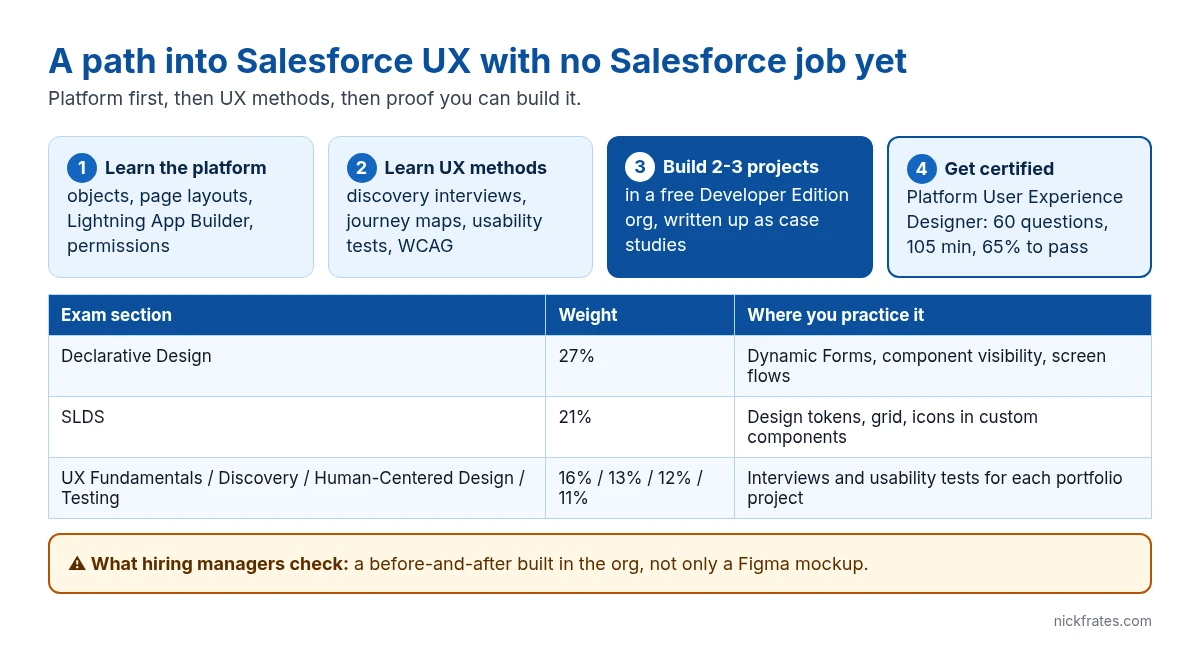
That’s why the exam’s biggest section is Declarative Design at 27%, with SLDS next at 21%. Both are about building with Salesforce’s own tools, not drawing mockups. My UX Designer study guide covers every section.
How to become a Salesforce UX designer, step by step
1. Learn the platform first. Spend a few weeks on admin basics: objects, fields, page layouts, Lightning App Builder, profiles and permission sets. You can’t redesign what you don’t understand, and hiring managers test this in interviews. The free Admin Cert Lab is a good structure for it.
2. Learn UX methods. Discovery interviews, personas, journey maps, usability testing and accessibility basics (WCAG). If you already come from UX or graphic design, this step is short.
3. Build portfolio projects in a free org. Sign up for a free Developer Edition org and pick a messy screen, like a default Account or Case page with 40 fields. Redesign it with Dynamic Forms, tabs and conditional visibility, then write up the before, the after and why.
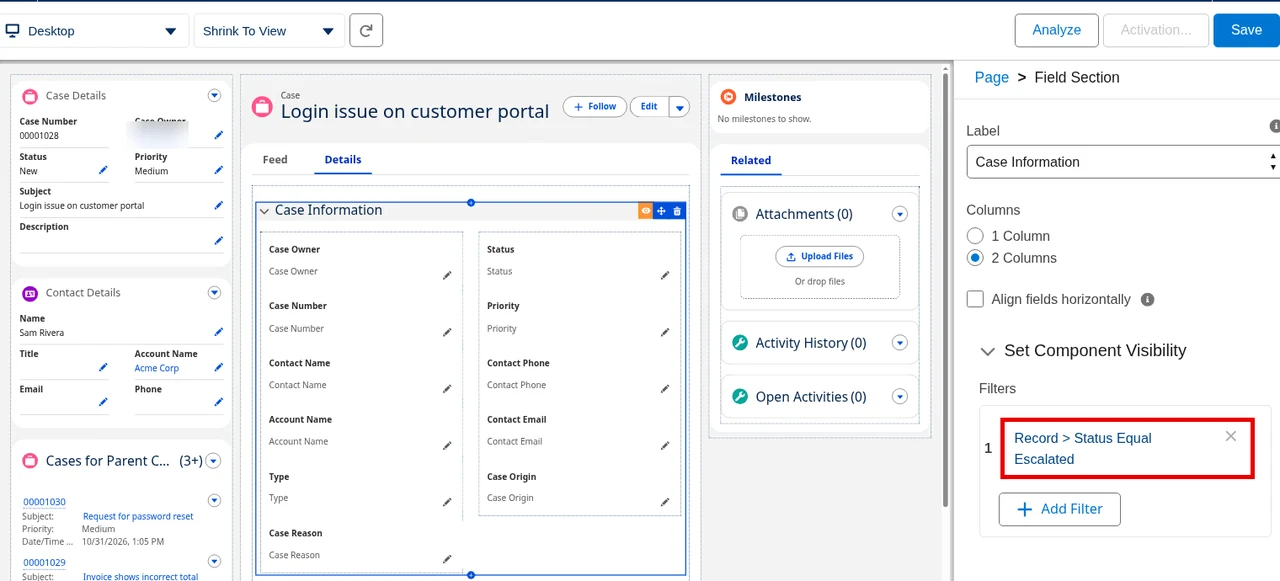
The screenshot above is the screen I’d want a candidate to know cold: Lightning App Builder with a field section selected and a visibility filter set. Setup path: open any record, click the gear, then Edit Page.
4. Earn the certification. The Platform User Experience Designer exam is 60 scored questions in 105 minutes, with a 65% passing score. It costs $200, plus $100 for a retake. The guide describes candidates with about 6 months of UX experience and 3 to 6 months on the Salesforce Platform, but that’s a profile, not a requirement.
5. Apply where UX and Salesforce meet. Look for titles like Salesforce UX Designer, Salesforce Product Designer, Salesforce Business Analyst with UX focus, and Experience Cloud designer. Consulting partners hire for this more than in-house teams do.
Cert Lab by Nick Frates
Prep for the UX Designer exam
Lessons, section checks, flashcards and practice questions for Discovery, Declarative Design, SLDS and the rest of the guide.
Start the UX Designer Cert Lab for $9.99 →Three portfolio projects that beat a certificate alone
| Project | What it proves | Built with |
|---|---|---|
| Case page redesign for service agents | Declarative design and reducing cognitive load | Dynamic Forms, tabs, component visibility, the Highlights panel |
| Guided intake screen flow | Designing for errors and new users | Screen flow with sections, help text and input validation |
| Self-service help center page | Customer-facing design and accessibility | Experience Builder in an Experience Cloud site |
Write each one up as a short case study: the problem, who you talked to, two or three options you considered, what you built and how you tested it. Screenshots of the before and after do more than any paragraph. For the flow project, my screen flow walkthrough gives you a working starting point.
Mistakes career changers make
- Leading with Figma mockups. Salesforce UX is mostly declarative. A redesigned page built in the org beats a beautiful mockup nobody can build.
- Skipping admin basics. If you can’t explain page layouts vs Lightning pages, the interview stops there.
- Ignoring SLDS. It’s 21% of the exam and the thing that makes custom work look native.
- Treating the cert as the finish line. It’s proof you know the concepts. The portfolio is proof you can do the job.
Cert Lab by Nick Frates
Learn the platform first, free
The Admin Cert Lab covers objects, page layouts, Lightning App Builder and security, the base every Salesforce UX designer needs.
Start the free Admin Cert Lab →Free, no card, no trial.
FAQ
Can you become a Salesforce UX designer with no experience?
Yes. The Platform User Experience Designer certification has no prerequisite, and a portfolio built in a free Developer Edition org can stand in for job experience.
Do I need the Admin certification first?
No, it isn’t required, but admin-level platform knowledge is assumed throughout the UX Designer exam, so learning it first makes the exam and interviews much easier.
How hard is the Salesforce UX Designer exam?
It has a 65% passing score on 60 scored questions, one of the lower passing scores, but its questions are scenarios about choosing the best design, so hands-on practice matters.
Do Salesforce UX designers need to code?
Not usually. Most of the work is declarative (Lightning App Builder, Dynamic Forms, screen flows), though knowing how SLDS works helps when you work with developers on custom components.
Cert Lab gives you exam-style questions and hands-on practice tasks. More on design is in UX design principles and UX research methods.
Hope this helps!
Best,
Nick