Hey friends,
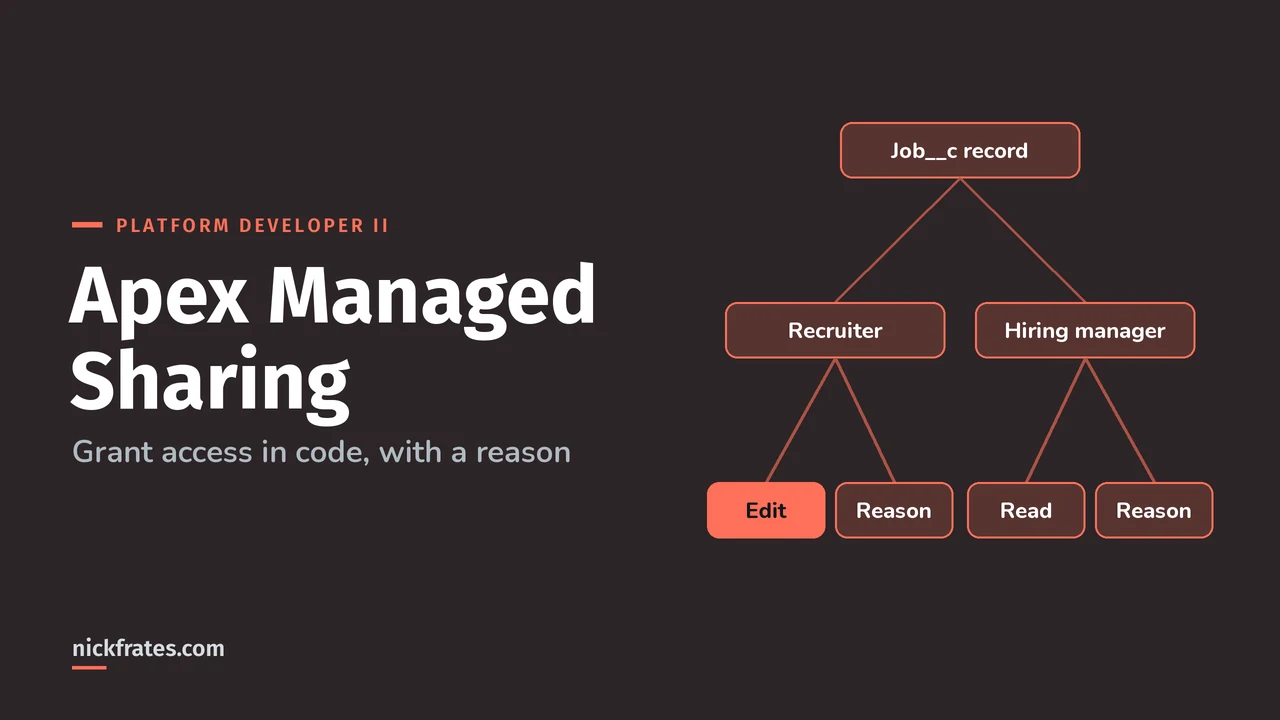
Apex managed sharing lets developers grant record access in code by inserting rows into an object's share object (like Job__Share) with an Apex sharing reason as the row cause. Unlike manual sharing, it survives owner changes, and only users with Modify All Data can add or change it.
Sources: the Apex Developer Guide pages Understanding Apex Managed Sharing, Sharing a Record Using Apex and Recalculating Apex Managed Sharing. The Platform Developer II exam asks you to justify sharing objects and Apex managed sharing in Advanced Developer Fundamentals.
What are the types of sharing?
| Type | Granted by | Row cause | Survives owner change? |
|---|---|---|---|
| Managed sharing | Ownership, role hierarchy, sharing rules | Owner, Rule, and others | Yes |
| User managed (manual) sharing | The owner or someone with Full Access | Manual | No, removed on owner change |
| Apex managed sharing | Your Apex code or SOAP API | Your Apex sharing reason | Yes |
Role hierarchy access isn't stored in share rows. It's calculated at runtime. If the org-wide defaults and roles are fuzzy, my Salesforce security model post covers them.
What goes on a share record?
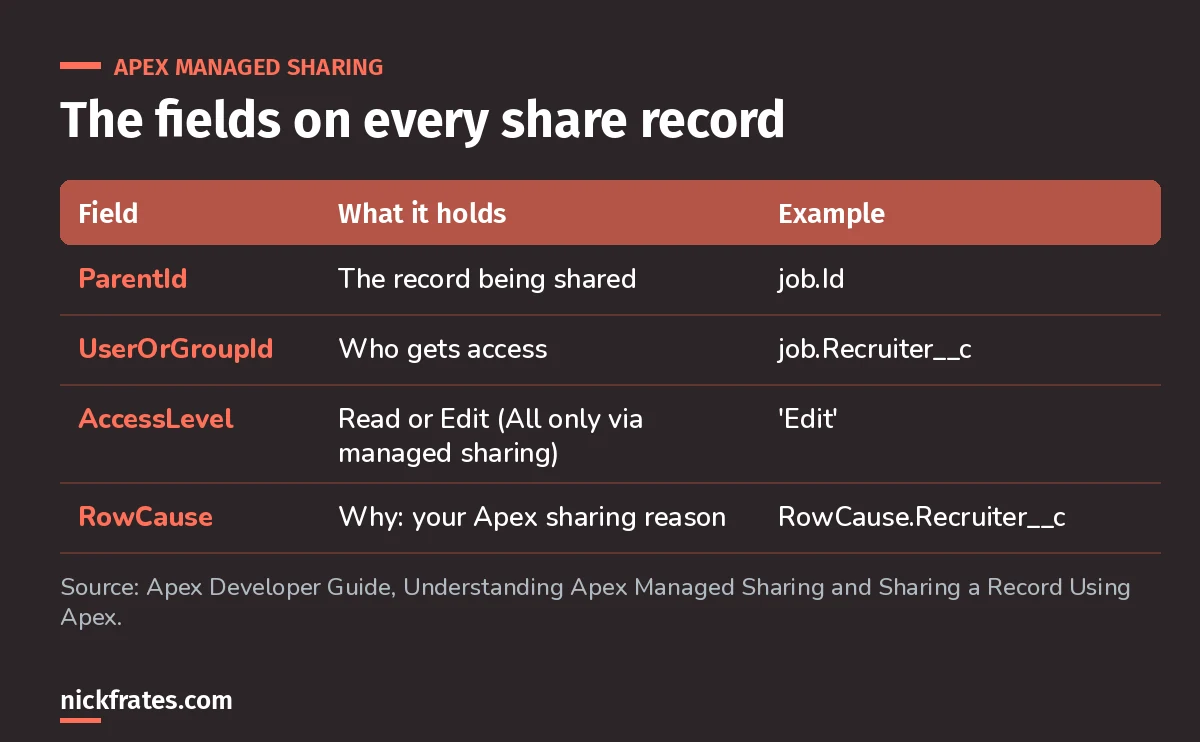
Four fields. RowCause is what makes it Apex managed.
Access levels: Read and Edit are what you grant in code. All (Full Access) can only come from managed sharing, and None only applies to AccountShare. When a user has several grants, the most permissive wins.
How do you create an Apex sharing reason?
For a custom object, add it in the object's Apex Sharing Reasons related list. Salesforce notes this is a Salesforce Classic page. For standard objects with a share object, deploy a SharingReason through the Metadata API. Names end in __c and you reference them as Schema.Job__Share.RowCause.Recruiter__c.
What does Apex managed sharing look like in code?
Salesforce's example: a recruiting app where each Job record should be shared with its recruiter (Edit) and hiring manager (Read). Here's a trimmed version:
Why Database.insert(shares, false)? A share that grants no more than the org-wide default fails, and that's harmless. Partial success lets the useful shares save. Salesforce's sample inspects each SaveResult and ignores the trivial-access error.
Cert Lab by Nick Frates
Let the Platform Developer II Cert Lab test you to success
Scenario questions on sharing objects, with sharing vs without sharing, custom metadata and custom settings, each answer explained.
Start the Platform Developer II Cert Lab for $9.99 →Not ready to buy? Try a free lesson and see how fast you learn.
How does sharing recalculation work?
Write a class that implements Database.Batchable and associate it with the custom object in its Apex Sharing Recalculation related list. It runs when an admin clicks Recalculate, and whenever the object's org-wide default changes. You can also start it with Database.executeBatch.
Salesforce's advice for execute: delete and re-create all the Apex managed shares for the records in the chunk, so sharing ends up accurate and complete. More on the batch side in my Batch Apex guide.
When should you use Apex managed sharing?
- Access depends on a lookup field (recruiter, account manager, partner contact) that sharing rules can't express.
- Access must survive owner changes, so manual sharing won't do.
- You need to share with the same user for several reasons, and remove one reason without touching the others.
If a criteria-based sharing rule can do it, use the rule. Note that you can't create criteria-based sharing rules in Apex, and criteria-based sharing can't be tested in Apex.
What Apex sharing mistakes should you avoid?
- Using RowCause Manual for app logic. Manual shares disappear when the owner changes.
- Trying to grant All. Full Access only comes from managed sharing.
- Forgetting updates. If the recruiter field changes, delete the old reason's share and insert a new one.
- Failing the whole insert on trivial shares. Use partial success and check the errors.
- No recalculation class. Without one, an org-wide default change can leave shares out of date.
I'll be honest about how I learned this stuff. I loved Focus on Force and used it through 17 Salesforce certifications. Reading the study guide first was slow for me; taking practice tests rapid-fire and studying every wrong answer was fast. So when I built Cert Lab, I built it around that: test yourself quickly, see why each option is right or wrong.
FAQ
What is RowCause in Salesforce sharing?
The Reason field on a share record. In Apex and the API it's rowCause: Owner, Rule, Manual, or a custom Apex sharing reason.
Who can create Apex managed sharing?
Only users with the Modify All Data permission can add or change Apex managed sharing on a record.
Does Apex managed sharing survive an owner change?
Yes. Apex managed sharing is kept when the owner changes or is deactivated. Manual sharing is removed.
Can you use Apex managed sharing on standard objects?
Yes, for standard objects with a share object (like AccountShare) whose org-wide default is Private or Public Read Only. Their sharing reasons are created through the Metadata API.
Where should you go next?
- The Platform Developer II study guide for the rest of Advanced Developer Fundamentals.
- Apex design patterns for where sharing code belongs.
- Platform Developer II practice questions.
Nick Frates, a senior Salesforce developer with 17 certifications, built the Platform Developer II Cert Lab at nickfrates.com: rapid-fire practice questions for every exam section, each answer explained.
Cert Lab by Nick Frates
Let the Platform Developer II Cert Lab test you to success
Lessons, flashcards, a quiz for each of the five exam sections and full practice exams, every answer explained.
Start the Platform Developer II Cert Lab for $9.99 →Not ready to buy? Try a free lesson and see how fast you learn.
Hope this helps!
Best,
Nick