Hey friends,
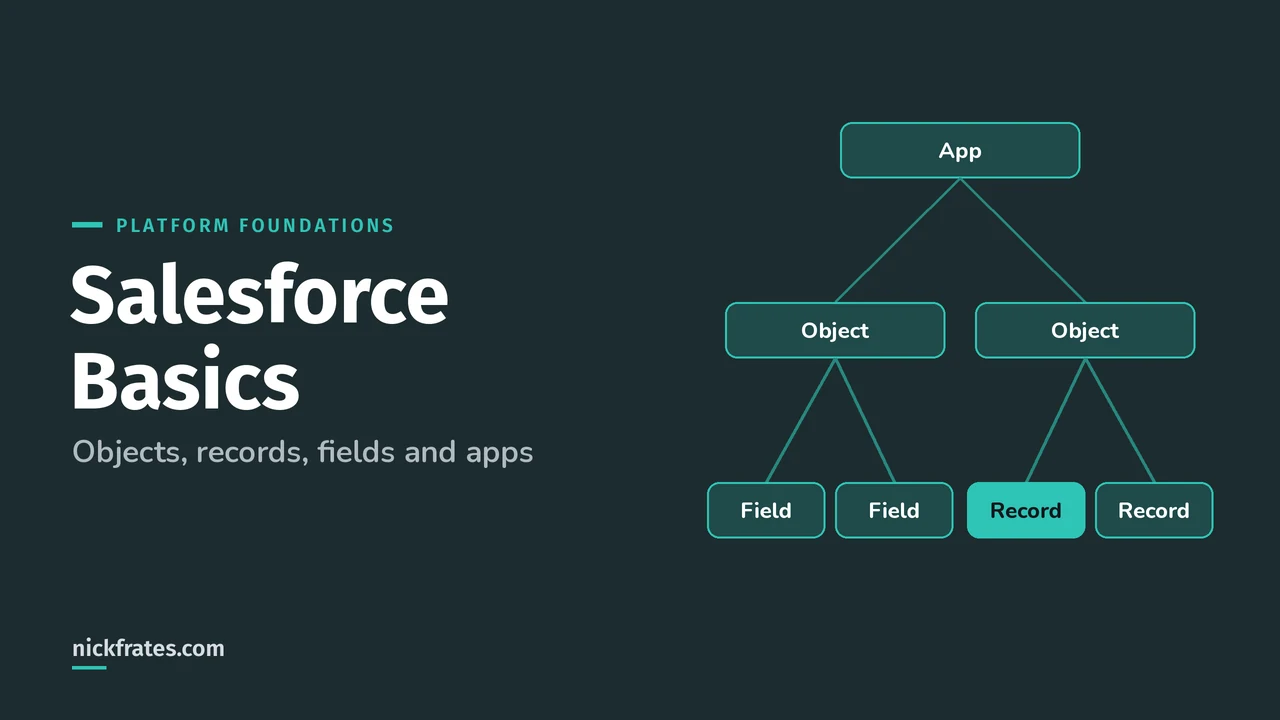
Salesforce basics come down to four words: objects, fields, records and apps. An object is a table (like Account), a field is a column on that table (like Phone), a record is one row (like Acme Corp), and an app is a bundle of objects and tabs grouped for one job, like Sales.
If you're starting the Platform Foundations certification or just got your first Salesforce login, this is the mental model everything else sits on. Data Model is 25% of the Platform Foundations exam, so it's worth getting right.
What is an object in Salesforce?
An object is a container for one kind of information. Trailhead's Data Modeling module puts it simply: Salesforce thinks of database tables as objects, columns as fields and rows as records.
There are two kinds you'll touch on day one:
- Standard objects come with Salesforce. Account, Contact, Lead, Opportunity and Case are the big five.
- Custom objects are ones you create for data that's specific to your business, like a Property object for a real estate company. Their API names end in
__c.
Trailhead also lists external objects, platform events and big objects, but you won't need those to get started. When you create a custom object, the platform builds things like the page layout for you, which is a big part of why admins can move so fast.
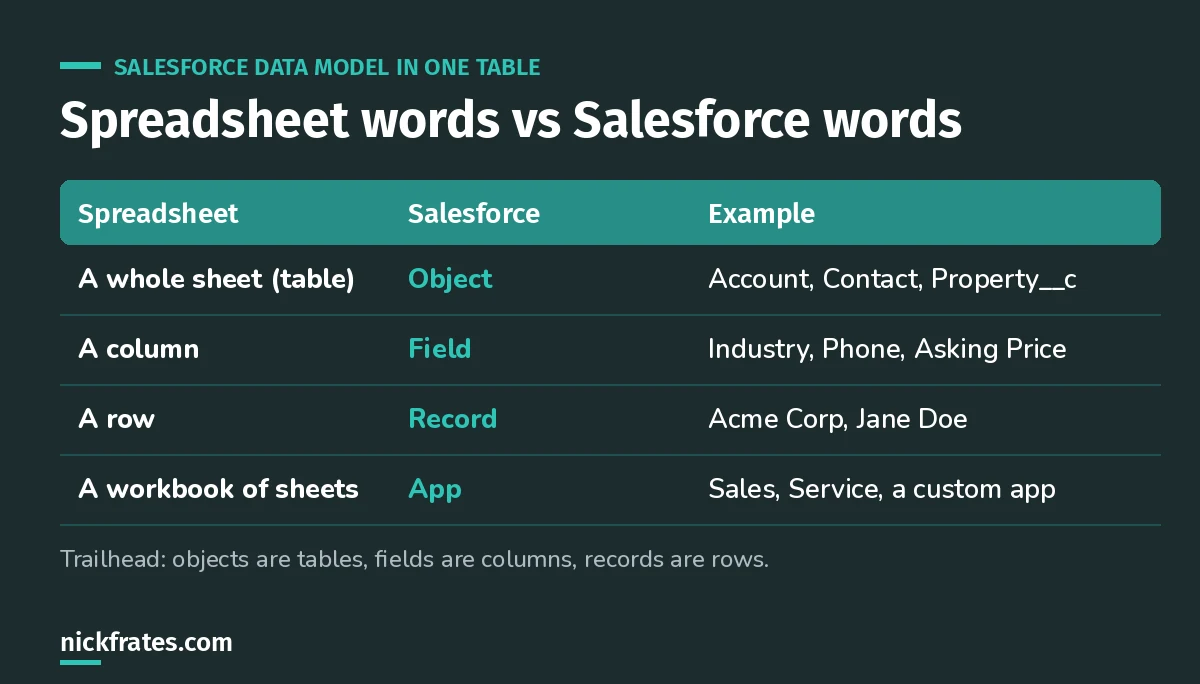
If you've used a spreadsheet, you already understand the Salesforce data model.
What is a field?
A field is one piece of information you store about each record. Standard objects come with standard fields (Account Name, Phone). You can add custom fields, and Salesforce Help lists every custom field type: text, number, currency, date, checkbox, picklist, formula, lookup and more.
Picking the right type matters. A picklist keeps values clean (Hot, Warm, Cold) where free text would give you "hot", "HOT" and "very warm". A formula field calculates its value for you. A lookup field links one record to another.
What is a record?
A record is one entry in an object. "Acme Corp" is an Account record. "Jane Doe at Acme" is a Contact record. Every record has a unique ID, and most have an owner. Ownership matters a lot later when you learn about sharing and visibility.
Records connect through relationships. Jane's Contact record looks up to the Acme Account. Trailhead covers the two main kinds in Object Relationships, and I wrote up the differences in lookup vs master-detail.
What is an app in Salesforce?
Trailhead defines a Lightning app as a collection of items that work together to serve a particular function. In practice, an app is the set of tabs you see in the navigation bar. The Sales app shows Leads, Accounts, Contacts and Opportunities. A service app shows Cases.
You switch apps with the App Launcher (the grid of dots at the top left). The data doesn't move when you switch. Same Account records, different set of tabs around them. That surprises a lot of beginners.
A worked example: how it all fits
Say you run a solar company, like Ursa Major Solar in Trailhead's custom objects unit. You want to track energy audits for customers.
- Your customers are Account records (standard object).
- The people you talk to are Contact records linked to each account.
- You create a custom Energy Audit object with fields like Audit Date (date), Roof Type (picklist) and Annual Usage (number).
- A lookup field on Energy Audit points to the Account, so each audit shows on the customer's page.
- You build an Energy Consulting app with tabs for Accounts, Contacts and Energy Audits, and give it to your consultants.
That's it. Five steps and you've used every basic concept in this post.
A bit about how I study. I loved Focus on Force when I was earning my first certifications, and I learned fastest from rapid-fire practice tests, not from rereading. So Cert Lab is built around fast testing, with every explanation linked to current Salesforce Help pages and screenshots. Certifications got me interviews, hires, raises and moves into new domains. Experience still matters most, so pair the cert with something real you can talk about.
Cert Lab by Nick Frates
Let the Platform Foundations Cert Lab test you to success
Short quizzes on objects, records, navigation and reports, with every answer explained, so these basics turn into points on exam day.
Start the Platform Foundations Cert Lab for $9.99 →Common beginner mistakes
- Creating a custom object when a standard one fits. Check Account, Contact, Case and the rest first. Standard objects come with built-in features.
- Free text where a picklist belongs. Reports get messy fast.
- Thinking an app holds its own data. Apps are just navigation. The records live in objects.
- Ignoring the record owner. Ownership drives who can see what. Read my post on the {a(P_['secmodel'],'Salesforce security model')} when you're ready.
FAQ
Are objects and tabs the same thing?
No. An object holds data. A tab is a way to open that object's records from the navigation bar. A custom object needs a tab before users can browse to it easily.
What's the difference between a standard and a custom field?
Standard fields come with Salesforce, like Account Name. Custom fields are ones you add, and their API names end in __c.
Do I need to code to create objects and fields?
No. Admins create them with clicks in Object Manager in Setup.
Is this on the Platform Foundations exam?
Yes. The Data Model section (25%) covers the core standard objects and how they relate, and Navigation (28%) covers apps and finding information.
Where should you go next?
- Platform Foundations study guide
- Platform Foundations practice questions
- Salesforce data modeling guide
- Salesforce reports and dashboards
Cert Lab by Nick Frates
Let the Platform Foundations Cert Lab test you to success
Lessons, flashcards, a quiz for each of the four exam sections and full practice exams, every answer explained.
Start the Platform Foundations Cert Lab for $9.99 →Hope this helps!
Best,
Nick


