Hey friends,
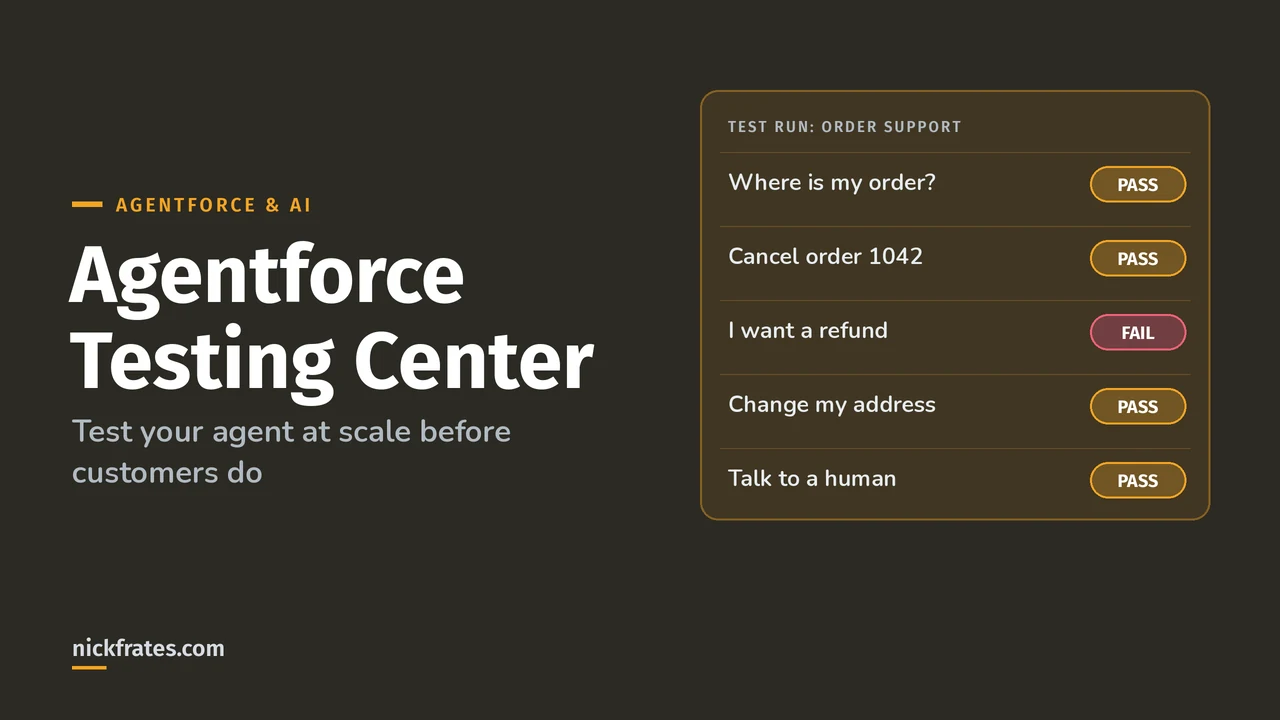
Agentforce Testing Center lets you run hundreds of test conversations against an agent at once, generated by AI or uploaded from a CSV, and scores each one: did it pick the right subagent, call the right actions, give an accurate answer, and resolve the user's goal. Because agents are non-deterministic, one good chat in the builder proves very little. Testing Center is how you get confidence before go-live.
Everything here comes from Salesforce Help's Testing Center pages. It's also the main tool behind the Agentforce Specialist exam's Testing, Deployment, and Maintenance section (10%).
A naming note: since April 2026 Salesforce calls agent topics subagents. Same thing, new name. Testing Center screens use the new one.
Two versions of Testing Center
- New Testing Center in Agentforce Studio (Beta): tests agents or prompt templates, with turn-level and conversation-level scopes, personas, voice and custom scorers. This post focuses on it.
- Legacy Testing Center in Setup: still documented separately. Check which one a Help article applies to before following it.
Before you test
- Use a sandbox. Tests with live data can create and change CRM records.
- Permissions: Manage Agentforce Grids and Manage Agentforce Testing. Uploading CSVs also needs file upload permission.
- The agent version must be committed. Draft versions don't show up.
- To generate tests from knowledge, link the agent to a data library first.
- Decide what success means before you run anything. Salesforce's own testing strategy guide warns about measuring what's easy instead of what matters.
Step 1: Create a test suite
- In Agentforce Studio, open Tests and click New Suite.
- Name it and pick the agent and version.
- Choose the Test Scope: turn-level or conversation-level.
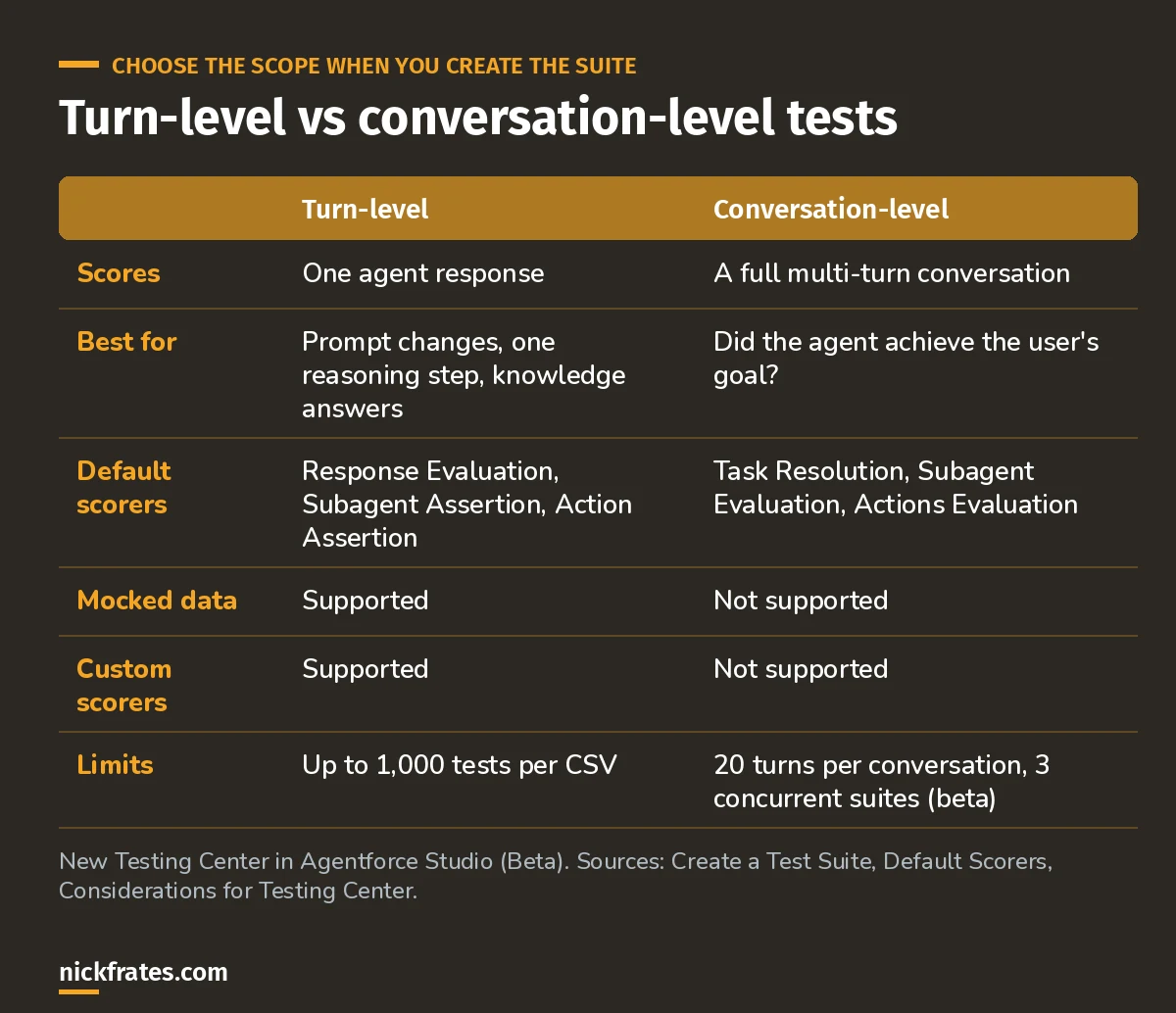
Turn-level for precise checks, conversation-level for "did it actually help?"
Switching versions clears the current results in the worksheet, but older runs stay in the test run history (Help). Employee agents aren't supported for conversation-level tests.
Step 2: Set test conditions
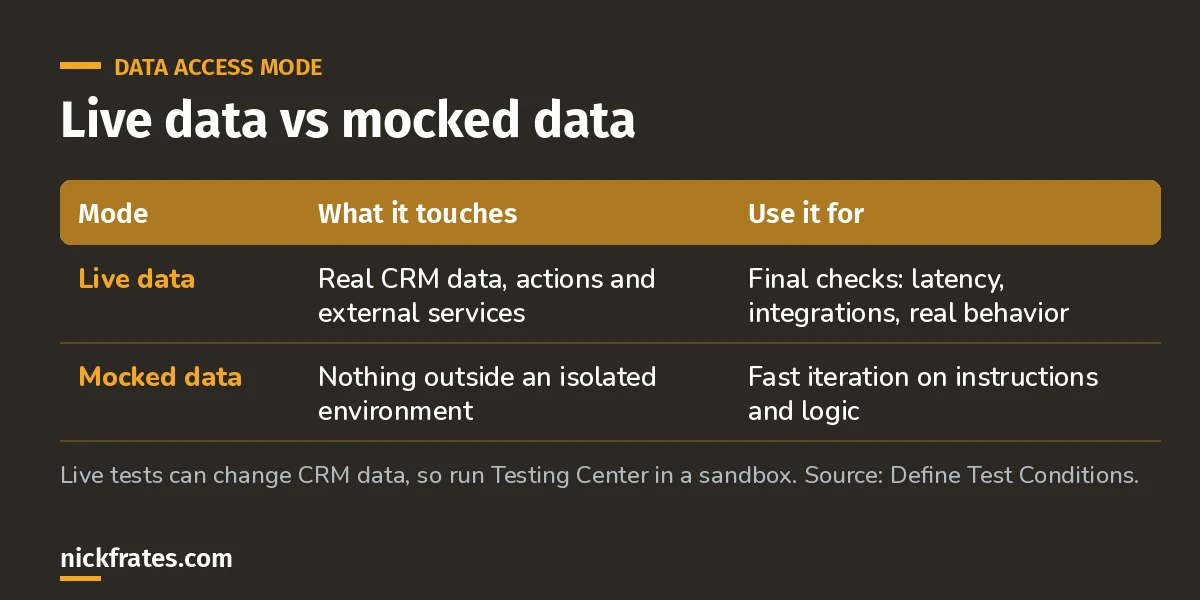
Iterate on mocked data, sign off on live data.
You can also add conversation history and context variables (fields on objects tied to the agent) to make scenarios realistic. Both show up only as columns in the CSV template; generated test cases ignore them (Help).
Step 3: Get test cases
Three ways, and you can mix them:
- Generate from subagents and actions: up to 200 at a time. A short description of the test focus guides what gets generated (Help). Don't put counts or "generate test cases" in the description.
- Generate from knowledge: Q&A tests from a linked data library. Not available for conversation-level tests.
- Upload a CSV: up to 1,000 tests per file. Download the template first, because its columns change with your scope and conditions (Help).
A turn-level CSV looks like this:
Utterance,Expected Subagent,Expected Actions,Expected Response
"Where is order 1042?",Order Status,"['GetOrderStatus']","Order 1042 shipped on May 2 and should arrive by May 6."
"Cancel my order 1042",Cancel Order,"['CancelOrder']","Your order 1042 is cancelled. You'll get a confirmation email."
"Can I change the shipping address?",Modify Order,"['UpdateShippingAddress']","Yes. What's the new address?"
The Expected Response mistake: write the answer you expect, not instructions about it. "The agent should mention the order number and be polite" produces bad scores. Salesforce calls this out by name.
Expected Actions uses a Python-style list, like ['GetOrderStatus']. For conversation-level tests, the required column is Conversation: a plain-language description of what the simulated user wants.
A tip from the docs I use a lot: generate cases with AI, download the CSV, fix the ones that are off, and upload it again.
Cert Lab by Nick Frates
Practice the testing and deployment questions
The AI-201 Cert Lab covers Testing Center, scorers and sandbox-to-production deployment, with practice questions that explain why each option is right or wrong.
Start the AI-201 Cert Lab, $9.99 →Step 4: Read the scores
Default scorers always run (Help):
- Response Evaluation (turn-level): an LLM judge compares the agent's answer to the expected one.
- Subagent Assertion / Evaluation: did it route to the right subagent? See Agentforce topics and actions for how routing works.
- Action Assertion / Actions Evaluation: did it call the right actions?
- Task Resolution (conversation-level): pass or fail on whether the user's issue got resolved.
Custom scorers are LLM judges you define in a prompt template, for things like tone, policy adherence or a business outcome. They return either a fixed set of labels or free-form output (Help). They work for turn-level tests only.
How I read a run: fix routing failures first (wrong subagent), then action failures, then response quality. A great answer from the wrong subagent is luck, not a pass.
Limits and costs worth knowing
- As of Summer '26, Testing Center is unmetered: tests don't consume Einstein Requests or Flex Credits. Data 360 queries made during tests are still metered (Help).
- Conversation-level (beta): up to 3 concurrent suites, 20 turns per conversation, 20 generated cases or 1,000 uploaded.
- Simulated voice is English only. Escalation isn't supported; the conversation just ends with a transfer request.
- If the agent gets stuck verifying the customer, give bypass details in the instructions and test objective; simulated users can't enter verification codes.
Practice questions
1. You changed the instructions of one subagent. What's the fastest useful test?
Answer: generate turn-level cases for just that subagent, on mocked data.
2. Your custom tone scorer doesn't appear in a conversation-level suite. Why?
Answer: custom scorers aren't supported for conversation-level tests.
3. Your agent version doesn't show in the version picker. Why?
Answer: it isn't committed yet. Draft versions can't be tested.
Keep going
- AI-201 practice questions with explanations.
- Prompt Builder tutorial: Testing Center can test prompt templates too.
- Agentforce tutorial: build the agent first.
- Agentforce Specialist study guide.
Cert Lab by Nick Frates
Get the Agentforce Specialist Cert Lab
Lessons, practice questions and flashcards for all 6 AI-201 exam sections, built from Salesforce Help.
Start the AI-201 Cert Lab, $9.99 →Hope this helps!
Best,
Nick