Hey friends,
Lightning App Builder is Salesforce's point-and-click tool for building app pages, Home pages and record pages for Lightning Experience and the mobile app. You drag components from the palette onto a template's regions, set properties, add visibility rules so components show only when they're relevant, then save and activate the page.
I'm following Trailhead's Lightning App Builder module and its visibility rules unit, plus Salesforce Help on Dynamic Forms, and adding what I've learned building these pages for real users.
Step 1: Pick the page type
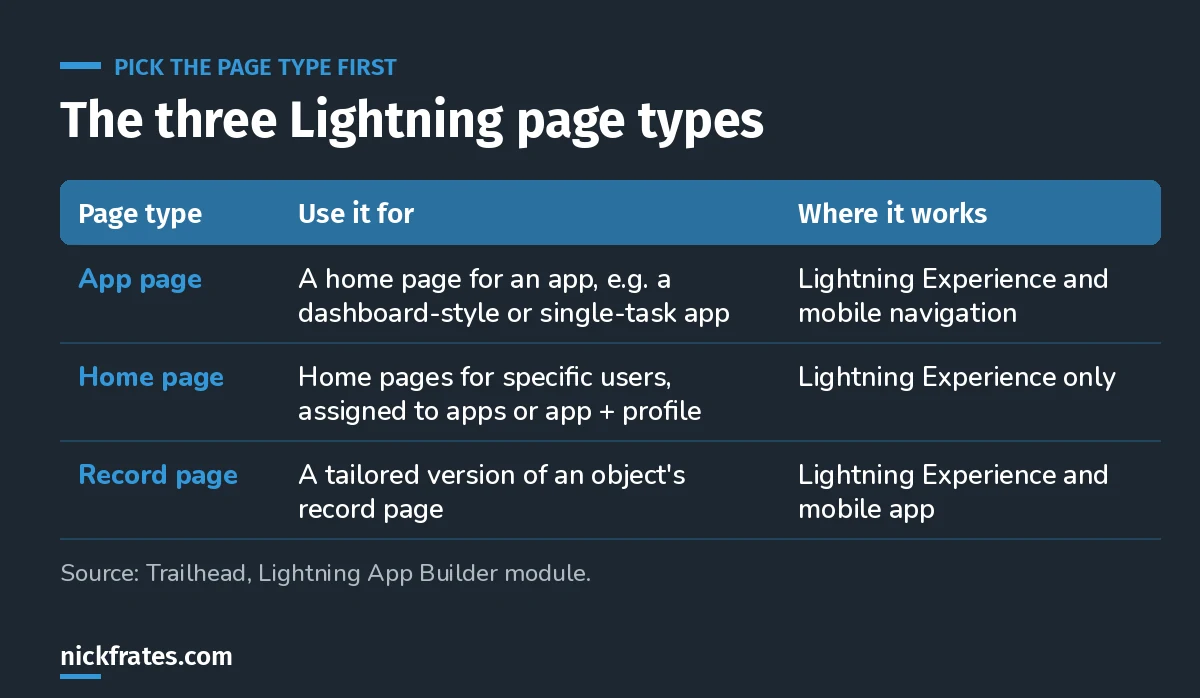
Record pages are where most of the value is.
Trailhead lists the kinds of apps you can build: single-page apps that drill into standard pages, dashboard-style apps, "point" apps for one task (like submitting expenses), custom record pages, and custom Home pages.
Step 2: Learn the five areas of the builder
- Header: the page label and a Pages list of the last 10 pages you changed. When you edit an app, it also has App Settings for branding, navigation and the utility bar.
- Toolbar: cut, copy, paste, undo, redo, save, activate, and preview at different sizes.
- Component palette: standard, custom and AgentExchange components. On record pages a Fields tab lists the object's fields.
- Canvas: where you build. A Lightning page is a template divided into regions, and regions hold components.
- Properties pane: settings for the page, or for whichever component is selected.
Components come in three flavors: standard (built by Salesforce), custom (built by you or your developers, including Lightning web components) and third-party ones from AgentExchange.
Step 3: Use Dynamic Forms on record pages
Dynamic Forms moves fields and sections out of the page layout and into the Lightning page as individual Field and Field Section components. Help lists what that gets you:
- Place fields and sections anywhere, including across tabs and columns.
- Show and hide fields and sections with visibility rules.
- Manage fields in Lightning App Builder instead of the page layout editor.
- Fewer page layouts and record types, and one assignment model instead of two.
Some pages have it on by default. Otherwise, build a page from scratch with Field components or open an existing record page and use the migration wizard. One thing to know: on Dynamic Forms pages, the fields users see when they create, edit or clone a record come from the page, not the page layout.
Not every object supports it. If you open a record page and there's no Fields tab in the palette, Dynamic Forms isn't supported for that object. Help gives Products, Events and Tasks as examples that still use the page layout.
Cert Lab by Nick Frates
User Interface is a full App Builder exam section
The App Builder Cert Lab covers Lightning pages, Dynamic Forms, visibility rules and actions with practice questions that explain every option.
Start the App Builder Cert Lab, $9.99 →Step 4: Add visibility rules
Any component on a record, app or Home page can have visibility filters, including custom and AgentExchange components. With no filter, it always shows. With filters, it stays hidden until the filter logic is met.
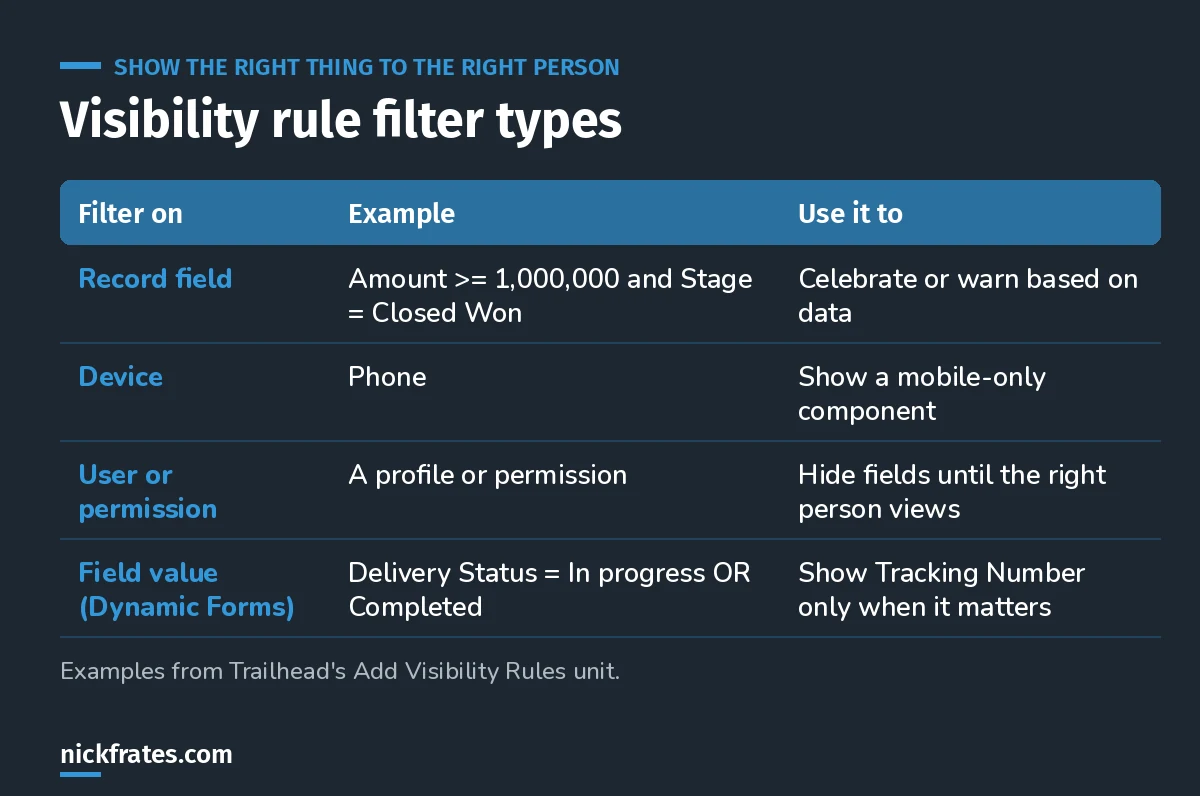
Visibility rules are how one page serves several audiences.
Trailhead's examples, which you can recreate on an opportunity page:
- A Rich Text component that says the deal closed, shown when Amount is at least 1,000,000 and Stage is Closed Won.
- A second Rich Text component with a Device filter set to Phone, so only mobile users see it.
- With Dynamic Forms, a Tracking Number field that appears when Delivery/Installation Status is In progress or Completed. Set Show component when to Any filters are true for the OR.
Components with filters get an eye icon in the builder, which makes them easy to spot later.
The gotcha: if every component in a region (a tab, an accordion section or a column) is hidden when the page loads, the region is just empty. Leave at least one always-visible component in each region, or users will see blank tabs.
I used the same idea to show tabs conditionally on a record page.
Step 5: Save, activate and test
Save, then activate the page so users actually get it. For Home pages, Trailhead notes you can assign pages to apps or to app-and-profile combinations, so different teams can have different Home pages. Then open the page as a real user on desktop and on a phone. Pages adapt to the device based on the template you chose, so check both.
My rules for good Lightning pages
- Put the decision-making fields at the top. If users scroll for the key field, the page is wrong.
- Use tabs to separate work from reference.
- Prefer visibility rules over extra record types when the only difference is which fields show.
- Test as a user with the least access. Visibility rules don't replace field-level security.
Keep going
- Salesforce data modeling: the objects and fields behind your pages.
- Salesforce formula examples: fields worth surfacing on a record page.
- Conditionally required fields: making fields required only when needed.
- App Builder practice questions: User Interface scenarios.
Cert Lab by Nick Frates
Get the Platform App Builder Cert Lab
Lessons, practice questions and flashcards for all 5 App Builder exam sections, built from the official exam guide.
Start the App Builder Cert Lab, $9.99 →Hope this helps!
Best,
Nick