Hey friends,
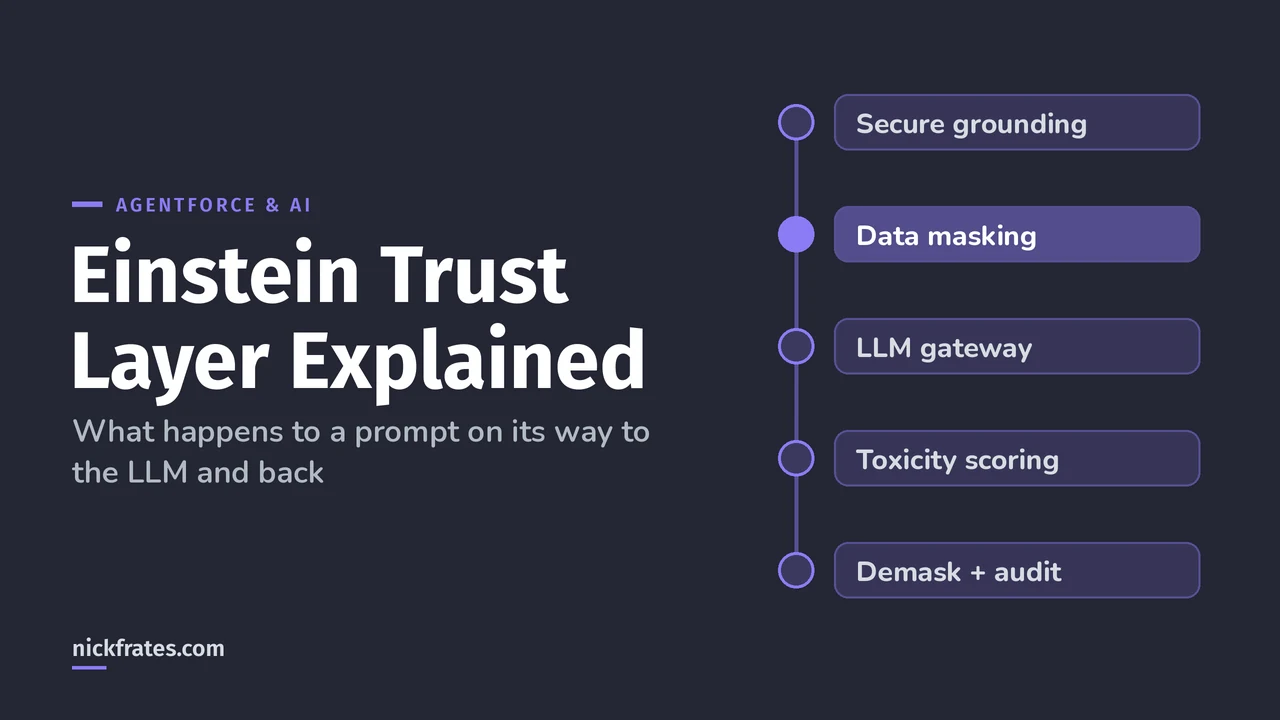
The Einstein Trust Layer is the set of controls every Salesforce generative AI request passes through: it grounds the prompt only with data the user can see, masks sensitive values, adds safety instructions, sends the prompt to the model under a zero data retention agreement, then scores the response for toxicity and logs everything to Data 360. That one sentence covers most exam questions about it.
Everything below comes from Salesforce Help: the Einstein Trust Layer overview and the deeper Designed for Trust walkthrough. Where I add my own opinion, I say so.
The journey of one prompt
Salesforce describes three legs: the prompt journey (your data plus the template, through the Trust Layer to the model), response generation, and the response journey back. The run-time steps for a prompt template make it concrete:
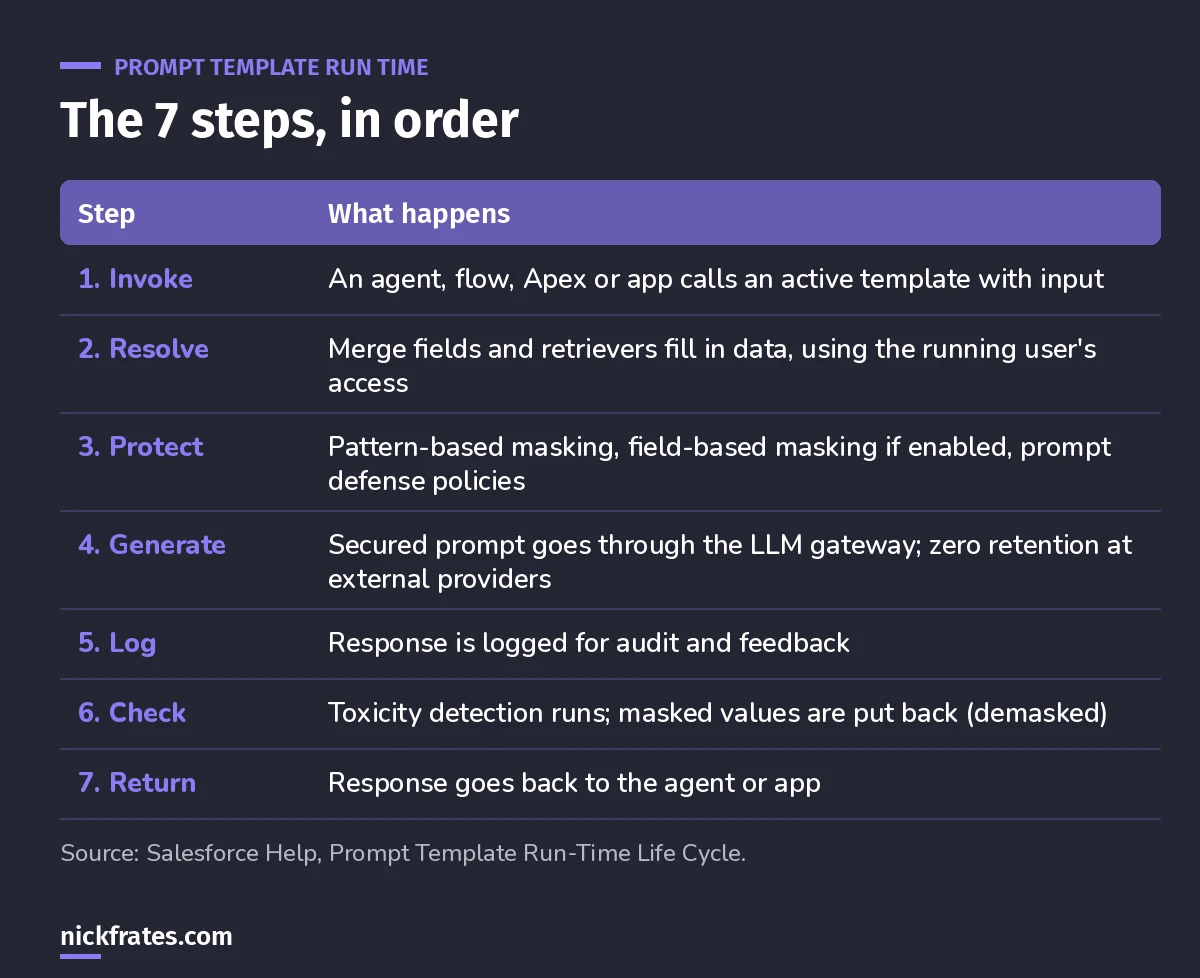
Steps 2, 3 and 6 are where the Trust Layer does its work.
Salesforce calls step 2 "resolution". You'll also see "hydration" or "prompt grounding" for the same thing (Help).
1. Secure data retrieval and dynamic grounding
Grounding means adding your CRM context to the prompt so the model answers about your customer, not customers in general. You ground with merge fields: record fields, flows, Apex, related lists and Data 360 objects.
The security rule: retrieval runs as the user executing the prompt. Role-based controls, user permissions and field-level security all still apply. If a user can't see the Salary field, it doesn't end up in their prompt.
That's why I tell people to fix their security model before rolling out AI features. The Trust Layer respects your sharing; it doesn't fix it.
2. Data masking
Before the prompt leaves Salesforce, sensitive data is swapped for placeholder text. There are two ways it's detected (Help):
- Pattern-based: regex patterns, context words and machine learning. A Social Security number is found by its digit format and nearby words like "SSN". Names have no pattern, so an ML model spots them.
- Field-based: uses metadata. Fields with Shield Platform Encryption or data classification tags get masked when they're merged into a prompt template. It only covers record merge fields and related lists.
The Trust Layer keeps a temporary map of each placeholder to its real value. When the response comes back, it demasks it, so the user sees real names. You choose what to mask in Einstein Trust Layer Setup and can check it in Prompt Builder or the audit trail.
The big exception: data masking is disabled for agents. It's available for embedded features like Service Replies and work summaries. This is the single most common wrong assumption I see, and it's a great exam trap.
Salesforce also says plainly that no detection model is 100% accurate, especially across regions and countries. Don't treat masking as your only control.
3. Prompt defense
Prompt Builder and the Prompt Template Connect API add system policies: instructions that tell the model how to behave, for example not to answer when it doesn't have the information. They reduce hallucinations and are one defense against jailbreaking and prompt injection.
4. The LLM gateway and zero data retention
The secured prompt goes through the LLM gateway, which is how Salesforce talks to different model providers. Traffic is TLS-encrypted in transit. Where the model lives matters:
- Models built or fine-tuned by Salesforce run inside the Salesforce trust boundary.
- External models, such as OpenAI's, sit in a shared trust boundary.
- Models you bring are hosted on your infrastructure.
Zero data retention applies to the external partner providers: your data isn't used for training or product improvement, it isn't retained, and it's deleted after the response is sent back. No one at the provider looks at it unless Salesforce grants access over documented suspicion of illegal activity or serious policy violations.
Cert Lab by Nick Frates
Practice the governance questions
The AI-201 Cert Lab covers the Trust Layer, model access and audit data in its Prompt Engineering and Governance sections, with practice questions that explain every option.
Start the AI-201 Cert Lab, $9.99 →5. Toxicity detection
ML models flag toxic content in prompts and responses (Help). The details worth memorizing:
- Response detection is on by default and can't be turned off. Prompt detection is a beta, off by default.
- Categories include Violence, Sexual, Profanity, Hate and Physical (illicit substances and similar), and the Trust Layer also gives an overall score.
- Scores run from 0 to 1, with 1 the most toxic. They're logged in the audit trail in Data 360.
- Users see a warning in some features, like Prompt Builder. Not every feature shows one.
6. Audit trail and feedback
Prompts, masked prompts, responses, toxicity scores and user feedback are stored in Data 360. You need to turn on Einstein generative AI data collection and install the report package to see them (Help). Then you get prebuilt reports and dashboards, and you can build your own.
I'd turn this on before go-live, not after the first complaint. It's the only way to answer "what exactly did the AI send?"
7. Controlling which models can be used
In Setup, Einstein Setup has a Configure Model Providers section where you turn providers on or off (Help). Turning one off can stop agents, prompt templates, Testing Center and other features that use its models, and it can take up to 10 minutes to apply. Test in a sandbox first.
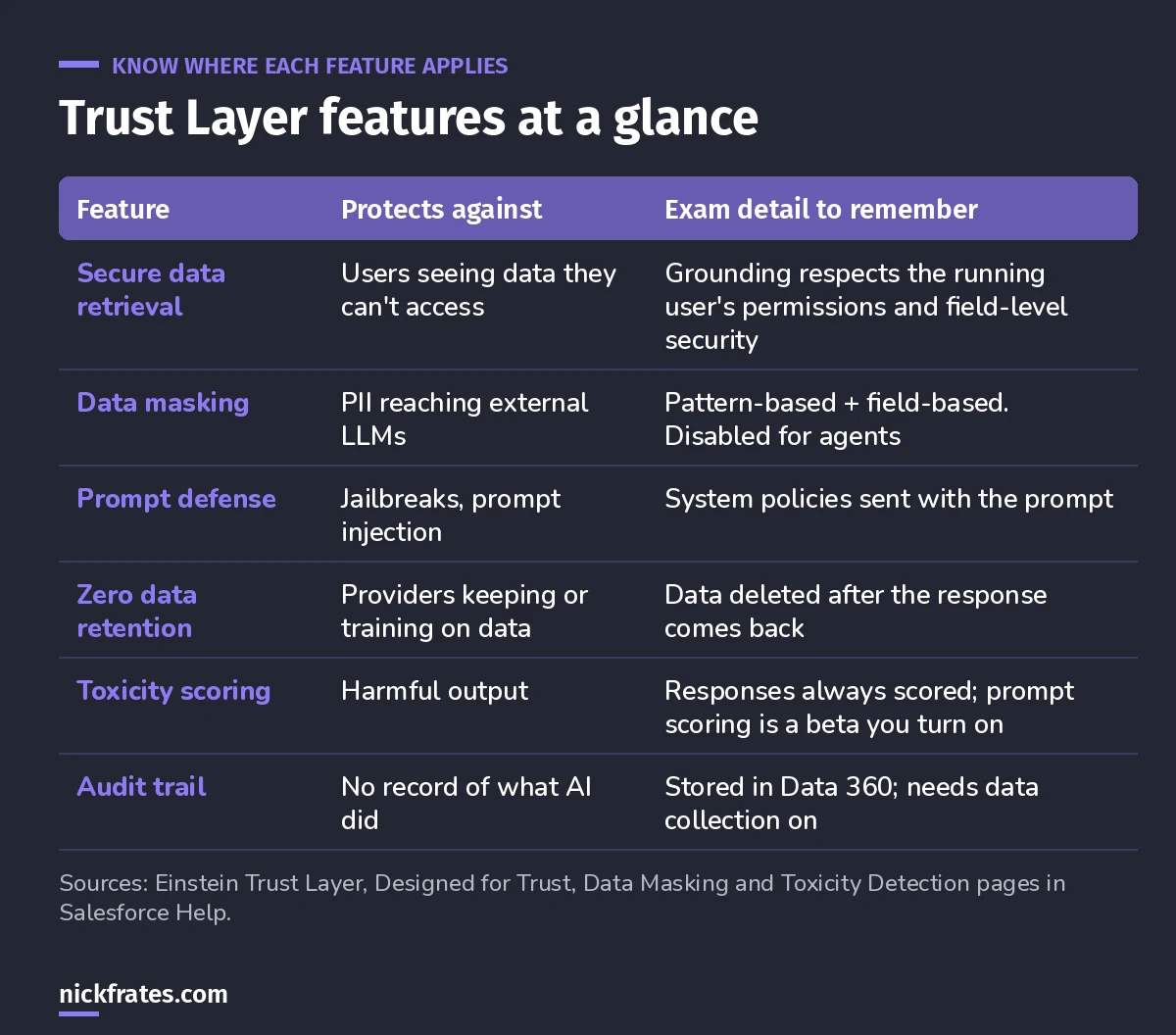
The one-table version for review.
Misconceptions I see
- "The Trust Layer masks everything." Not for agents, and field-based masking needs fields that are classified or encrypted.
- "Zero retention means nothing is logged." The provider keeps nothing. Your own audit trail in Data 360 keeps plenty, by design.
- "The AI can see all my data." Grounding runs as the user. Less access, less context.
- "Toxicity scoring is optional." For responses it's always on.
Three practice questions
1. A field is tagged with a data classification. A prompt template merges it. What happens before the prompt reaches an external LLM?
Answer: field-based masking replaces it with a placeholder (if masking is set up), and the response is demasked on the way back.
2. A rep can't see the Discount field. Will a prompt template they run include it?
Answer: no. Grounding uses the running user's permissions and field-level security.
3. Where would you find the masked prompt that was sent to the model?
Answer: in the audit trail data in Data 360, once data collection is on.
Keep going
- Agentforce Specialist study guide: the Trust Layer in the context of the whole exam.
- Agentforce tutorial: build your first agent.
- What replaced the AI Associate exam: the AI ethics and data basics behind all this.
- The Salesforce security model: the permissions grounding depends on.
Cert Lab by Nick Frates
Get the Agentforce Specialist Cert Lab
Lessons, practice questions and flashcards for all 6 AI-201 exam sections, built from Salesforce Help.
Start the AI-201 Cert Lab, $9.99 →Hope this helps!
Best,
Nick