Hey friends,
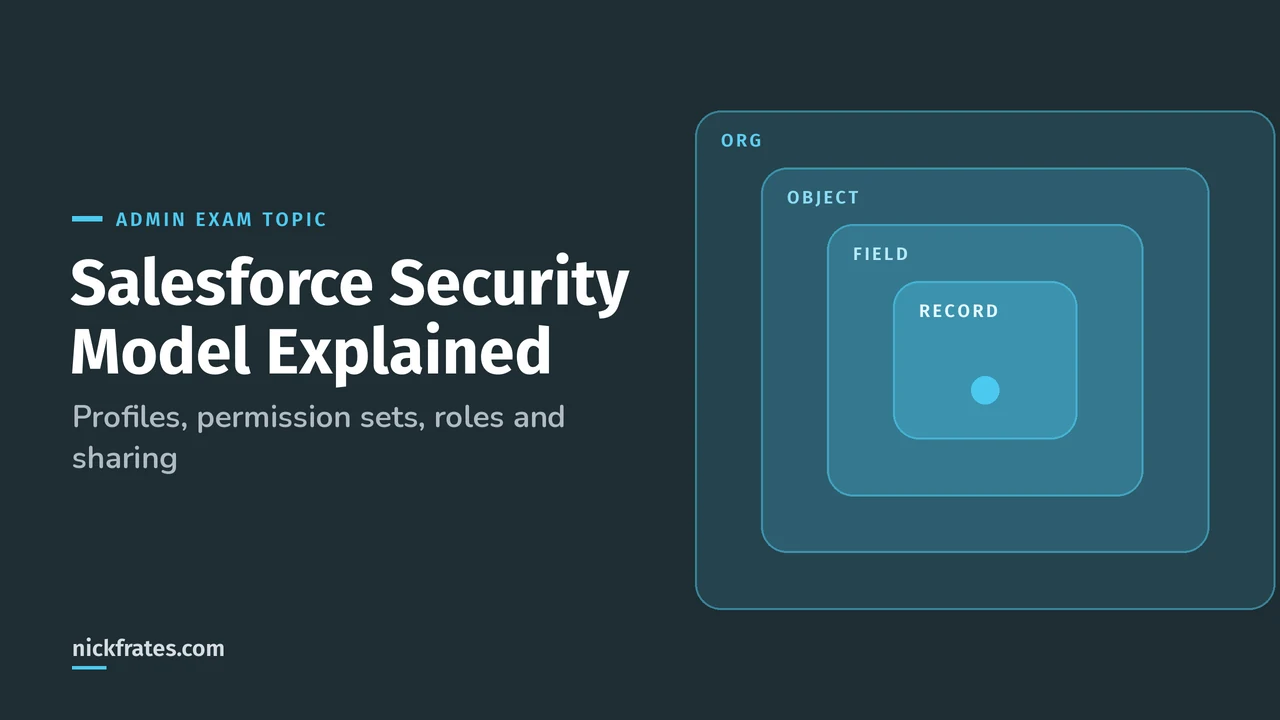
The Salesforce security model works in four layers: org, object, field and record. Profiles and permission sets decide what a user can do with an object or field. Org-wide defaults, the role hierarchy and sharing decide which records they can see. Almost every security question on the Admin exam is really asking which of those layers you'd change.
Configuration and Setup is 15% of the Platform Administrator exam, and security and sharing sit right in the middle of it. They also show up again in reports (a user only sees report rows they have access to). This post walks through each layer, then gives you a way to answer the scenario questions fast.
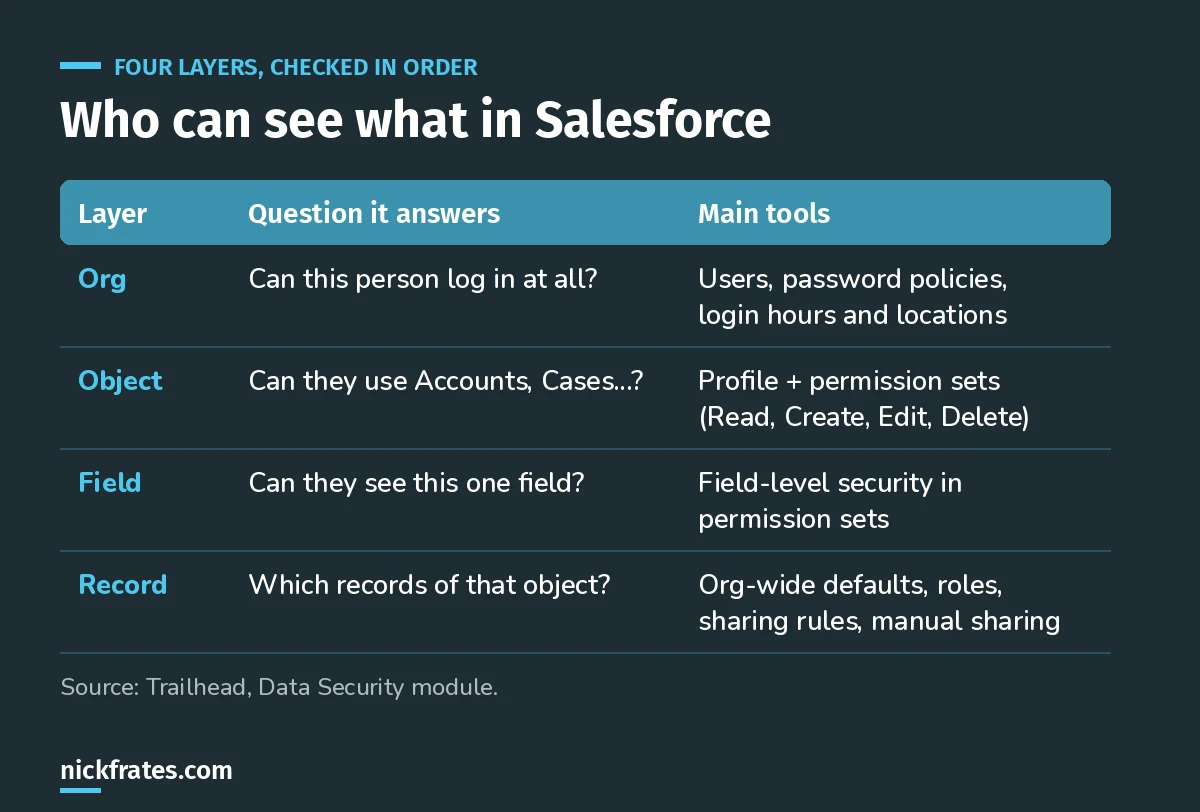
The four layers. Keep this table in your head for every scenario.
The four layers of the Salesforce security model
Trailhead's Data Security module frames it the same way. You can control access to your whole org, a specific object, a specific field or an individual record. Combining those layers is how you give thousands of users the right access without setting it one user at a time.
One rule that surprises people: the model works at the API level too. A permission you set in Setup applies whether someone uses the UI, a data tool or an integration.
Org level. Who can log in at all, password policies, and login hours and locations.
Object level. Whether a user can create, read, edit or delete any record of an object. Trailhead recommends permission sets and permission set groups to manage this.
Field level. Whether a user can see or edit a specific field, even when they have the object. The classic example: interviewers can see a job position, but not the bonus field on it.
Record level. Which individual records of that object they can see. This is where org-wide defaults, roles and sharing live, and it's where most exam questions go. Relationship type matters here too; see lookup vs master-detail relationships for how master-detail children inherit sharing.
Profiles vs permission sets vs permission set groups
A user's baseline permissions on any object are the combination of their profile, their permission sets and their permission set groups, per the record access unit.
| Tool | What it is | When to reach for it |
|---|---|---|
| Profile | Every user has exactly one | The baseline. Keep it minimal. |
| Permission set | A bundle of extra permissions | Give one more ability to some users without a new profile |
| Permission set group | A group of permission sets | Bundle the permission sets a job role needs, then assign once |
| Muting permission set | Lives inside a group | Turn off one permission in a group for those users without editing the shared sets |
Exam pattern: "Some users on a profile need one extra permission" is almost always a permission set, never a new profile or a change to the shared profile.
Muting is named in the official Admin objectives, so expect it. Trailhead's object access unit walks through building a Recruiters permission set group, which is a good 20-minute hands-on version of this section.
Record access: org-wide defaults, roles and sharing
Record access is a ladder. You start locked down and only ever open up.
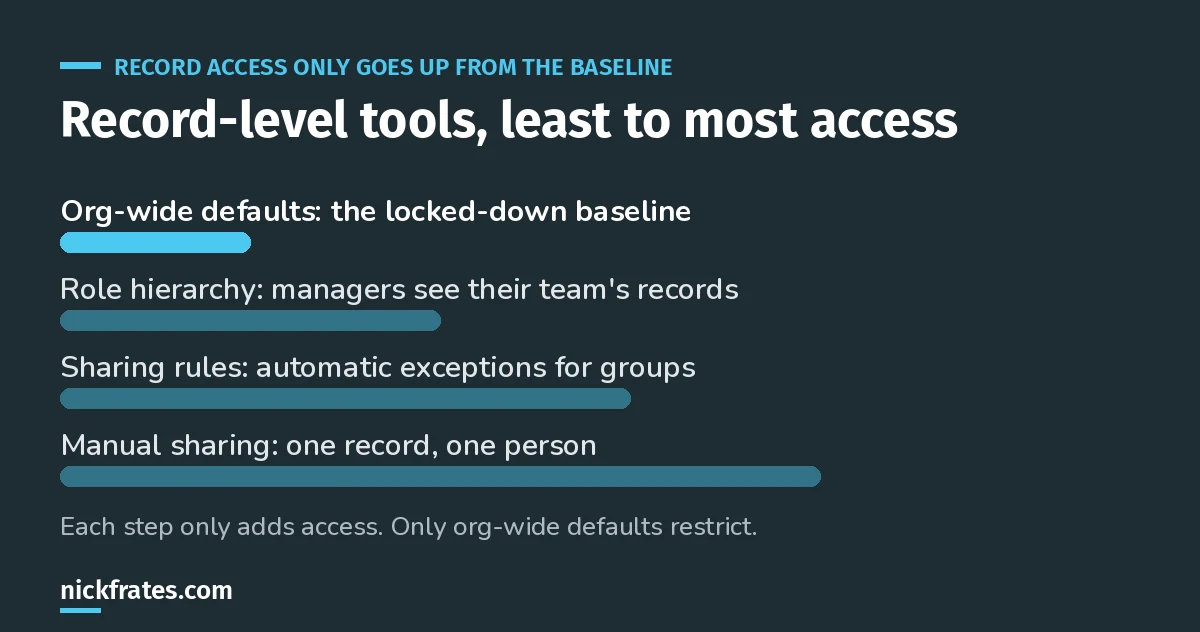
Only org-wide defaults restrict. Everything else adds access.
Org-wide defaults (OWD) set the baseline for records a user doesn't own. Trailhead's guidance: set it to the access the most restricted user should have. The options you'll see most:
- Private: only the owner and users above them in the role hierarchy can view, edit and report on the records.
- Public Read Only: everyone can view and report on the records, but only the owner and users above them can edit.
- Public Read/Write: everyone can view and edit.
- Controlled by Parent: on a detail object, access follows what the user can do with the parent record. More on relationships in my Salesforce data modeling guide.
Role hierarchy gives managers the same record access as the people below them. Roles are about records, not about what a user can do in the app. That's the profile's job.
Sharing rules are automatic exceptions to the OWD for a group of users, such as everyone in a public group or role. They only ever give more access.
Manual sharing lets a record owner, or a user with enough permission, share one record using the Share button. Trailhead's example is a recruiter going on vacation.
Cert Lab by Nick Frates
Practice the security section free
The Configuration and Setup lessons in my Admin Cert Lab cover users, profiles, permission sets and sharing, with practice questions that explain every option.
Start the free Admin Cert Lab →How to answer security scenario questions
When a question describes a security problem, ask these in order:
- Is it about what they can do (create, edit, see a field)? Then it's a profile, permission set or field-level security answer.
- Is it about which records they see? Then it's OWD, role hierarchy or sharing.
- Does the scenario need to restrict records? Only the OWD can do that. Sharing rules can't take access away.
- Is it a few users or a one-off? Permission set, or manual sharing. A whole group? Permission set group, or a sharing rule.
Worked example 1. Reps should see only their own opportunities, and managers should see their team's. Answer: set Opportunity OWD to Private and rely on the role hierarchy. A sharing rule can't do it, because sharing rules only open access.
Worked example 2. Support agents can see Accounts but must not see the Annual Revenue field. Answer: field-level security. Hiding the field from the page layout isn't security, because it still shows up in reports, list views and the API.
Worked example 3. Ten people on the Sales profile also need to export reports. Answer: a permission set assigned to those ten. Changing the Sales profile would give it to everyone.
Worked example 4. The finance team needs read access to every closed-won opportunity, but OWD is Private. Answer: a criteria-based sharing rule on Stage, shared to a finance public group or role.
The four mistakes I see most
- Using page layouts as security. Layouts control what shows on a page. Field-level security controls access.
- Trying to restrict with a sharing rule. Lower the OWD instead, then open up.
- Cloning profiles for every exception. You end up with 40 profiles nobody can audit. Use permission sets.
- Forgetting roles affect reports. A manager's report rows come from the role hierarchy, so a missing role looks like "missing data".
Bonus: how you check who changed what
The same Trailhead module lists the auditing tools, which are fair game too: created by and last modified by on every record, login history for the past six months, field history tracking, the Setup Audit Trail for configuration changes, and Event Monitoring for detailed user activity.
What to study next
- My 6-week Admin study plan puts security in week 1.
- How to pass the Admin exam on your first try covers the other traps, including deleting users and fields.
- 25 free Admin practice questions to test yourself.
- The full Admin certification guide for cost, format and sections.
Cert Lab by Nick Frates
Start the free Admin Cert Lab
Lessons, practice questions and flashcards for the Salesforce Platform Administrator exam, in one free course.
Start the free Admin Cert Lab →Hope this helps!
Best,
Nick