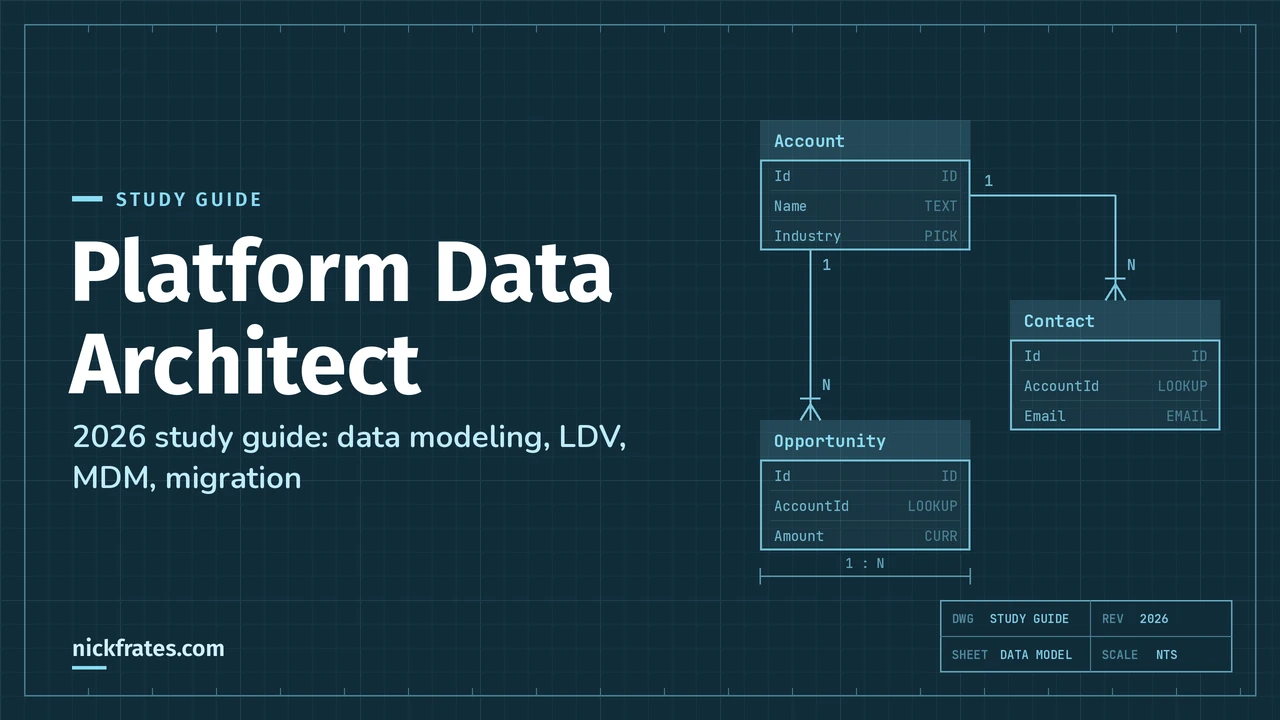
This is a deep study guide for the Salesforce Certified Platform Data Architect exam (exam code Plat-Arch-201), the credential that was called Data Architect until Salesforce standardized its certification names in July 2025. It follows the official exam outline section by section, with plain-English explanations, original diagrams, "which feature when" tables, a worked example and 25 practice questions with answers and explanations.
I've worked on Salesforce orgs with tens of millions of records, and the lessons this exam tests are the ones that hurt when you learn them in production: a "parking lot" account with 200,000 contacts, a report that times out every Monday, a migration that locks up because every child row points at the same parent. My goal here is to explain the why behind each pattern, so you can reason through scenario questions instead of memorizing them.
Updated for 2026: checked in October 2026 against the current official exam guide and the Trailhead Academy exam page. Platform Data Architect wasn't part of the July 2026 renames or the February 2027 retirements, so the outline, weights and passing score below are current. Where the exam guide is older than the product (it still says Spring '23), I point out what has changed since.
| Section | Weight | Approx. questions |
|---|---|---|
| Data Modeling/Database Design | 25% | ~15 |
| Master Data Management | 5% | ~3 |
| Salesforce Data Management | 25% | ~15 |
| Data Governance | 10% | ~6 |
| Large Data Volume Considerations | 20% | ~12 |
| Data Migration | 15% | ~9 |
| Exam fact | Detail |
|---|---|
| Official name | Salesforce Certified Platform Data Architect (formerly Salesforce Certified Data Architect) |
| Exam code | Plat-Arch-201, as listed on the Trailhead Academy exam page |
| Format | 60 scored multiple-choice/multiple-select questions, plus up to 5 unscored questions |
| Time | 105 minutes |
| Passing score | 58% (about 35 of 60 scored questions) |
| Fee | US$400 to register, US$200 to retake, plus applicable taxes |
| Prerequisite | None. Salesforce recommends, but doesn't require, Platform App Builder, Platform Developer and Platform Developer II |
| Release alignment | Spring '23, per the current exam guide |
| Delivery | Onsite at a testing center or online proctored; no reference materials allowed |
| Maintenance | One Platform Data Architect maintenance badge on Trailhead per year |
| Official resources | Exam guide, credential page and the official Architect Journey: Data Architecture and Management Trailmix |
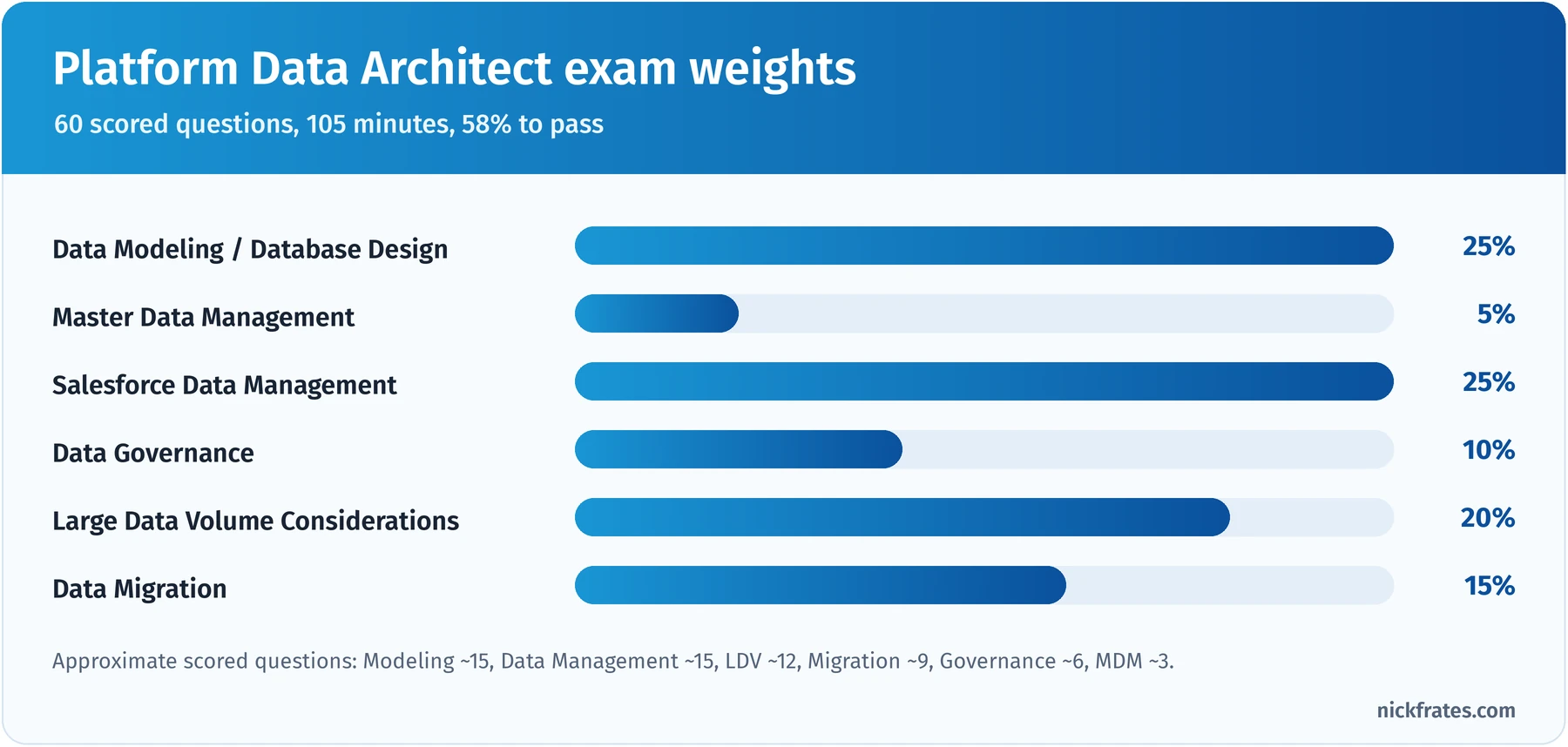
Data modeling and data management are half the exam; add LDV and you're at 70%.
Took the exam or a practice test? Enter your section scores in my Salesforce exam score calculator to see your estimated overall score and which sections are costing you the most points.
Also preparing for the Admin or Platform Developer exam? Cert Lab has lessons, practice questions and flashcards for both.
Contents
- Who this certification is for
- What changed for 2026
- How to use this guide
- Salesforce data architecture in one picture
- Data Modeling/Database Design (25%)
- Master Data Management (5%)
- Salesforce Data Management (25%)
- Data Governance (10%)
- Large Data Volume Considerations (20%)
- Data Migration (15%)
- Deep dive: where should the data live?
- Worked example: a data architecture for a growing service company
- Hands-on checklist
- Common exam traps
- Flashcard terms
- Mixed practice exam: 4 more questions
- Quick-reference cheat sheet
- Frequently asked questions
- Related study guides
Who this certification is for
Salesforce describes the candidate as an architect who assesses the architecture environment and requirements and designs sound, scalable and performant solutions on the Salesforce Platform as it pertains to enterprise data management. The suggested background is 2 to 3 years of Salesforce experience and 5+ years supporting or implementing data-centric solutions. Typical job titles in the exam guide are Advanced Administrator, Data Architect, Technical/Solution Architect and Advanced Platform Developer.
The exam guide lists what the candidate should know. Read it as a checklist:
- Data modeling: custom fields, master-detail and lookup relationships, mapping client requirements to database requirements, and the standard object structure for Agentforce Sales and Service.
- Making best use of standard objects and big objects, and how standard objects relate to license types.
- Large data volume (LDV) considerations: indexing, LDV migrations and performance.
- Declarative and programmatic platform concepts, and scripting with tools like Data Loader and ETL platforms.
- Data stewardship and data quality: the "clean data" mindset.
Just as useful is what the guide says you don't need: non-Salesforce database concepts, configuring integration tools, hands-on experience with MDM tools, Lightning development, or any programming language. That tells you the questions are about design choices on Salesforce, not syntax.
Who finds it hardest? Admins know the objects but often haven't felt LDV pain, so indexing, skew and loading questions catch them out. Data professionals from other platforms know MDM and governance but miss Salesforce-specific behavior: implicit sharing, record locking, big object limits and license access.
Where it fits. Platform Data Architect is one of four certifications (with Platform App Builder, Platform Developer and Platform Sharing and Visibility Architect) that together earn Salesforce Certified Application Architect, a step toward the Certified Technical Architect review board.
What changed for 2026
- No rename in 2026. Salesforce renamed 16 certifications on July 24, 2026 and announced 24 retirements effective February 1, 2027. Platform Data Architect is on neither list.
- The name changed in 2025. Data Architect became Platform Data Architect in July 2025, when Salesforce standardized certification names and moved registration to Trailhead Academy with Pearson VUE delivery. If you earned Data Architect before then, you hold Platform Data Architect now; nothing to retake. The old Trailhead URL (/credentials/dataarchitect) redirects to the new credential page.
- The outline is still the Spring '23 outline. The exam guide says questions align to the Spring '23 release. The six sections and weights above match the current guide.
- Product names moved on. The exam guide and older study material use names that Salesforce has since changed. Know both:
| Name in the exam guide or older material | Current name you'll see in Salesforce |
|---|---|
| Customer 360 Platform | Salesforce Platform |
| Sales Cloud and Service Cloud | Agentforce Sales and Agentforce Service (the exam guide already uses these in its knowledge list) |
| Data Cloud | Data 360 |
| Webassessor / Kryterion registration | Trailhead Academy registration, Pearson VUE delivery |
- Some platform facts changed since older study guides were written. Async SOQL for big objects was retired in Summer '23, so query big objects with standard SOQL on their index fields, Batch Apex or the Bulk API. Field Audit Trail now tracks up to 200 fields per object. Data Loader supports up to 150 million records per file with Bulk API 2.0. And Salesforce's LDV guide now says you can create custom indexes by contacting Customer Support or by deploying custom index metadata through the Metadata API. If a practice test you find elsewhere says otherwise, it's probably out of date.
- Data 360 belongs in your toolkit. The single-view and virtualization objectives predate it, but it's often the right modern answer for unifying many sources, so I cover it alongside the classic options.
How to use this guide
This is a scenario exam. Most questions describe a company, a data problem and a constraint (volume, budget, regulation, timeline), then ask what the architect should recommend. You need to know which pattern fits which situation and what the trade-off is.
- Get a free Developer Edition org or a Trailhead Playground and build the small models described here. Load a few thousand records with Data Loader, break things on purpose and watch what happens.
- Read one section at a time. Each ends with a key takeaway and practice questions.
- Read every answer explanation, including why the wrong answers are wrong. On this exam the distractors are usually real features used in the wrong place, like a skinny table offered for a write-performance problem.
- In the last week, do the worked example, the mixed practice set and the cheat sheet, and time yourself: 60 questions in 105 minutes is 1 minute 45 seconds per question.
If you want the learning-science reasons for this order (retrieval practice, spacing, interleaving), read The Science of Studying for Salesforce Certifications.
Short on time? My Platform Data Architect study plan boils this down to section weights, the numbers to memorize and a four-week schedule.
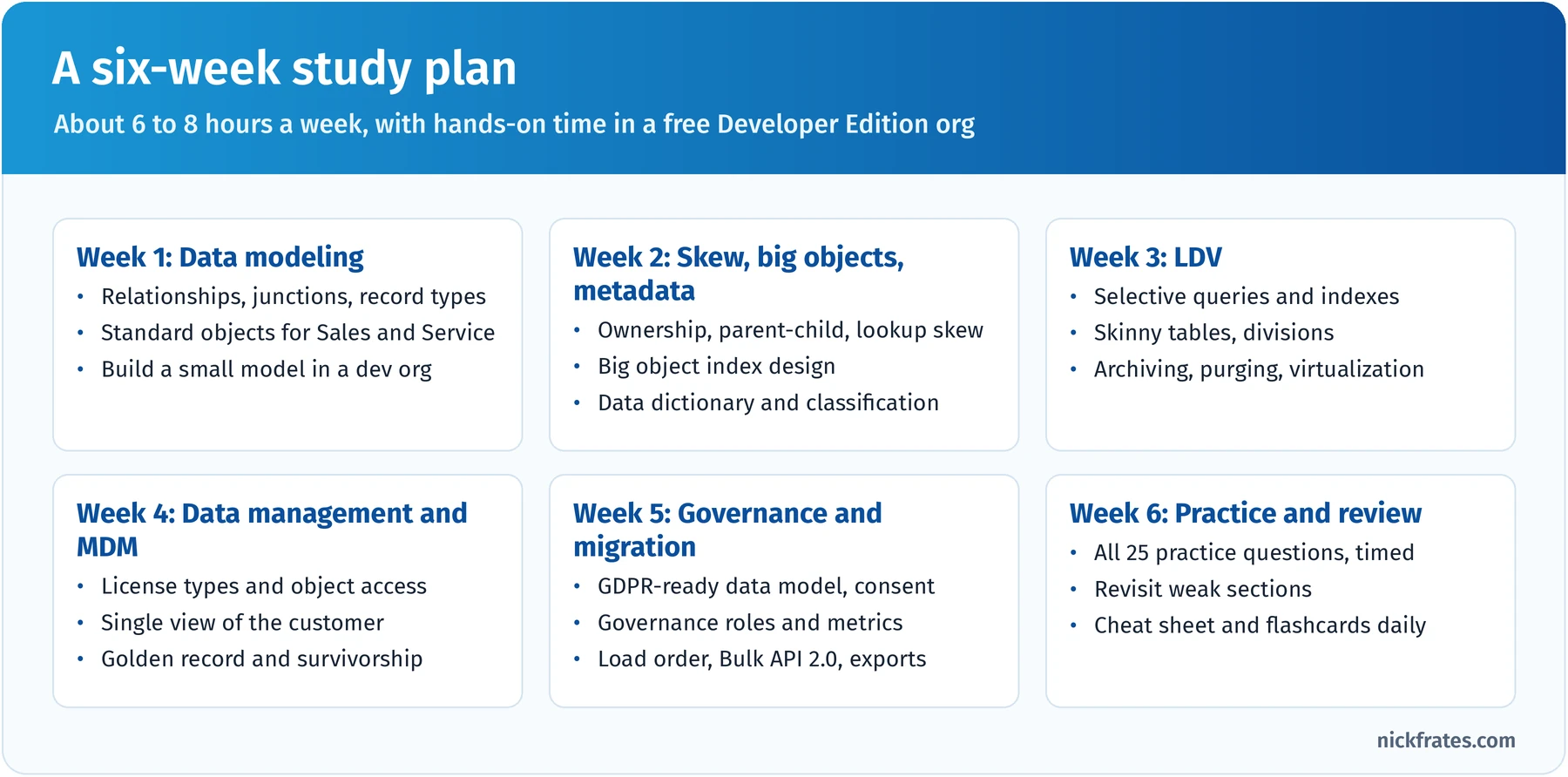
A six-week plan for someone with a couple of years of Salesforce experience.
Salesforce data architecture in one picture
Almost every question on this exam sits somewhere on one flow. Before the sections, learn the flow and the decisions at each step:
- Sources: ERP and billing, marketing tools, websites, legacy CRMs, other Salesforce orgs and external reference data.
- Move and clean: profile, cleanse, de-duplicate and transform, then load with ETL, Data Loader or the Bulk API, using external IDs so loads can be repeated safely.
- Store: standard and custom objects (transactional), big objects (massive history), external objects (virtualized) and Data 360 (unified profiles).
- Use and serve: records, reports, automation and agents, plus exports and integrations to other systems.
Underneath run three concerns: data modeling and LDV design, MDM and governance, and archiving and purging.
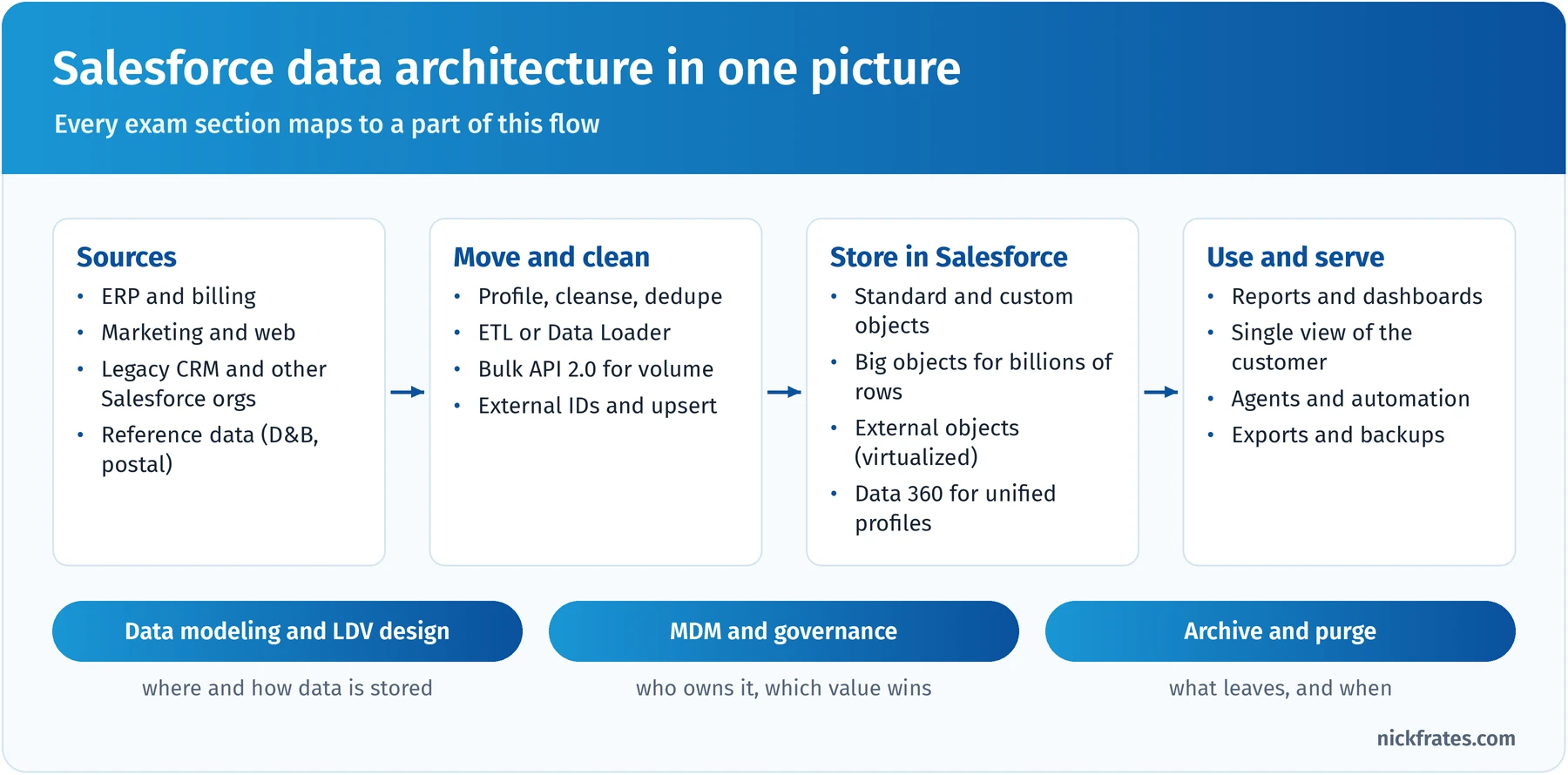
Every exam section maps to one part of this flow.
When you read a question, place it on this picture first. "Reports are slow on a 40-million-row object" is LDV. "Two systems disagree on the address" is MDM. "Prove we deleted a customer's data" is governance plus purging.
Data Modeling/Database Design (25%)
This is the joint-largest section. It tests whether you can design a data model on Salesforce that fits the business, respects the security model, scales, and stays understandable over time. The official objectives:
- Compare and contrast techniques and considerations for designing a data model for the Salesforce Platform (objects, fields and relationships, object features).
- Given a scenario, recommend approaches to design a scalable data model that obeys the current security and sharing model.
- Compare and contrast approaches for capturing and managing business and technical metadata (business dictionary, data lineage, taxonomy, data classification).
- Compare the reasons for implementing big objects versus standard and custom objects in a production org, with the pros and cons of big objects.
- Given a scenario, recommend approaches to avoid data skew (record locking, sharing calculation issues and excessive child-to-parent relationships).
Start with standard objects. Before you design a custom object, ask whether a standard one already models the concept, because standard objects bring behavior you'd otherwise rebuild: lead conversion, opportunity products and forecasting, case escalation and entitlements, and the security and reporting around them. The exam guide expects you to know the standard object structure for Agentforce Sales and Service: Account, Contact, Lead, Opportunity and Opportunity Product, Product and Price Book, Quote, Order, Campaign, Case, Entitlement, Asset and Knowledge. Two variations come up often:
- Person accounts combine an Account and a Contact into one record for B2C businesses. They're hard to turn off once enabled, count against storage as both an account and a contact, and change how lookups, reports and integrations behave, so recommend them only when the business genuinely sells to individuals.
- Contacts to Multiple Accounts uses the Account Contact Relationship object so one contact can relate to several accounts while keeping one primary account.
Custom objects are right when the concept is genuinely unique to the business, like a shipment or an inspection. Give each one a clear purpose, a description and an owner who decides what goes in it.
Relationships drive security, not just navigation. The relationship you pick decides who owns the child, who can see it, whether you get roll-ups and how records lock during loads.
| Relationship | What it means | Sharing and ownership | When to use it |
|---|---|---|---|
| Lookup | Loose link; the child can exist without the parent (unless the field is required) | Child has its own owner and its own sharing | Related but independent records, like a Case that references an Asset |
| Master-detail | Child can't exist without the parent; deleting the parent deletes the children | Child has no owner; access comes from the parent | Tightly owned children that need roll-up summaries, like expense lines on an expense report |
| Many-to-many (junction object) | A custom object with two master-detail fields | Access depends on both parents; the first master-detail is the primary one | Linking two objects where each side can have many of the other, like Job Applications between Candidates and Positions |
| External lookup | Links a child to a parent external object using the parent's External ID | External objects have no sharing; access is via object and field permissions | Showing orders from an ERP under a Salesforce account via Salesforce Connect |
| Indirect lookup | Links a child external object to a standard or custom parent using a unique external ID field on the parent | Same as above | External records that carry the Salesforce parent's business key, not its Salesforce ID |
Each object can have up to two master-detail relationships, and all relationship fields count toward a limit of 40 per object. Converting a lookup to master-detail only works when every existing child already has a parent.
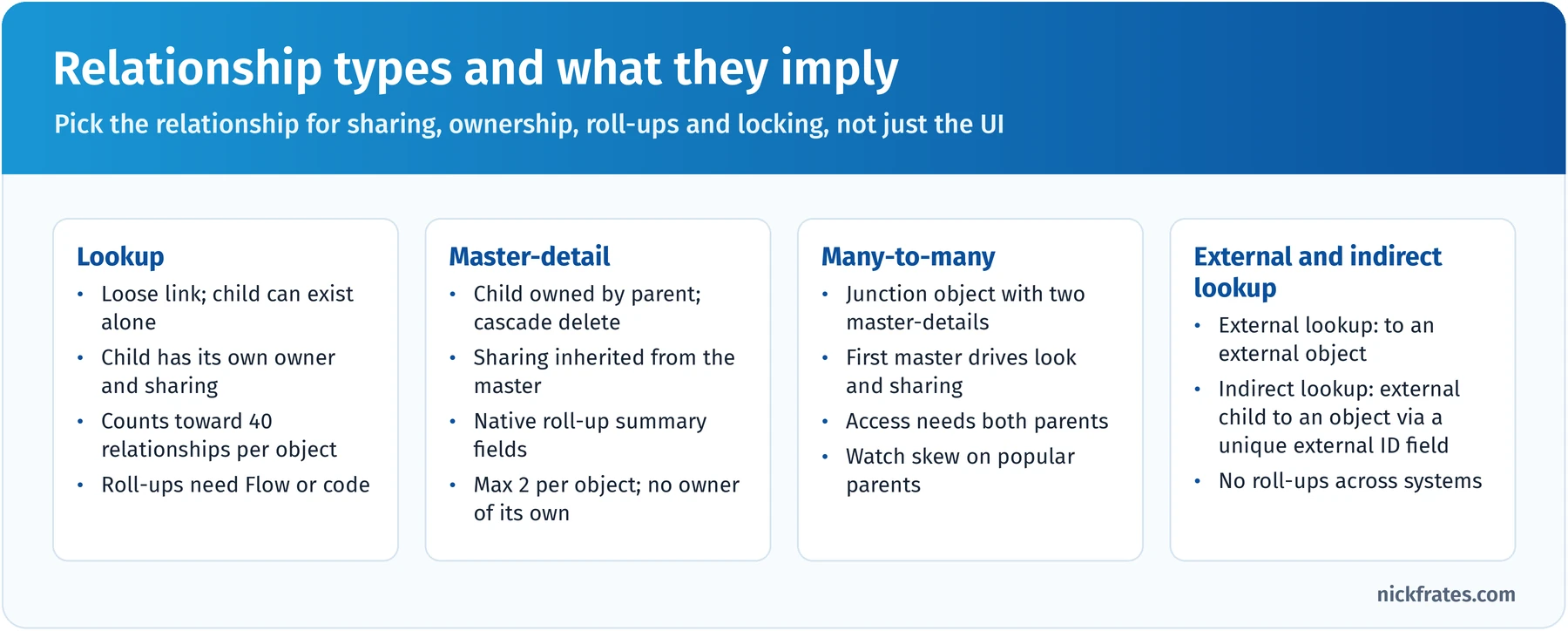
The relationship you choose decides sharing, ownership and roll-ups.
Designing within the sharing model. A scalable model works with the security model you already have. The rules I use:
- If children should be visible to anyone who can see the parent, master-detail does that with no extra sharing rows. If children need different visibility (an HR note on an employee record), use a lookup so the child has its own sharing.
- Remember implicit sharing: access to a child contact, opportunity or case grants read access to the parent account. It's convenient, and it's also what makes parent-child skew expensive.
- Prefer org-wide defaults, the role hierarchy and criteria-based sharing over thousands of manual or Apex managed shares. Every share is a row Salesforce must maintain.
Fields: design choices that matter later. Choose field types for the data, not the screen. Use restricted picklists and global value sets when values must be consistent for reporting. Give every integration-loaded object an External ID holding the source key; you can mark up to 25 auto-number, email, number or text fields per object as external IDs, and each is indexed automatically. Avoid filtering on formulas that reach across objects or use TODAY(), because those are non-deterministic and can't be indexed.
Metadata management: business and technical. Architects make data understandable, not just storable. Business metadata explains meaning: a glossary (what exactly is an "active customer"?), a data dictionary with each field's purpose and allowed values, owners and stewards per domain, and a classification taxonomy. Technical metadata explains structure and movement: API names, types and relationships, data lineage (which source and load job produced a value and how it was transformed), field usage and audit history.
In Salesforce, the data classification fields on every field give you a native home for part of this: Data Owner, Field Usage (Active, DeprecateCandidate, Hidden), Data Sensitivity Level (Public, Internal, Confidential, Restricted, MissionCritical) and Compliance Categorization (such as PII, GDPR, HIPAA, PCI and CCPA). Descriptions and help text carry definitions, and you can generate a living data dictionary from the Tooling API's FieldDefinition. For lineage, store the source system and source key on each record and keep load job IDs in your ETL logs.
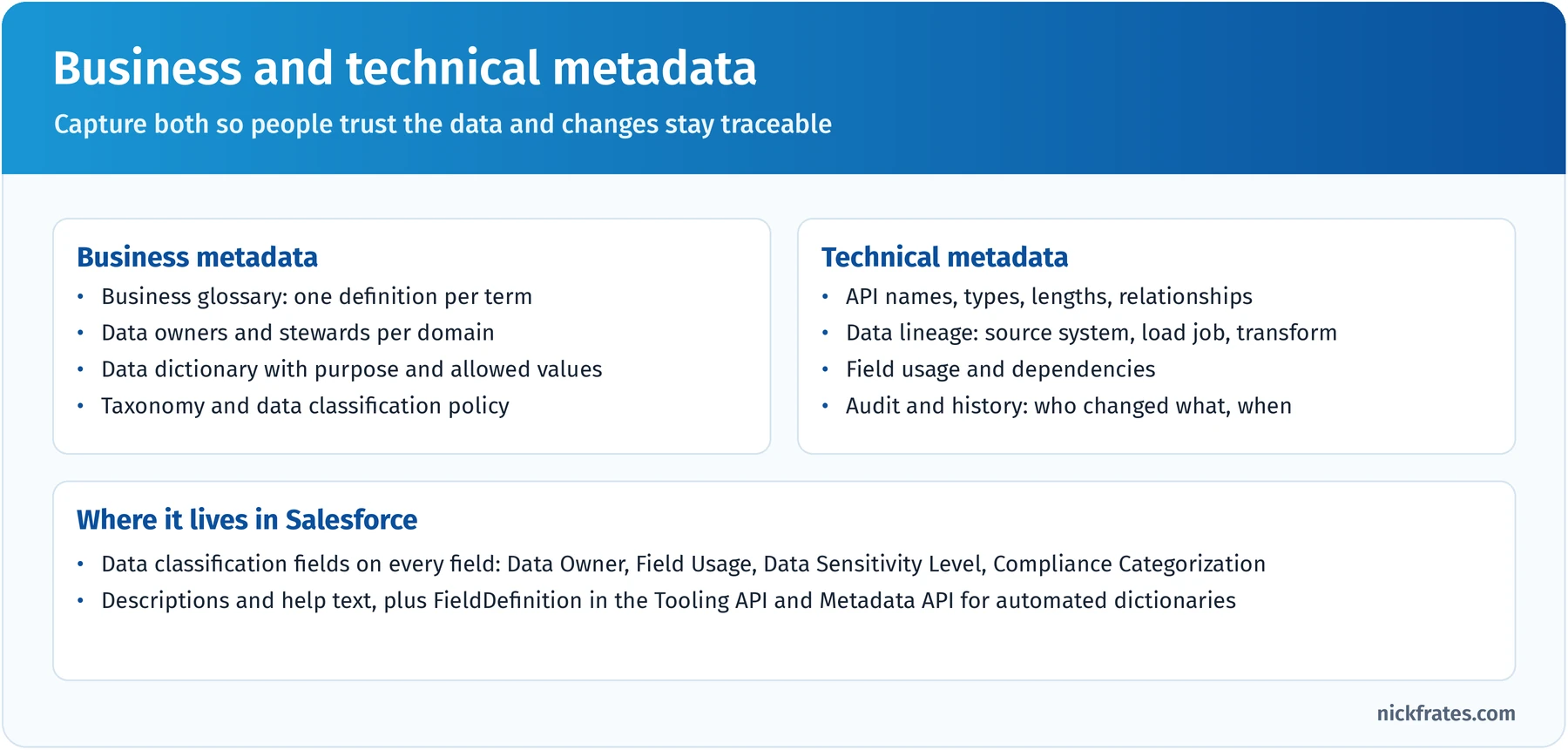
Capture both kinds, or nobody will trust the data in two years.
Big objects versus standard and custom objects. Big objects hold hundreds of millions or billions of records with consistent performance. Standard big objects are defined by Salesforce (FieldHistoryArchive, used by Field Audit Trail, is the classic example); custom big objects (API names ending in __b) are ones you define in Setup or the Metadata API.
| Consideration | Standard and custom objects | Custom big objects |
|---|---|---|
| Scale | Millions of records | Hundreds of millions to billions |
| Database | Relational and transactional | Horizontally scaled, non-transactional |
| Querying | Any SOQL filter; reports, list views | SOQL that filters on the index fields in order; no standard reports or list views |
| Index | Standard plus custom indexes | One required index of 1 to 5 fields, defined up front and not editable after deployment |
| Security | Object, field and record-level sharing | Object and field permissions only; no sharing rules |
| Automation | Triggers, flows, validation rules | No triggers, flows or processes; write with Apex (Database.insertImmediate), Bulk or SOAP API |
| Encryption | Shield Platform Encryption supported | Not supported; archived encrypted data is stored as clear text |
Big objects shine for audit and tracking (logins, device readings), historical archives (closed cases that must stay queryable) and high-volume customer context (clickstream or loyalty events). They're the wrong choice when users need to edit records, share them by role, use standard reports or trigger automation. Also know: up to 100 big objects per org; Enterprise, Performance, Unlimited and Developer Editions include capacity for up to 1 million big object records, and Salesforce can provide more; writes can partially fail, so retry the whole batch; and they're reached through SOQL, Bulk, SOAP and Chatter APIs, not the REST API.
Design the index for the question you'll ask. A big object query must filter on the index fields from left to right, so the index is your query design. If support always looks up history by account and then date, index Account__c, Event_Date__c, Event_Id__c. Text fields in the index share a 100-character limit.
Data skew: the three kinds. Skew is what happens when too many records concentrate on one owner or one parent. Salesforce's guidance puts the danger line at about 10,000 records.
- Ownership skew: one user or queue owns more than 10,000 records of an object, like every unassigned lead parked on an integration user. Changing that user's role, or their membership in groups used by sharing rules, forces a huge sharing recalculation. Spread ownership across real users. If you can't, give the owner no role, or a separate role at the top of the hierarchy that it never leaves, and keep it out of public groups used in sharing rules.
- Parent-child (account) skew: more than 10,000 children under one parent, like 300,000 contacts under an "Unassigned" account. Each child save briefly locks the parent, so parallel loads fail with lock errors, and implicit sharing means removing one user's access to one contact can force a scan of all the others. Spread children across many parents and load them sorted by parent.
- Lookup skew: huge numbers of records look up to the same record, like every order pointing to one "Web Store" account. Saving a record locks its lookup targets, so concurrent inserts collide. Spread references across several targets, use picklists instead of lookups for static reference values, and reduce concurrency for loads that hit the same target.
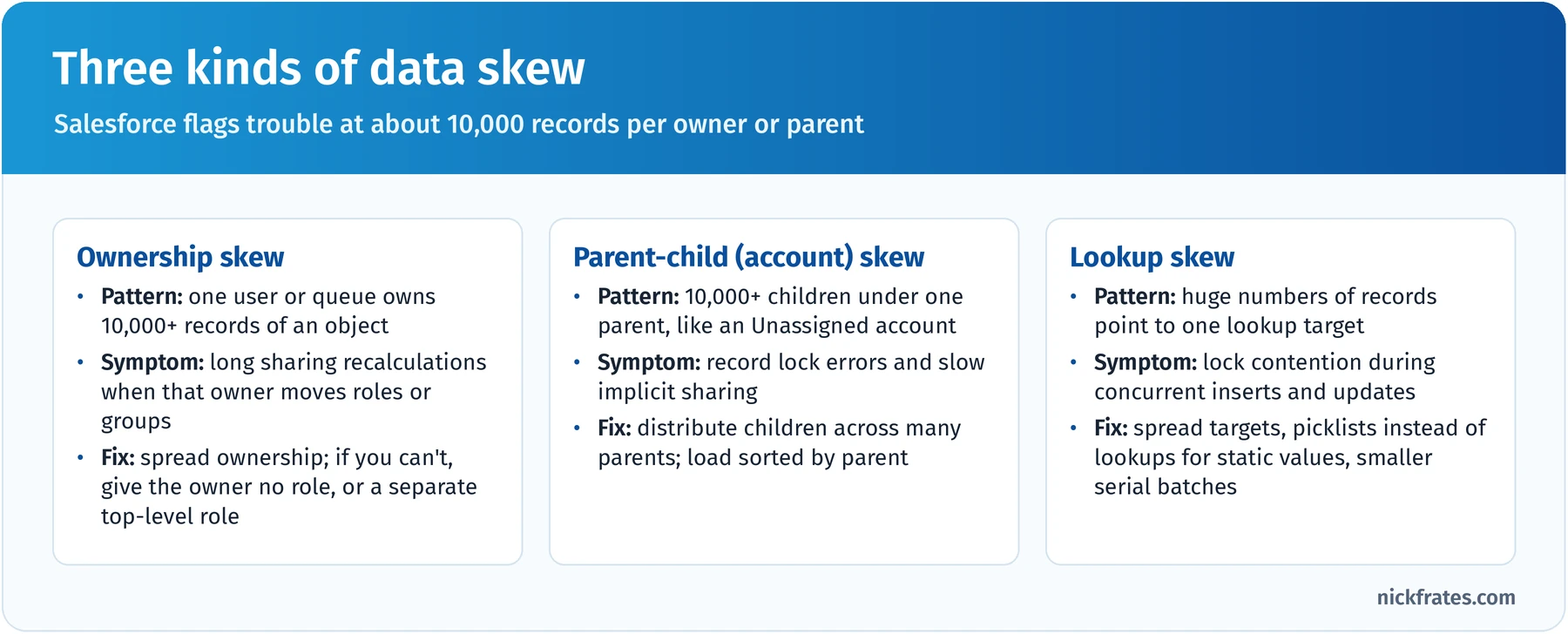
Skew is a design problem first; tuning comes second.
Key takeaway: in this section, the right answer starts from how the data will be secured, queried and loaded, then picks the relationship, object type and field design that keep all three cheap.
Practice questions: Data Modeling/Database Design
Question 1. A property management company tracks maintenance requests for its buildings. Each request must always belong to a building, building managers should automatically see every request for buildings they can see, and leadership wants the total open repair cost shown on each building record without any custom code. How should the architect relate Maintenance Request to Building?
- A. A lookup relationship with a required field and a sharing rule per building manager
- B. A lookup relationship with a record-triggered flow that maintains a cost total
- C. A master-detail relationship with Building as the master and a roll-up summary field for open repair cost
- D. A junction object between Building and Maintenance Request
Answer: C. Master-detail ties the request's existence and visibility to the building and gives a native roll-up summary field, all without code. Why not the others: a required lookup plus per-manager sharing rules is more configuration to maintain and doesn't give a native roll-up (A); a flow can total values but adds automation to maintain when master-detail does it natively (B); a junction object models many-to-many, but each request belongs to exactly one building (D).
Question 2. A logistics company stores 900 million GPS pings from its trucks and adds about 2 million a day. Dispatchers occasionally look up a truck's pings for a given day from a custom component on the truck record. Nobody edits pings, and no automation runs on them. What should the architect recommend?
- A. A custom big object with an index on truck ID, then ping timestamp
- B. A custom object with a custom index on the truck lookup field
- C. Field history tracking on the truck's Location field
- D. A skinny table on a custom Ping object
Answer: A. Append-only, enormous, read by a known key and needing no automation or sharing is exactly the big object use case, and the index order matches how dispatchers search. Why not the others: a custom object would consume huge amounts of data storage and struggle at this volume even with an index (B); field history is for tracking edits to tracked fields and has retention limits, not for storing telemetry (C); a skinny table speeds up reads on an existing object but doesn't solve storage or volume (D).
Question 3. A nonprofit imports 250,000 donors from a legacy system. Many donors have no organization, so the team plans to attach them all to one account called "Individual Donors". The org uses a private sharing model for contacts. What should the architect recommend?
- A. Proceed, but give the Individual Donors account to a user with a high role
- B. Store the donors as leads instead of contacts
- C. Proceed, but load the contacts with Bulk API in parallel mode to finish quickly
- D. Distribute the donors across a pool of placeholder accounts that each stay well under 10,000 contacts, or use person accounts if the business model is truly individual-based
Answer: D. One account with 250,000 children is textbook parent-child skew, which causes lock contention and slow implicit sharing; spreading children across many parents, or modeling individuals as person accounts, avoids it. Why not the others: a high-role owner doesn't remove the lock and implicit sharing problem and can make recalculations worse (A); leads are for unqualified prospects, not ongoing donors, and lose contact-based features (B); parallel loads into one parent make lock errors more likely, not less (C).
Question 4. A financial services firm's data governance team wants every field that holds personal data to show who is accountable for it and how sensitive it is, and they want to produce a data dictionary from Salesforce automatically each quarter. What should the architect recommend?
- A. Add a custom text field named "Owner" on each object
- B. Populate the data classification fields (Data Owner, Data Sensitivity Level, Compliance Categorization, Field Usage) and generate the dictionary from field metadata through the Tooling or Metadata API
- C. Keep a spreadsheet of fields on a shared drive and update it after each release
- D. Use field history tracking on every sensitive field
Answer: B. The data classification fields are built for exactly this metadata, live with each field, and can be read programmatically to build a dictionary. Why not the others: a custom field on records describes records, not fields (A); a spreadsheet drifts from reality and isn't automatic (C); field history records data changes, not ownership or sensitivity (D).
Master Data Management (5%)
Only about three questions, but MDM ideas leak into the data management and migration sections, so it's worth an hour. Note that the exam guide says you're not expected to have hands-on experience with MDM tools; it tests the concepts and how you'd apply them in Salesforce. The official objectives:
- Compare and contrast techniques for implementing MDM solutions: implementation styles, harmonizing and consolidating data from multiple sources, survivorship rules, thresholds and weights, external reference data for enrichment, canonical modeling and hierarchy management.
- Given a scenario, recommend techniques for establishing a "golden record" or "system of truth" for the customer domain in a single org.
- Given a scenario, recommend approaches for consolidating data attributes from multiple sources, with criteria for picking the winning attributes.
- Given a scenario, recommend approaches to capture and maintain customer reference data and metadata to preserve traceability and establish a common context for business rules.
Master data is the shared, slowly changing data that many processes depend on: customers, products, suppliers, employees, locations. MDM is the discipline (people, process and technology) of keeping one trusted version of it. The trusted version is called the golden record, and the system that owns a given attribute is its system of record or system of truth.
The four implementation styles. Expect at least one question that describes a situation and asks which style fits. The deciding question is who is allowed to author master data:
- Registry: the hub stores only IDs and match links that point to each source record; sources keep and author their own data. Fast and low-impact, good for a cross-reference.
- Consolidation: the hub copies, matches and merges source data into a golden record used downstream for reporting and analytics; sources aren't updated back.
- Coexistence: the hub builds the golden record and syncs changes back, so several systems keep authoring but converge on the same values. It needs clear survivorship and sync rules.
- Centralized (transactional): the hub is the only place master data is created and changed, and other systems subscribe. Strongest control, biggest process change.
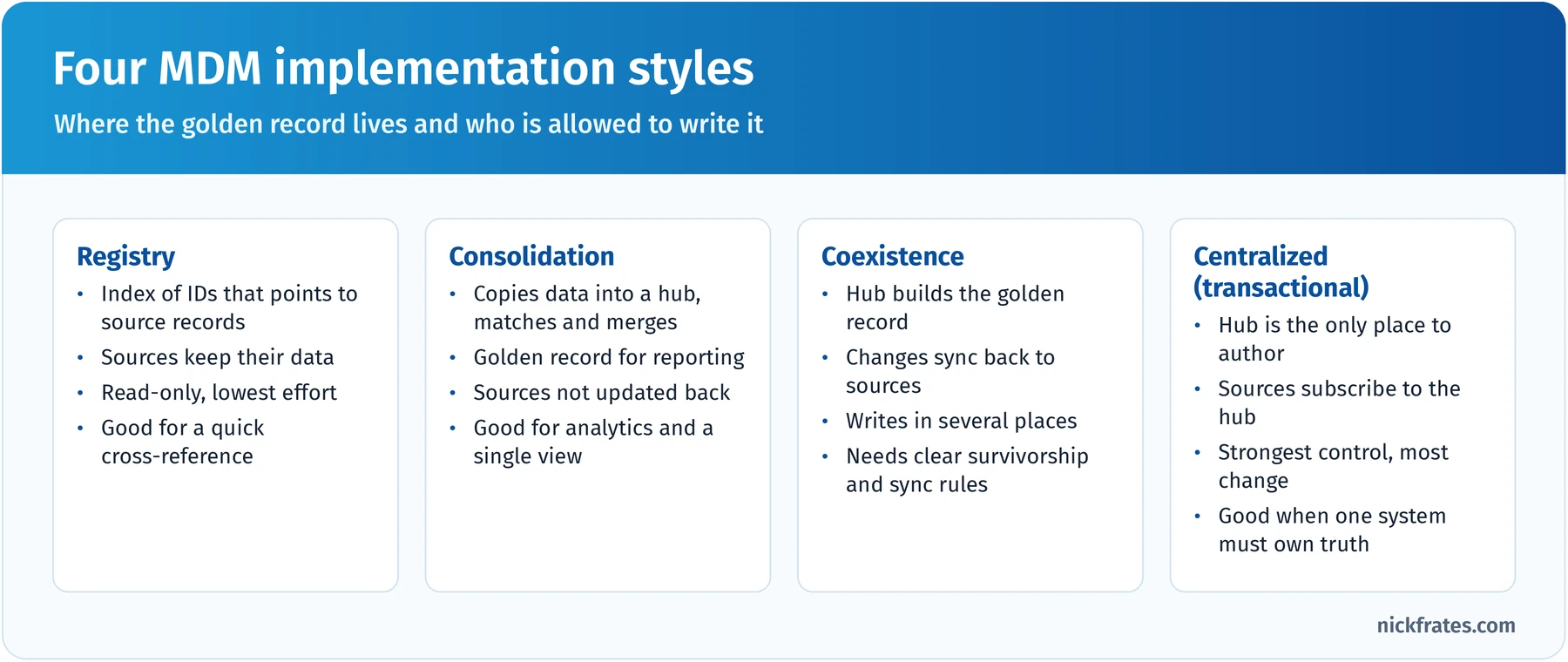
The style decides where the golden record lives and who may write it.
Golden record in a single Salesforce org. When Salesforce holds the customer golden record, the toolkit is mostly native:
- Matching rules (exact and fuzzy matching on fields like name, email, phone and address) and duplicate rules that alert or block at the moment of entry, through the UI or the API.
- Duplicate record sets to review potential duplicates, and duplicate jobs (in Performance and Unlimited Editions) to scan existing records.
- Merge for accounts, contacts, leads and cases, which keeps one master record and re-parents related records.
- External IDs and a source-system field on every mastered record, so each Salesforce record keeps a link to the source records it came from.
Survivorship: picking the winning attributes. When three systems hold three different phone numbers, survivorship rules decide which one goes on the golden record, attribute by attribute. The common rules:
| Rule | How it decides | Example |
|---|---|---|
| Source trust (priority) | Rank systems per attribute; the most trusted source wins | Billing wins for address because invoices must reach the customer; CRM wins for phone because reps verify it |
| Recency | The most recently updated or verified value wins | The address a customer confirmed last week beats one from 2021 |
| Completeness | The most fully populated value wins | A full address with postal code beats a city name alone |
| Frequency | The value most sources agree on wins | Two of three systems say "Acme Corp", so it wins over "ACME Inc." |
| Thresholds and weights | Combine scores; only merge when the match score passes a threshold | Auto-merge above 95% confidence; send 80 to 95% to a steward; ignore below 80% |
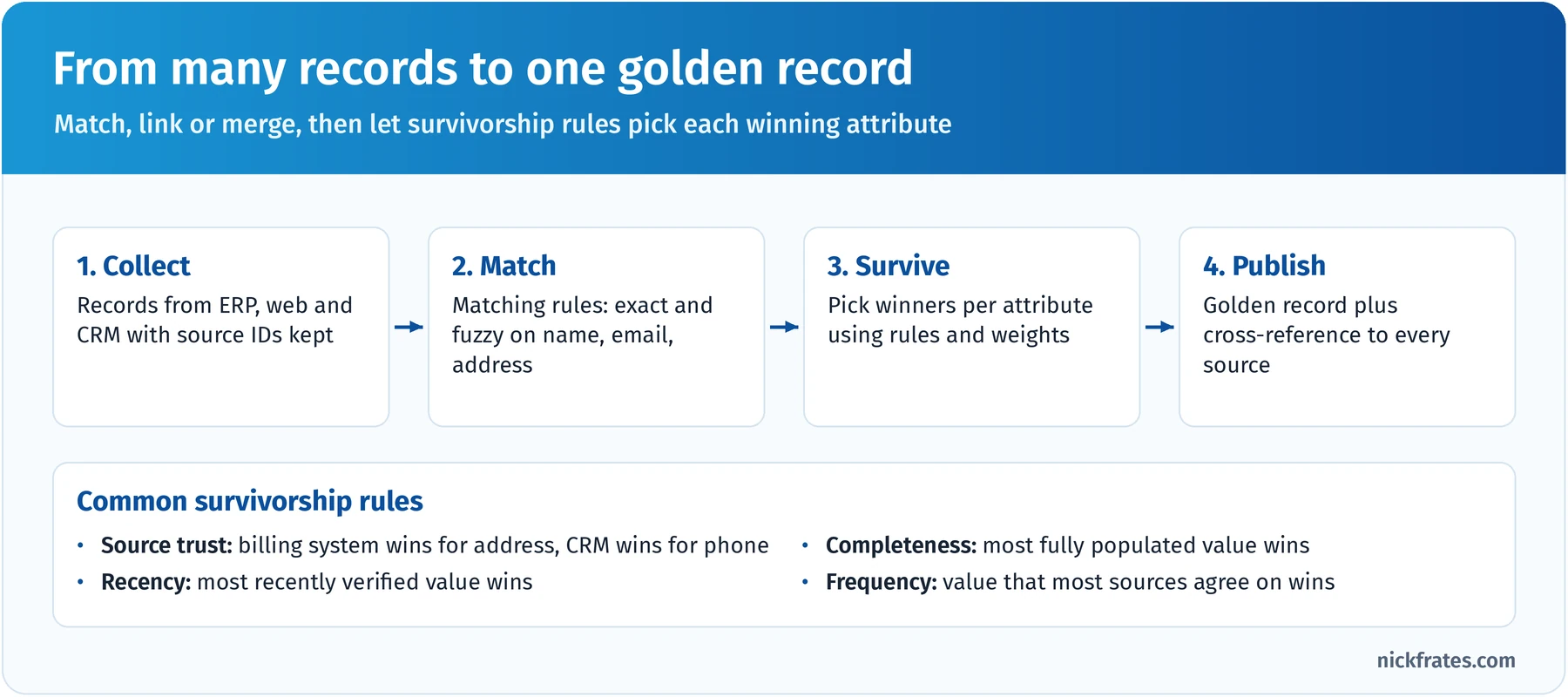
Survivorship works attribute by attribute, not record by record.
Reference data, canonical models and hierarchies. Three related ideas round out the section:
- External reference data (company registries, postal address services) enriches and validates master data and gives every system the same anchor for matching, like a D-U-N-S number.
- A canonical model is one system-neutral definition of an entity that every integration maps to, which cuts point-to-point mappings.
- Hierarchy management keeps parent-child structures (global parent, subsidiaries, sites) consistent. In Salesforce the Account Parent field models this; keep the hierarchy's source explicit so roll-ups don't drift.
Traceability. Be able to explain where every master value came from: keep the source system and source ID on each record, keep a cross-reference of merged IDs so other systems can still find a customer after a merge, and log which survivorship rule chose each value. Survivorship is per attribute, so the golden record can take its address from billing and its phone from CRM. Data 360 identity resolution follows the same idea with reconciliation rules such as last updated, most frequent and source priority.
Key takeaway: pick the MDM style from who must author the data, then make survivorship explicit per attribute and keep source IDs so every value is traceable.
Practice questions: Master Data Management
Question 1. A manufacturer has customer data in Salesforce, an ERP and an e-commerce platform. All three must keep creating and updating customers, but the business wants addresses and legal names to converge on the same values everywhere within a day. Which MDM style and supporting approach fit best?
- A. Registry style, with each system keeping its own values
- B. Centralized style, with only Salesforce allowed to create customers
- C. Consolidation style, with a read-only hub feeding a data warehouse
- D. Coexistence style, with survivorship rules per attribute in a hub that syncs the golden values back to all three systems
Answer: D. Coexistence lets several systems keep authoring while a hub reconciles them and pushes the winning values back, which matches "converge everywhere". Why not the others: registry only cross-references IDs, so values never converge (A); centralized stops the ERP and e-commerce platform from authoring, which the business doesn't want (B); consolidation creates a golden record for reporting but doesn't sync values back to sources (C).
Salesforce Data Management (25%)
The other joint-largest section. Data modeling asks how data should be shaped; this section asks how to run it: which licenses see which objects, how to keep data consistent as it arrives, how to show one customer whose data lives in many systems, and what to do with more than one org. The official objectives:
- Given a scenario, recommend the right combination of Salesforce license types to use standard and custom objects effectively.
- Given a scenario, recommend techniques to ensure data is persisted in a consistent manner.
- Given a scenario with multiple systems of interaction, describe techniques to represent a single view of the customer on the Salesforce Platform.
- Given a scenario, recommend a design to consolidate and/or leverage data from multiple Salesforce instances.
License types and object access. Licenses decide which objects a user can touch, so they shape your model. If you build a process on Opportunities and half the users have a license that can't see Opportunities, the design fails. The licenses that come up most:
| License | What it's for | Object access to remember |
|---|---|---|
| Salesforce (full CRM) | Internal CRM users | All standard CRM objects (Leads, Opportunities, Cases, Campaigns, Forecasts) plus custom objects |
| Salesforce Platform | Internal users of custom apps | Accounts, Contacts, reports, dashboards and custom apps; no Leads, Opportunities, Campaigns or Forecasts |
| Customer Community | High-volume external customers | Accounts, Contacts, Cases, Knowledge and custom objects; no roles, so access is via sharing sets |
| Customer Community Plus | External users needing roles and reports | Adds roles, sharing rules, reports and dashboards |
| Partner Community | Channel partners | Adds Leads, Opportunities and Campaigns, with partner roles |
| Salesforce Integration | System-to-system API users | API-only access; five are included in Enterprise, Unlimited and Performance Editions |
Entitlements vary by edition and contract, so check Salesforce Help's license comparison before committing. On the exam, the trick is usually spotting that a planned license can't see an object the design depends on; the fixes are a different license, a custom object for that audience, or an Experience Cloud site with the right external license.
Persisting data consistently. Consistent data is cheaper than cleaned data. Layer controls from the point of entry outward:
| Goal | Technique |
|---|---|
| Same values every time | Restricted picklists, global value sets, State and Country/Territory Picklists |
| Required business data present | Required fields, validation rules, dependent picklists |
| No duplicates at entry | Matching rules and duplicate rules (alert or block), including for API loads |
| No duplicates from integrations | Upsert on an External ID field marked Unique, so retries update instead of insert |
| Standard formats | Before-save record-triggered flows to normalize phone, casing and codes |
The integration rule I'd underline twice: every system that writes to Salesforce should upsert on an external ID. Loads become repeatable, retries don't create duplicates, and every record traces back to its source.
A single view of the customer with many systems of interaction. "Systems of interaction" are where customers engage: web, app, contact center, stores. The four broad patterns:
- Consolidate into Salesforce: copy data in, keyed by external IDs, when users act on it daily and need reporting, sharing and automation. Costs storage and sync jobs.
- Virtualize with Salesforce Connect: external objects read the source in real time (OData 2.0 and 4.0, cross-org, or a custom Apex adapter) when data is large or volatile and users look at a slice. Depends on source uptime; no sharing and limited reporting.
- Data 360 unified profile: ingest or federate many sources and let identity resolution build profiles for segmentation, insights and AI grounding. An engagement and analytics layer, not a transactional store.
- MDM hub plus integration: a hub masters customer data for many enterprise systems, not just Salesforce. The most cost, time and governance effort.
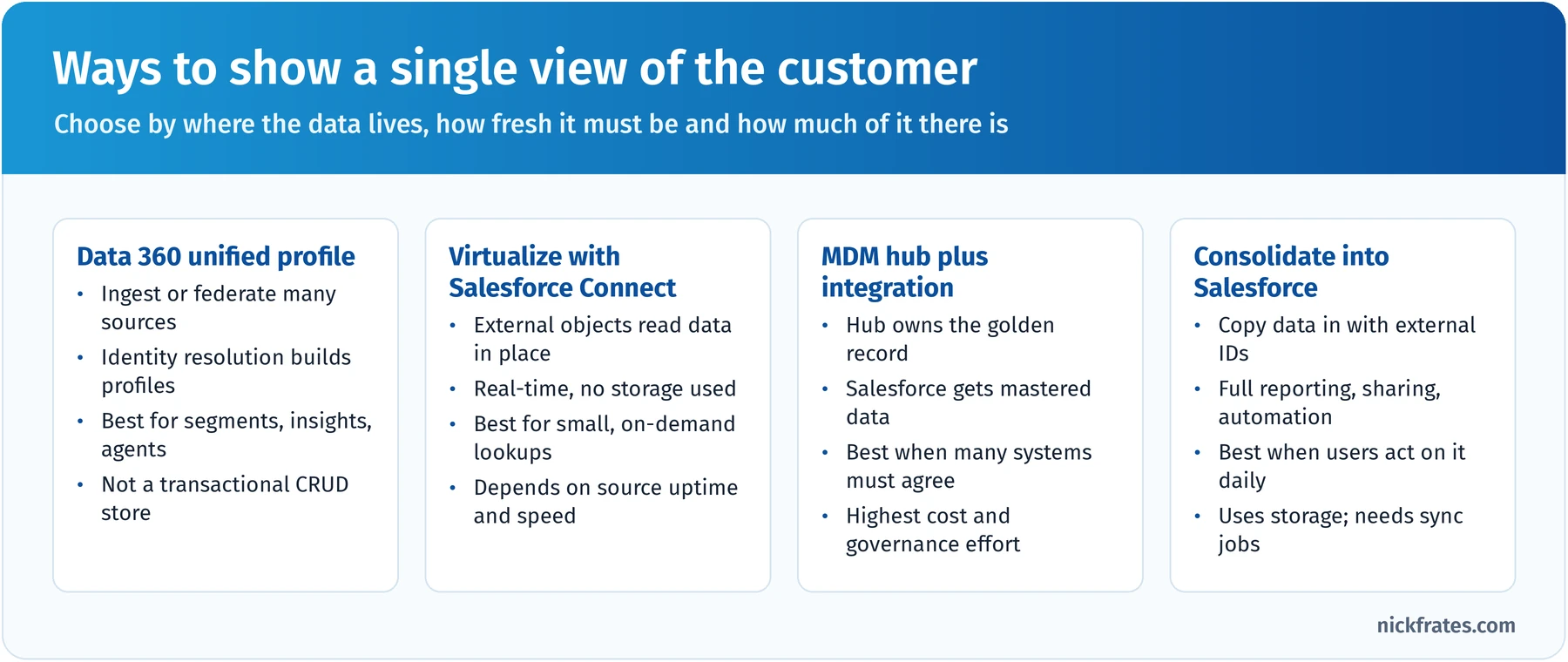
Choose by where data lives, how fresh it must be and how much of it there is.
To decide, ask how often users act on the data, how much there is and how fresh it must be. Order history glanced at weekly is a virtualization candidate; entitlements that drive routing every minute belong in Salesforce; clickstream from millions of visitors belongs in Data 360, with only the insight surfaced on the record.
Data from multiple Salesforce orgs. Companies end up with several orgs through acquisitions, regional autonomy or regulatory separation. The exam asks you to recommend whether to consolidate or connect, and how:
- Consolidate into one org when business units share customers and processes or leadership needs one global pipeline. It's a big migration, but it removes ongoing integration cost. Plan a merged data model, a global ID strategy, cross-org de-duplication and a sharing model that keeps units apart where needed.
- Hub-and-spoke integration through middleware such as MuleSoft when orgs must stay separate but share some objects. Name the system of record for each object and use a global identifier.
- Salesforce Connect cross-org adapter when users in one org occasionally need live records from another. Nothing is copied; each lookup is an API call against the other org, so it suits read-mostly, lower-volume access.
- Data 360 when the goal is unified profiles and analytics across orgs rather than one transactional system.
The legacy Salesforce to Salesforce feature still exists in some orgs, but new designs get far more control from middleware, Salesforce Connect or Data 360.
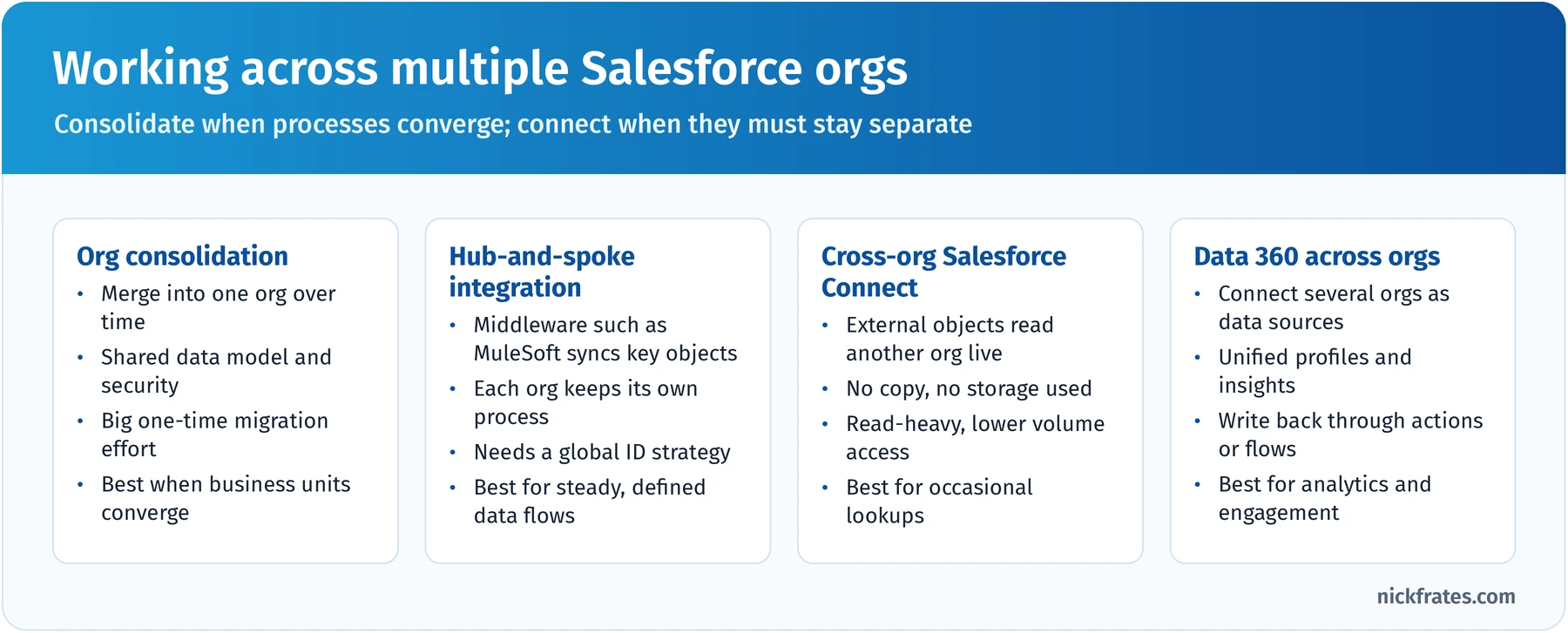
Consolidate when processes converge; connect when they must stay separate.
Key takeaway: check license access before you finalize a model, enforce consistency at entry and on every integration upsert, and pick single-view and multi-org patterns from how often users act on the data, how much of it there is and how fresh it must be.
Practice questions: Salesforce Data Management
Question 1. A company is rolling out a custom inventory app to 800 warehouse staff who need to view Accounts and work custom inventory objects. They never touch leads, opportunities or cases. Leadership wants the lowest-cost license that fits. What should the architect recommend?
- A. Salesforce Platform licenses, after confirming the app uses only Accounts, Contacts and custom objects
- B. Full Salesforce licenses for everyone, to be safe
- C. Customer Community licenses
- D. Salesforce Integration licenses
Answer: A. Salesforce Platform licenses are designed for internal users of custom apps who don't need CRM objects, and they include Accounts and Contacts. Why not the others: full CRM licenses work but cost more for no benefit (B); Customer Community licenses are for external users in an Experience Cloud site, not employees (C); Integration licenses are API-only and can't be used by people through a UI (D).
Question 2. An e-commerce platform sends new customers to Salesforce through an integration. When the network blips, the integration retries and creates duplicate contacts. What should the architect recommend first?
- A. A nightly batch job that merges duplicates
- B. A validation rule that blocks contacts without a phone number
- C. Store the e-commerce customer ID in a unique External ID field and have the integration upsert on it
- D. A duplicate rule that only alerts users
Answer: C. Upserting on a unique external ID makes the operation idempotent, so a retry updates the same record instead of creating a new one. Why not the others: nightly merging cleans up after the fact and loses data in between (A); a phone requirement doesn't stop retries from inserting twice (B); an alert-only duplicate rule doesn't block API inserts and depends on fuzzy matching (D).
Question 3. A utility's contact center agents need to see a customer's last 24 months of meter readings on the account page. The readings live in an operational database that already exposes an OData 4.0 endpoint, total several billion rows, and change every 15 minutes. Agents only look at one customer at a time. What should the architect recommend?
- A. Nightly copy of all readings into a custom object
- B. Salesforce Connect with an external object on the OData endpoint, related to Account with an indirect lookup on the customer number
- C. A custom big object loaded hourly
- D. Field history tracking on a Last Reading field
Answer: B. Virtualizing keeps billions of fast-changing rows in the source, shows current data on demand, and an indirect lookup relates external rows to the account by a shared business key. Why not the others: copying billions of rows nightly is costly and stale (A); a big object would still require continuous loading of huge volumes and custom UI (C); field history only tracks edits to one field on one record and isn't a reading store (D).
Question 4. After an acquisition, a company has two Salesforce orgs. Both sell to the same enterprise customers, leadership wants one global pipeline and one forecast, and the acquired team will adopt the parent company's sales process within a year. What should the architect recommend?
- A. Keep both orgs and use Salesforce to Salesforce to share opportunities
- B. Use the cross-org Salesforce Connect adapter so each org can view the other's opportunities
- C. Keep both orgs and build a weekly spreadsheet roll-up
- D. Plan a consolidation into a single org, with a global ID strategy and cross-org de-duplication of accounts
Answer: D. Shared customers, converging processes and a single forecast all point to consolidating into one org; the global IDs and de-duplication keep the migration clean. Why not the others: legacy record sharing between orgs doesn't give one pipeline or forecast (A); virtualization lets users look across orgs but doesn't create one forecast or process (B); spreadsheets aren't an architecture (C).
Data Governance (10%)
Six or so questions, in two areas: designing a data model that supports privacy regulation (GDPR is named explicitly), and designing an enterprise data governance program. The official objectives:
- Given a scenario, recommend an approach for designing a General Data Protection Regulation (GDPR) compliant data model, including options to identify, classify and protect personal and sensitive information.
- Compare and contrast approaches and considerations for designing and implementing an enterprise data governance program.
A note: I'm not a lawyer, and neither is the exam. It tests whether you know the Salesforce tools that support privacy obligations and can design for them; the customer's legal team decides what the obligations are.
A privacy-ready data model in four moves.
- Identify where personal data lives, including free-text fields, email messages, files, field history and integration staging objects.
- Classify it with the data classification fields: Compliance Categorization (PII, GDPR and others) and Data Sensitivity Level. Classification drives which protections apply.
- Protect it: least-privilege object and field-level security, a restrictive sharing model, Shield Platform Encryption for sensitive fields at rest, Data Mask for sandboxes, and Event Monitoring and Field Audit Trail to show who accessed or changed what.
- Record consent and preferences in a structured way so processes can respect them.
Consent and privacy objects. Salesforce provides a standard set of objects for privacy preferences, so you don't need to invent your own:
- Individual stores a person's data privacy preferences and links to their Lead, Contact, Person Account or User records. Its fields include preferences such as don't process, don't market, don't track, don't profile, forget this individual and export this individual's data.
- Contact Point objects (such as Contact Point Email and Contact Point Phone) store specific ways to reach a person.
- Contact Point Type Consent records consent for a channel type (email, phone) for a specific purpose, and Contact Point Consent records consent for a specific address or number.
- Data Use Purpose describes why you're using the data (marketing, billing, service), so consent can be tied to purpose.
Then design processes to check them: marketing that respects "don't market", integrations that exclude individuals flagged to forget, reports on consent by purpose.
Responding to data subject rights. GDPR gives individuals rights over their data. Map each to a design:
- Access and portability: know everywhere a person's data lives and export it in a structured format on request.
- Rectification: let stewards, or the person through a site, correct data, and sync corrections downstream.
- Erasure: a repeatable process to delete or anonymize records across objects, files, history and connected systems.
- Restriction and objection: flags on the Individual record that automation and marketing respect.
- Retention limits: retention rules per data category, with scheduled archiving or deletion.
Salesforce's Privacy Center can automate retention policies and right-to-be-forgotten requests if the customer licenses it; otherwise build the process with flows, Apex and Bulk API deletes. Either way, remember the copies in backups, sandboxes, exports, field history and downstream systems.
Encryption choices. Shield Platform Encryption offers probabilistic encryption (the default and strongest, but you can't filter on the field) and deterministic encryption (allows exact-match filtering, case-sensitive or case-insensitive). If users must filter on an encrypted field, choose deterministic; otherwise probabilistic is stronger. Test reports, formulas and integrations against encrypted fields before go-live. Classic Encryption is a separate, older feature: special encrypted custom text fields masked for users without permission to view them.
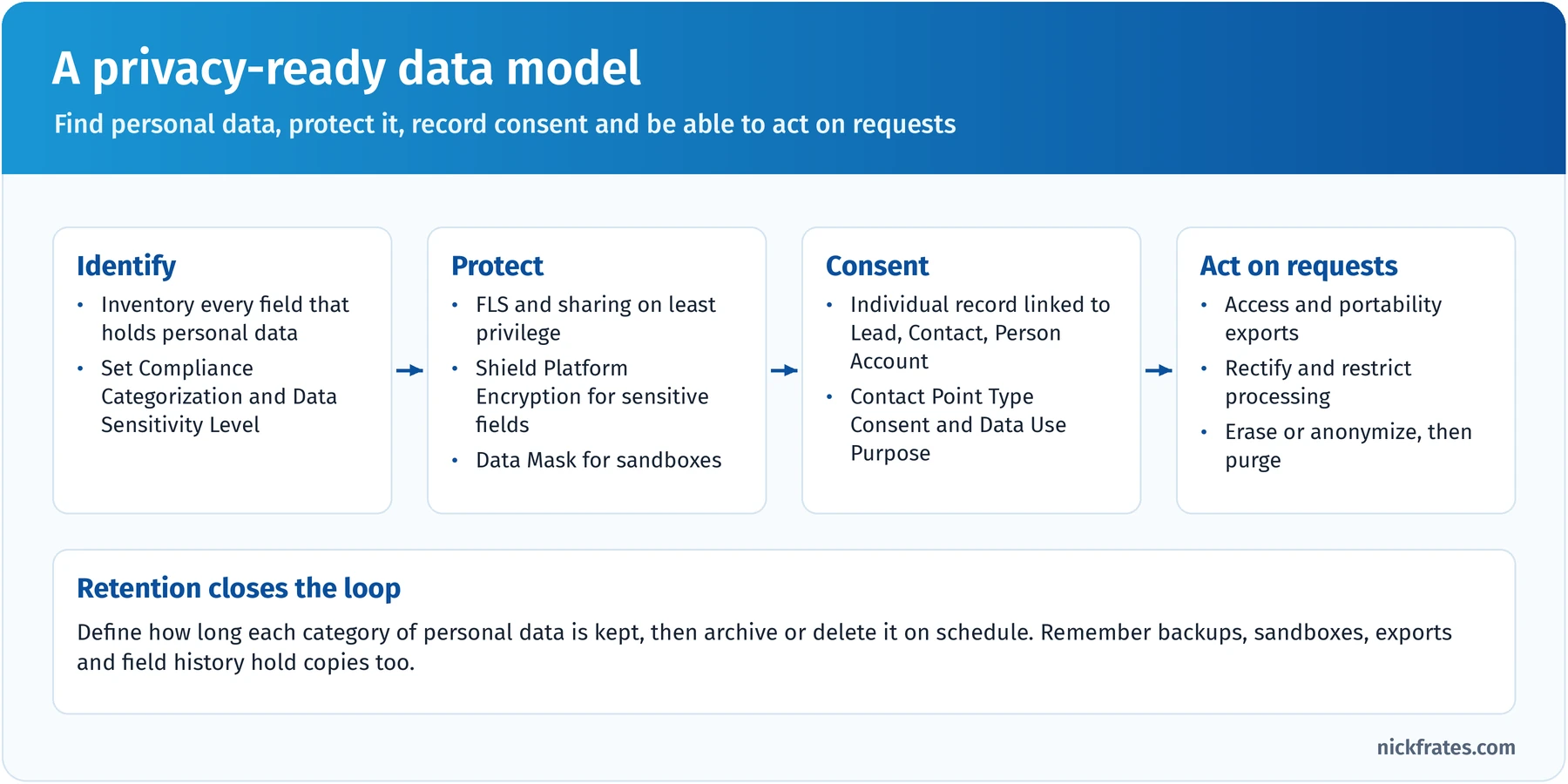
Find it, protect it, record consent, and be able to act on requests.
Designing an enterprise data governance program. Governance is the operating model that keeps data trustworthy after go-live. Questions here are about roles, models and measures.
- Data governance council: an executive sponsor and business leaders who set priorities, approve policies and settle disputes between domains.
- Data owners: accountable for a data domain (Customer, Product) and its definitions, quality targets and access decisions.
- Data stewards: responsible for day-to-day quality: monitoring dashboards, fixing records, running de-duplication and training users.
- Data custodians: admins and IT who implement the controls: validation, security, backups and integrations.
- Centralized: one team defines and enforces standards. Consistent and fast to decide, but a bottleneck far from business context.
- Decentralized (federated): each domain governs its own data. Close to the business, but definitions drift apart.
- Hybrid: central standards and tooling, with stewards in each domain. Balances consistency and ownership; needs clear decision rights.
A program needs policies and standards (naming, definitions, retention, classification), processes (change requests for new fields, stewardship workflows, escalation), measures (completeness, accuracy, duplicate rate, timeliness, tracked on a dashboard) and tooling (duplicate management, validation, classification, reporting). Start with the data that matters most, show quality improving, and grow from there.
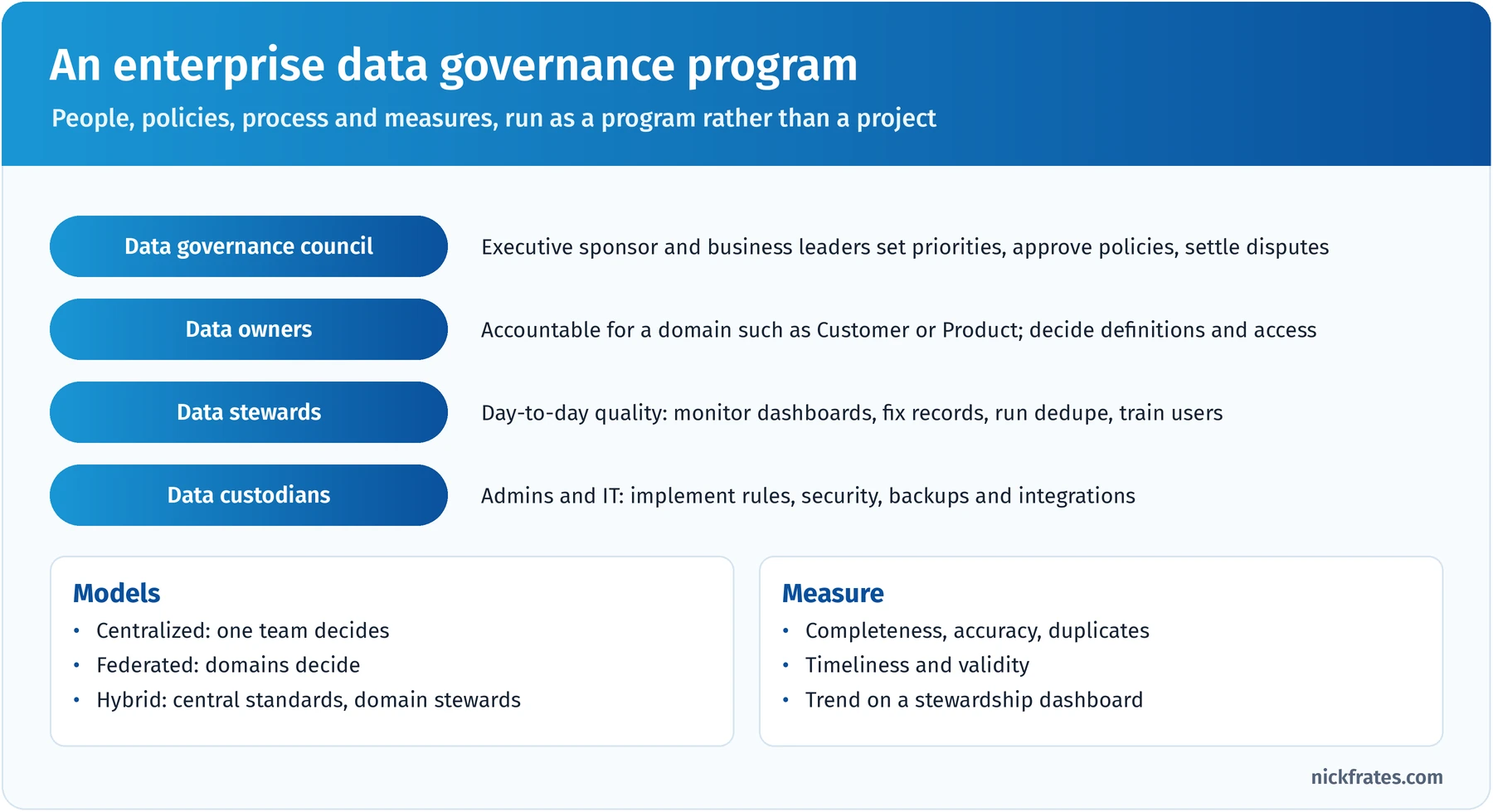
Governance is people, policy, process and measures, run continuously.
Key takeaway: for privacy, classify first, then protect, record consent in the standard objects and design a repeatable process for each data subject right; for governance, name owners and stewards, pick a model and measure quality over time.
Practice questions: Data Governance
Question 1. A European retailer wants marketing automation to stop contacting anyone who has withdrawn consent for promotional email, while still sending order confirmations to the same address. What should the architect recommend?
- A. A single "Do Not Contact" checkbox on Contact that blocks all email
- B. Delete the contact's email address when they withdraw consent
- C. Use the Individual object with Contact Point Type Consent records per channel and Data Use Purpose, and have marketing processes check consent for the promotional purpose
- D. Encrypt the email field with deterministic encryption
Answer: C. Consent tied to channel and purpose lets the business stop promotional email while still sending transactional messages, and processes can check it consistently. Why not the others: a single checkbox can't separate promotional from transactional purposes (A); deleting the email breaks order confirmations (B); encryption protects data at rest but says nothing about consent (D).
Question 2. A global company has strong central IT but complains that customer definitions differ by region and that nobody fixes bad records. Leadership wants consistency without moving every decision to headquarters. What governance approach should the architect recommend?
- A. A hybrid model: a central council sets standards and definitions, and named data stewards in each region own day-to-day quality, measured on a shared quality dashboard
- B. A fully centralized model where central IT edits all customer records
- C. A fully decentralized model where each region defines "customer" its own way
- D. A one-time data cleansing project before the next release
Answer: A. Hybrid governance gives consistent standards with regional ownership, which matches both complaints, and shared measures keep it honest. Why not the others: central IT editing every record creates a bottleneck far from business context (B); full decentralization causes the inconsistent definitions they already have (C); a one-time cleanse fixes today's data but not the process that degrades it (D).
Cert Lab by Nick Frates
Practise choosing the right data design
Exam questions describe a growing org and ask which design still works at scale. The Platform Data Architect Cert Lab drills those scenarios across every section, with an explanation for each option so you see why a design holds up or breaks.
Practise data architect questions, $9.99 →Large Data Volume Considerations (20%)
About 12 questions, and the section where hands-on experience pays off most. "Large data volume" has no official threshold; in practice it means objects with millions of records, tens of thousands of users or hundreds of gigabytes of data, where ordinary designs slow down. The official objectives:
- Given a scenario, design a data model that scales considering LDV and solution performance.
- Given a scenario, recommend a data archiving and purging plan that is optimal for the customer's data storage management needs.
- Given a scenario, decide when to use virtualized data and describe virtualized data options.
Why LDV changes the rules. Salesforce is multitenant, and a cost-based query optimizer decides how to run each query using statistics about your data. When filters can use an index, queries are fast at any size; when they can't, Salesforce scans, and at 20 million rows a scan is slow. Most LDV advice boils down to three habits: don't design queries that need scans, keep hot data small, and avoid contention when you write.
Selective queries and indexes. A filter is selective when it narrows results enough that an index beats a scan. Salesforce maintains standard indexes on fields such as the record ID, Name, CreatedDate, SystemModstamp, RecordTypeId, Division, Email on contacts and leads, and every lookup and master-detail field; External ID and unique fields are indexed automatically. You can add custom indexes on most other fields (not long or rich text areas, non-deterministic formulas or encrypted text) by contacting Customer Support or deploying custom index metadata.
The optimizer's thresholds, from Salesforce's LDV best practices guide:
| Index type | Used when the filter matches fewer than | Example |
|---|---|---|
| Standard index | 30% of the first million records and 15% of records beyond that | 2 million rows: up to 450,000 matches |
| Custom index | 10% of the first million records and 5% of records beyond that | 5 million rows: up to 300,000 matches |
Older study material also quotes hard caps (1 million and 333,333 records); the current guide frames selectivity only in the percentages above, so learn those. A few more rules that show up in scenarios:
- AND conditions use indexes unless one of them returns more than 20% of the records; OR uses indexes only if every field in the OR is indexed and they don't all return more than 10%.
- By default, index tables don't include null values, so filters like Region__c = null can't use the index unless Support enables null indexing.
- Negative filters (!=, NOT IN, EXCLUDES), leading wildcards (LIKE '%smith') and comparisons on non-deterministic formulas (cross-object references, TODAY(), NOW()) generally aren't selective.
- Two-column custom indexes help when you filter on one field and sort by another, like a list view filtered by State and sorted by City.
- The Developer Console's Query Plan tool shows whether a query can use an index.
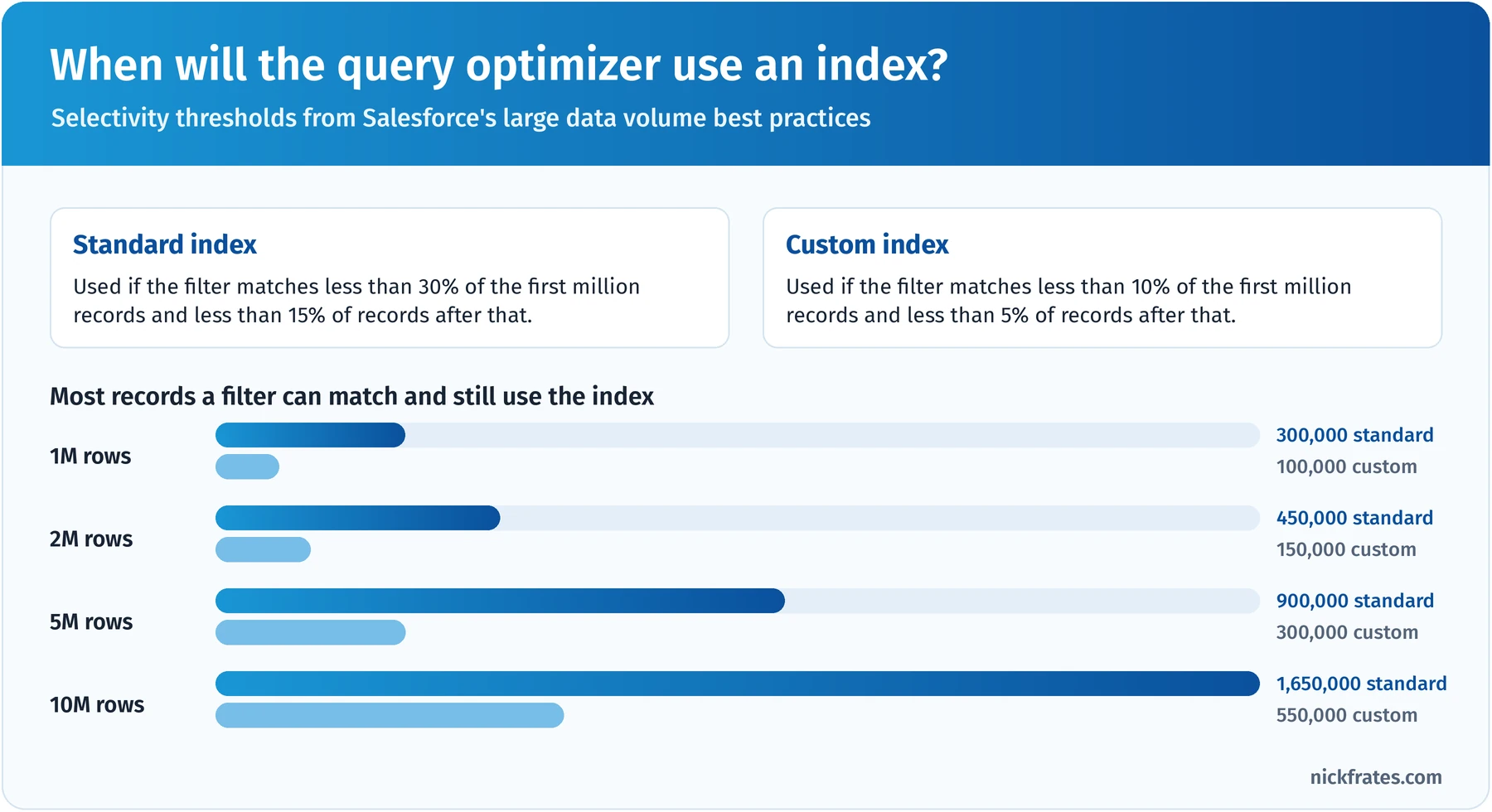
Selectivity is a percentage game; filters that match too much of the table won't use the index.
Skinny tables. Salesforce stores standard and custom fields in separate tables, so queries using both need a join. A skinny table combines frequently used fields from one object and omits soft-deleted records, speeding up reports, list views and SOQL on very large objects. Know these facts:
- Created only by Salesforce Customer Support; you can't create or modify them yourself, and they're used automatically.
- Available for custom objects and for Account, Contact, Opportunity, Lead and Case.
- Up to 200 columns, and only fields from one object (no fields from related objects).
- Kept in sync automatically when source data changes; copied to Full sandboxes only (other sandbox types need a Support request).
- They help read performance only, and adding a field to a tuned report means another Support request.
Divisions partition a very large org's data (US, EMEA, APAC) so searches, list views and reports default to a smaller slice. Support enables them, and the LDV guide requires more than one million records in a single object and more than 35 licenses. They partition; they don't secure.
Sharing at scale. Use Public Read Only or Public Read/Write org-wide defaults where the business allows, since private models create sharing rows to maintain. Defer sharing calculations (enabled by Support) suspends sharing rule and group membership recalculation during large changes so it runs once at the end, and granular locking, on by default, lets group membership operations run concurrently.
Designing a model that scales. Put together, an LDV-friendly design looks like this:
| Problem | Best-fit technique | Why |
|---|---|---|
| List views and reports time out on a 30M-row object | Selective filters on indexed fields; custom or two-column index; skinny table for the hottest report | Lets the optimizer avoid full scans and joins |
| Lock errors during nightly loads | Remove skew; sort children by parent; reduce concurrency for the affected batches | Fewer jobs fight for the same parent lock |
| Owner change takes hours | Spread ownership; skewed owners get no role; defer sharing calculations for the change | Shrinks sharing recalculation |
| Storage keeps growing with closed records | Archive to big objects or off-platform; purge per policy | Keeps the hot tables small |
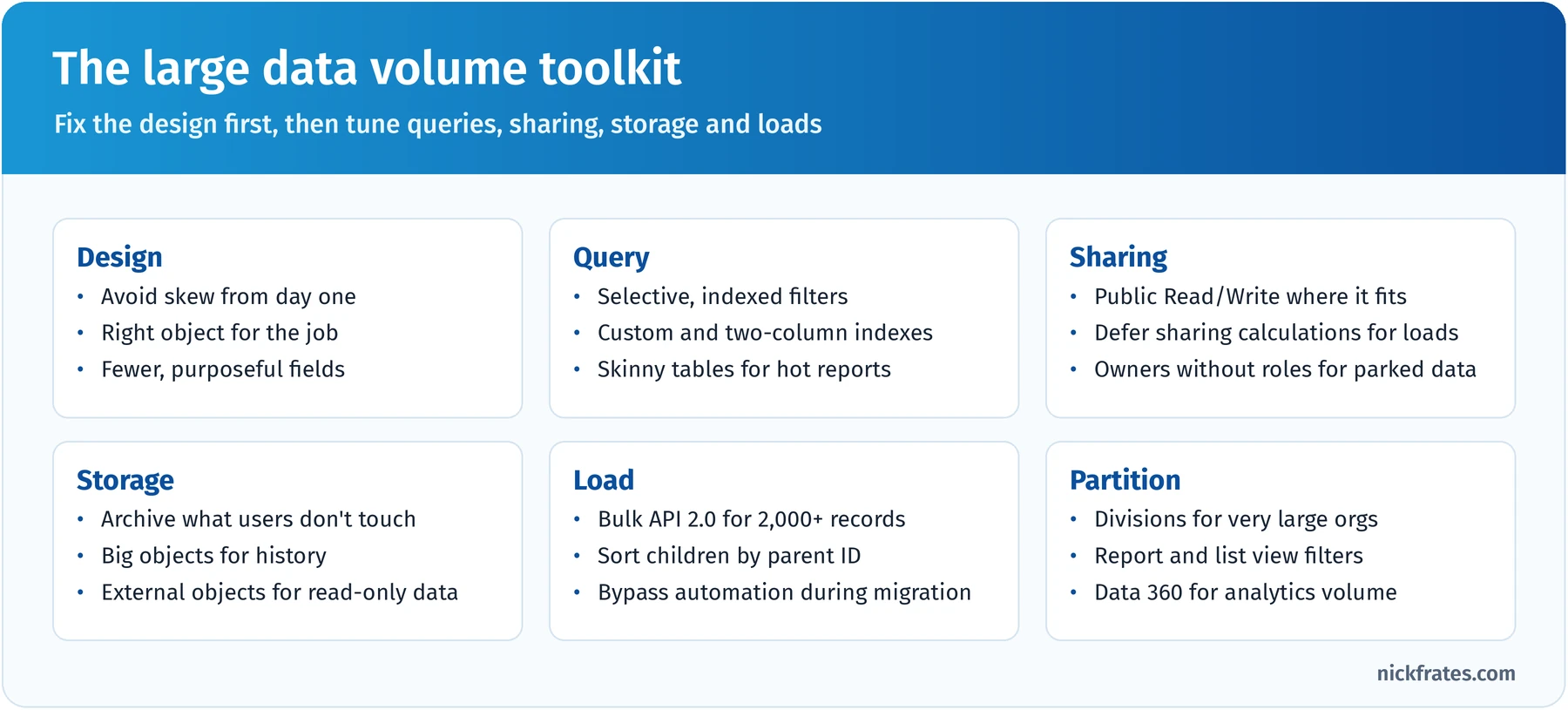
Fix the design first, then tune queries, sharing, storage and loads.
Archiving and purging. The fastest record is the one that isn't in the table. Start with a retention policy per object, agreed with the data owner and legal, then pick tiers:
| Tier | Option | Good for | Trade-off |
|---|---|---|---|
| Hot | Standard and custom objects | Open and recent records users work daily | Most expensive storage; affects performance as it grows |
| Warm, on platform | Custom big objects, or the Salesforce Archive product | Years of history that must stay queryable in Salesforce | Big objects need custom UI and index-based queries; no encryption |
| Cold, off platform | Data warehouse, data lake or Heroku Postgres, optionally surfaced with Salesforce Connect | Rarely accessed history, analytics | Data leaves the platform; access depends on the external system |
| Purge | Hard delete with Bulk API or Bulk API 2.0 | Data past its retention period | Irreversible; must be proven and logged |
For large deletes (about a million records or more), Salesforce recommends the Bulk API hard delete option, which needs the Bulk API Hard Delete permission, and deleting children before parents. Soft-deleted records sit in the Recycle Bin for 15 days. For history, standard field history tracking covers up to 20 fields per object for 18 to 24 months, while Field Audit Trail tracks up to 200 fields per object in the FieldHistoryArchive big object until you delete it.
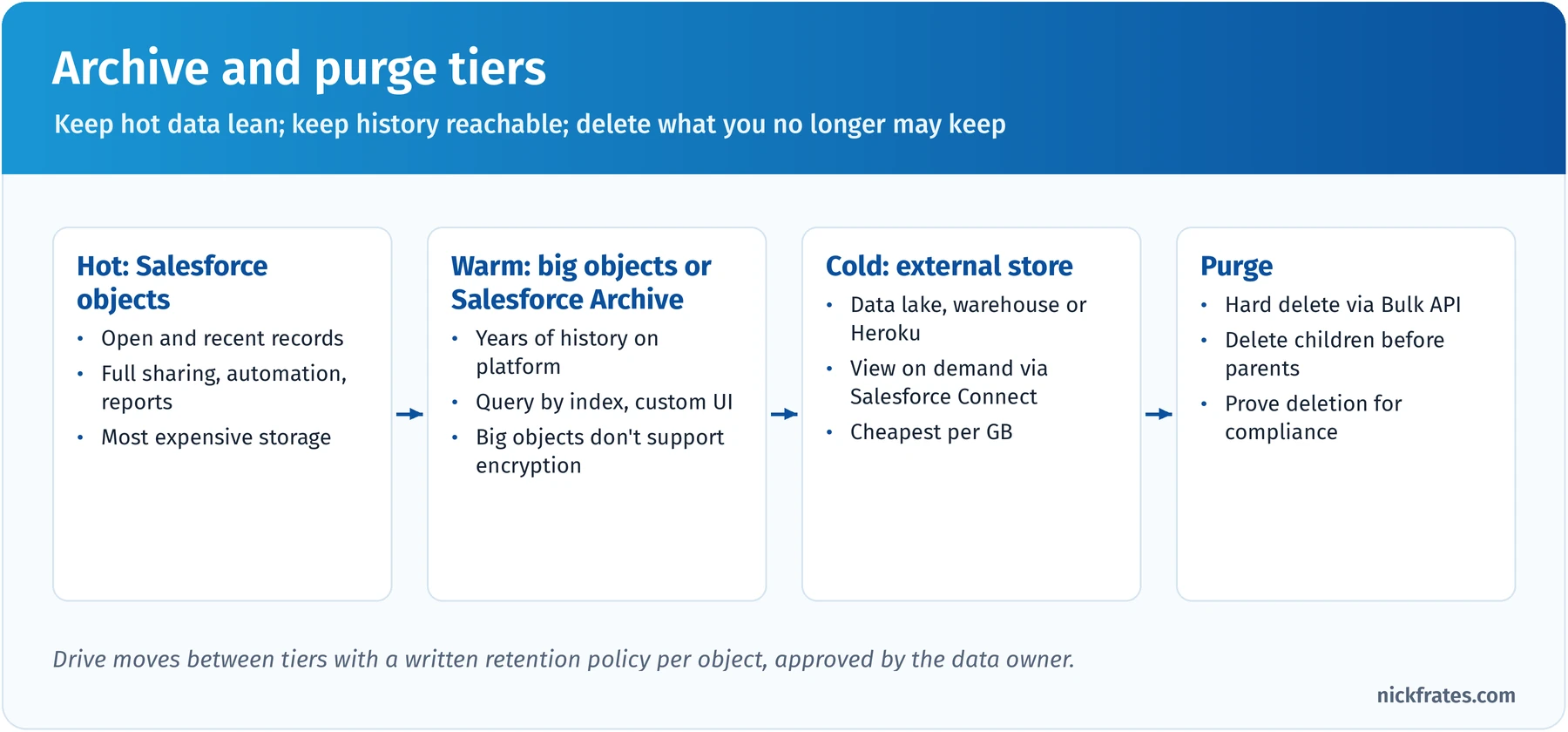
Keep hot data lean, keep history reachable and delete what you may no longer keep.
Virtualized data. Salesforce Connect maps external data to external objects (API names ending in __x) that appear in list views, record pages, related lists and SOQL without storing data in Salesforce. Adapters cover OData 2.0, 4.0 and 4.01, cross-org access to other Salesforce orgs, and custom adapters built with the Apex Connector Framework. Data 360 can also federate external data without copying it. Every lookup is a live callout, so performance depends on the source.
Use virtualization when data is large, changes often or must stay in the source, and users need a small slice at a time. Avoid it when users must report heavily across it, automate on it, share it by role or work while the source is down.
Key takeaway: in LDV questions, look for the root cause (non-selective filter, skew, sharing recalculation, too much hot data) and pick the technique that removes it; skinny tables and indexes speed reads, skew fixes and deferred sharing speed writes, and archiving and virtualization keep the hot store small.
Practice questions: Large Data Volume Considerations
Question 1. A support org has 45 million Case records. A list view that shows open cases filtered on a custom checkbox "Is_Escalated__c = true" and sorted by created date has become very slow. About 2% of cases are escalated. What should the architect do first?
- A. Ask Salesforce Customer Support for a skinny table containing every Case field
- B. Check the query plan, then request a custom index on the escalation field (or a two-column index with created date), since a 2% match is selective
- C. Archive all cases older than 30 days
- D. Change the Case org-wide default to Public Read/Write
Answer: B. The filter matches well under the custom-index threshold, so an index (or a two-column index matching filter and sort) lets the optimizer avoid a scan; the query plan confirms it. Why not the others: a skinny table is limited to 200 columns and is only worth it for a specific hot query, not "every field" (A); archiving recent cases breaks support work and doesn't address the filter (C); sharing defaults affect visibility calculations, not this filter's selectivity (D).
Question 2. A dashboard component filters Opportunities on a formula field that returns true when CloseDate is within the next 30 days. On 12 million opportunities it times out. What should the architect recommend?
- A. Request a custom index on the formula field
- B. Add more dashboard filters
- C. Move opportunities to a big object
- D. Filter directly on CloseDate with a date literal (CloseDate = NEXT_N_DAYS:30) and, if the query plan still shows a scan, ask Customer Support for a custom index on CloseDate
Answer: D. A formula using TODAY() is non-deterministic and can't be indexed, but a direct date-range filter on a real field can use an index (Support can add custom indexes to standard fields like CloseDate), and a 30-day window is a small slice of 12 million rows. Why not the others: non-deterministic formulas can't take a custom index (A); extra filters don't help if the main filter still can't use an index (B); opportunities need transactional features big objects lack (C).
Question 3. A telecom company must keep call detail records for seven years for regulators, but agents only use the last 90 days. The records now consume most of the org's data storage, and regulators need occasional lookups by account and date. What should the architect recommend?
- A. Keep 90 days in a custom object, move older records to a custom big object indexed by account and date with a simple lookup component, and purge records older than seven years
- B. Buy more data storage and keep everything in the custom object
- C. Delete records older than 90 days
- D. Turn on field history tracking for all call fields
Answer: A. A hot/warm split keeps the transactional object small, keeps history queryable on platform by the keys regulators use, and the retention policy drives purging. Why not the others: buying storage hides the cost and performance problem (B); deleting history breaks the seven-year obligation (C); field history tracks edits, not call records (D).
Question 4. Insurance agents need to view policy details on Account records. The policy system holds 80 million policies, updates continuously, exposes an OData 4.0 service and must remain the system of record. Agents view a few policies per call and never edit them in Salesforce. Which approach is best?
- A. Nightly Bulk API load of all policies into a custom object
- B. A custom big object with hourly loads
- C. External objects through Salesforce Connect's OData 4.0 adapter, related to Account with an external or indirect lookup
- D. A Data Export from the policy system emailed to agents weekly
Answer: C. Virtualizing keeps 80 million continuously changing records in the system of record and shows current data on demand, which is exactly the read-only, small-slice pattern Salesforce Connect suits. Why not the others: nightly copies are stale and expensive in storage (A); big objects still require constant loading and custom UI (B); weekly emailed files are stale and insecure (D).
Data Migration (15%)
About nine questions on getting data into Salesforce cleanly and quickly, and getting it out again. The official objectives:
- Given a scenario, recommend techniques and methods for ensuring high data quality at load time.
- Compare and contrast techniques for improving performance when migrating LDVs into Salesforce.
- Compare and contrast techniques and considerations for exporting data from Salesforce.
Quality at load time. The cheapest place to fix data is before it reaches Salesforce:
- Profile every source: counts, null rates, value distributions, formats and duplicates.
- Cleanse and de-duplicate in staging using agreed survivorship rules, and fix orphaned references.
- Map and transform: fields, picklist values, record types, owners (including inactive users) and an External ID with the legacy key on every object.
- Load parents first so children can reference them by external ID: users, accounts, contacts, products and price books, opportunities, cases, then activities and files.
- Validate counts and sums per object, spot-check with business users and reprocess failed rows.
- Reconcile and sign off with data owners before cutover.
During the load itself, protect quality with validation rules and required fields that guard integrity (bypass the ones built for user entry), restricted picklists that reject bad values, a deliberate decision on whether duplicate rules run (you may have de-duplicated in staging), and upsert by external ID so the load can safely re-run. If the business needs historical audit values, enable Set Audit Fields upon Record Creation so the load user can set CreatedDate, CreatedById, LastModifiedDate and LastModifiedById on insert.
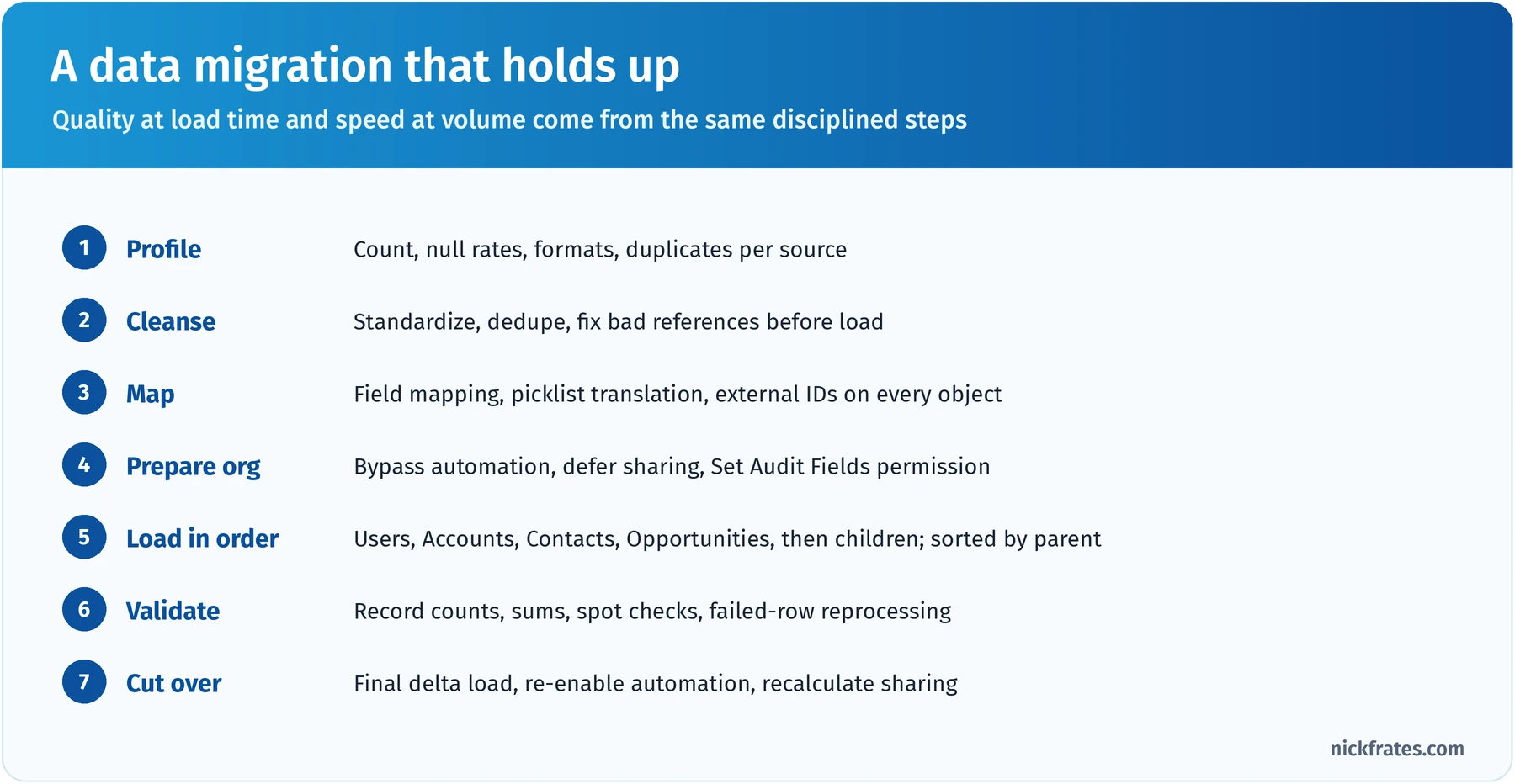
Quality at load time and speed at volume come from the same disciplined steps.
Choosing a loading tool.
| Tool | Volume | Use it for |
|---|---|---|
| Data Import Wizard | Up to 50,000 records | Simple admin imports of accounts, contacts, leads, campaign members and custom objects, with built-in duplicate checks |
| Data Loader | Up to 150 million records per file with Bulk API 2.0 | Larger or repeatable loads, any object, exports, hard deletes, command-line automation |
| Bulk API 2.0 | Any operation over about 2,000 records | Programmatic and ETL loads; Salesforce creates and manages batches for you |
| Bulk API (1.0) | Large loads that need manual batch control | Serial mode to reduce lock contention; PK chunking for very large queries |
| REST, SOAP or Composite API | Under about 2,000 records | Real-time and small synchronous operations |
| ETL or integration platforms (MuleSoft and partners) | Any | Complex transformations, orchestration, multiple sources, repeatable pipelines |
Bulk API 2.0 limits worth knowing: up to 150 million records per rolling 24 hours (shared batch allocation of 15,000 batches with Bulk API 1.0), and each ingest job's upload can be up to 150 MB of base64-encoded content, so keep raw CSV files at 100 MB or less.
Performance when migrating large volumes. The LDV migration questions are mostly about removing work Salesforce would otherwise do on every row:
- Bypass automation you don't need during the load: flows, triggers and validation rules designed for user entry. A common pattern is a custom permission or custom setting that the automation checks, assigned only to the migration user. (Workflow Rules and Process Builder reached end of support on December 31, 2025, so modern orgs mostly bypass flows and triggers.)
- Defer sharing calculations during the load and recalculate once at the end, or load with a more open org-wide default and tighten it afterward, accepting a one-time recalculation.
- Sort child records by parent ID so each batch touches as few parents as possible. If lock errors persist, run the affected job in Bulk API 1.0 serial mode; Bulk API 2.0 manages batching itself and has no serial option.
- Prefer insert to upsert for the first full load (upsert must look up each external ID); use upsert for deltas and re-runs.
- Load in parallel only when parents differ, and start with large batches, reducing size only if batches time out.
- Turn off notification emails and assignment rules for the load.
Exporting data from Salesforce. Exports come up for backups, analytics feeds, migrations to other systems and data subject requests.
| Option | What it does | Consider |
|---|---|---|
| Data Export service | Weekly (Enterprise, Performance, Unlimited) or monthly backup files of all data, as CSV in ZIP files | Manual exports every 7 or 29 days; files are only available for a limited time; not a restore tool |
| Data Loader export / export all | Query-based CSV export of an object; "export all" includes soft-deleted and archived records | Good for targeted or repeatable exports |
| Bulk API query (with PK chunking on Bulk API 1.0) | Splits very large exports into chunks by record ID | The right choice for tens of millions of rows; Bulk API 2.0 query handles chunking itself |
| Salesforce Backup or partner backup tools | Scheduled backups with point-in-time restore | When the requirement is recovery, not just a copy |
Every export is a copy of possibly personal data, so it needs the same governance as the source: access control, encryption, retention and deletion.
Key takeaway: quality comes from profiling, cleansing and upserting by external ID before and during the load; speed comes from removing per-row work (automation, sharing, locking); and exports need the right tool for the volume plus the same governance as the data itself.
Practice questions: Data Migration
Question 1. A company is migrating 40 million activity records into Salesforce. Test loads fail with "unable to lock row" errors because many activities belong to the same few accounts, and loads run in parallel. What should the architect recommend first?
- A. Load the activities with the Data Import Wizard
- B. Add more validation rules to catch bad rows earlier
- C. Split the file into more, smaller batches and keep loading in parallel
- D. Sort the activities by their parent record so each batch touches as few parents as possible, and use serial processing for the batches that still collide
Answer: D. Lock errors come from parallel batches updating the same parents; grouping children by parent and serializing the remaining collisions removes the contention. Why not the others: the Data Import Wizard is limited to 50,000 records (A); validation rules add work and don't address locking (B); more parallel batches make collisions more likely (C).
Question 2. Before go-live, the business insists that migrated cases keep their original created dates and creators from the legacy system for SLA reporting. What should the architect do?
- A. Store the original dates in custom fields only and accept the load date as CreatedDate
- B. Enable Set Audit Fields upon Record Creation and grant it to the migration user, then populate CreatedDate and CreatedById on insert
- C. Update CreatedDate with a flow after the records are loaded
- D. Ask Salesforce Customer Support to change the dates after the load
Answer: B. That permission is the supported way to set audit fields, and it works only on insert, which is exactly the migration case. Why not the others: custom fields work as a fallback but don't meet the stated requirement and break standard SLA reporting on CreatedDate (A); audit fields can't be updated after creation by flows (C); this isn't a standard Support request, and the supported permission already exists for exactly this need (D).
Question 3. A retailer must export 120 million order line records from Salesforce every quarter to its data warehouse. The current Data Loader export fails partway through. What should the architect recommend?
- A. Use the Bulk API to query the object, with PK chunking (or Bulk API 2.0, which chunks automatically), and load the results into the warehouse
- B. Run the weekly Data Export service and copy the order lines file
- C. Export the records from a report
- D. Use Salesforce Connect so the warehouse reads Salesforce in real time
Answer: A. Bulk queries split huge extracts into manageable chunks by record ID and are built for this volume. Why not the others: Data Export is a backup service with limited scheduling and short file availability, not a dependable feed (B); report exports are for small user-level extracts (C); Salesforce Connect brings external data into Salesforce, not the other way around (D).
Deep dive: where should the data live?
If I had to name the single skill that ties this exam together, it's deciding where each kind of data should live. Get that right and most LDV, governance and migration problems get smaller. Get it wrong and no index or skinny table will save you. Here's the order of questions I ask in real designs:
- Will users create, edit, share and automate on it every day? Then it belongs in standard or custom objects, with a relationship design that fits the sharing model.
- Is it billions of append-only rows that people read by a known key? Then a custom big object, with the index designed around that key.
- Does it already live in another system that must stay the system of record, and do users only need to look at a slice? Then an external object through Salesforce Connect.
- Do many sources need to be unified for segmentation, insights or AI grounding? Then Data 360, surfacing results on the record.
- Is it only needed for compliance or rare look-backs? Then archive it to a warm or cold tier, and purge it on schedule.
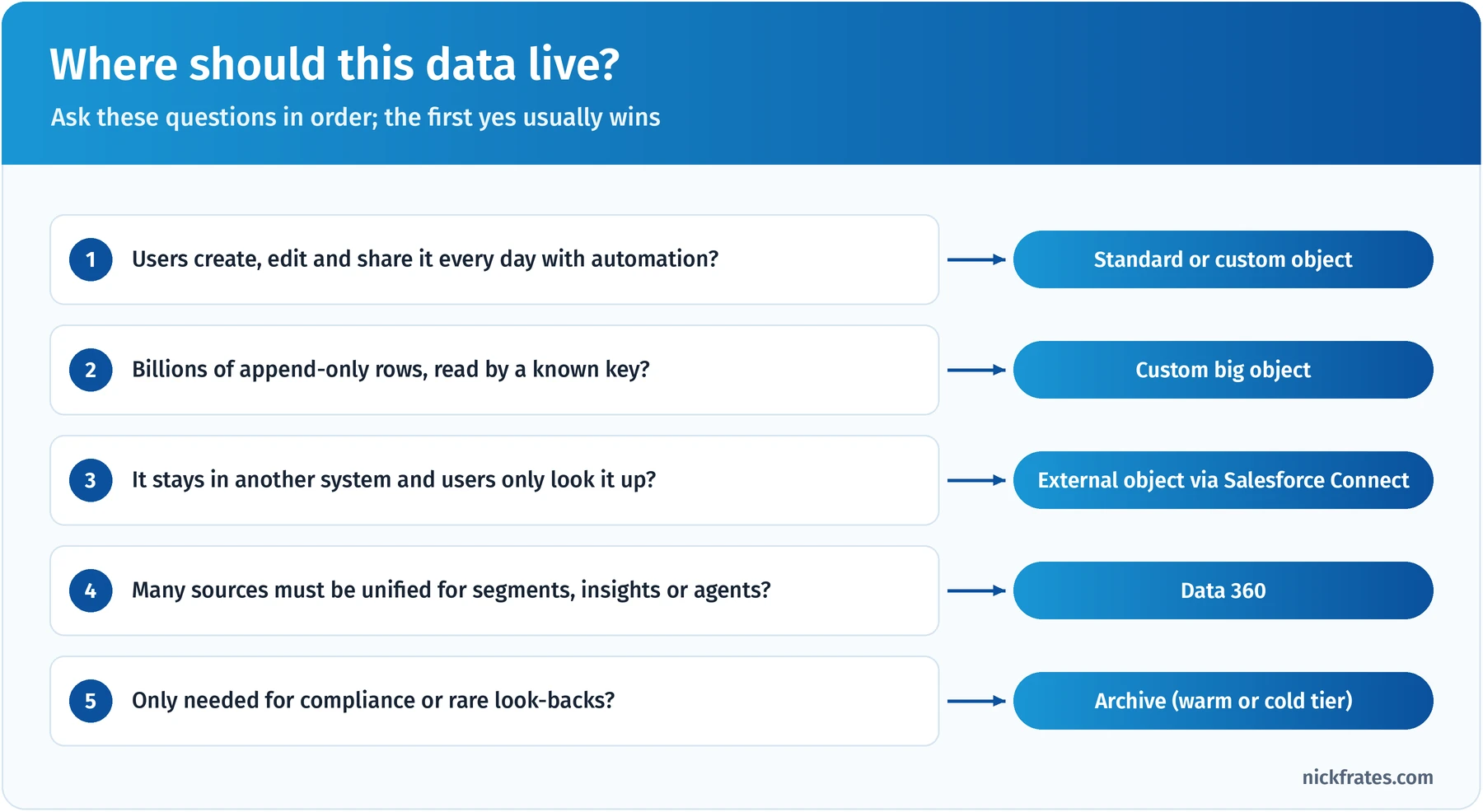
Ask the questions in order; the first yes usually wins.
The questions are in this order on purpose. Transactional needs trump everything: if people must edit and share it, it has to be a regular object, even if it's large, and then you manage the volume with LDV techniques. Here are the design decisions I see most often, with the reasoning and the trade-off:
| Decision | Usually choose | Because | Trade-off to accept |
|---|---|---|---|
| Child visibility should follow the parent | Master-detail | No extra sharing rows; roll-ups included | Child can't have its own owner or sharing |
| Integration keys | External ID (unique) on every integrated object | Idempotent upserts, traceability, indexed lookups | One more field to govern per source |
| High-volume event history | Custom big object | Scale and cheap storage on platform | No sharing, triggers or standard reports |
| Reference data that rarely changes (countries, tiers) | Picklists or custom metadata, not lookups to records | Avoids lookup skew and extra storage | Less flexible for admins than records |
| Parked or unassigned records | Distribute across several placeholder parents and owners without roles | Avoids parent-child and ownership skew | Slightly more admin to explain |
| Old closed records | Archive per retention policy | Keeps hot tables small and storage costs down | Archived data needs its own access path |
Two habits make these decisions stick. First, write the decision down with the reason and the trade-off, in the data dictionary or an architecture decision record, so the next architect understands it. Second, revisit it when volumes change. A design that's perfect at 2 million rows may need an archive tier at 50 million.
Worked example: a data architecture for a growing service company
Let's put the sections together on one fictional company. Brightwater Home Services installs and repairs heating, cooling and plumbing systems for homeowners in the United States and Ireland. Here's what they bring to the first workshop:
- About 3.5 million residential customers, currently in a legacy CRM, plus 400,000 customers from a recently acquired competitor that runs its own Salesforce org.
- 80 million historical service visits going back 12 years. Technicians and agents only use the last three years day to day, but warranty claims occasionally need older visits.
- 2 billion smart-thermostat readings a year in a cloud data lake. Agents want to see a customer's recent readings during a call.
- Customer addresses in the billing system are the most reliable; phone numbers in the CRM are the most current.
- Irish customers fall under GDPR, and marketing wants to send promotional offers only to customers who agreed.
- The go-live window for the migration is a single weekend.
Step 1: model the core. Brightwater sells to individuals (commercial work is under 2% of revenue), so I'd recommend person accounts. Service visits become a custom Service_Visit__c object in a master-detail relationship to a custom Property__c object, since a person can own several homes and visit visibility should follow the property. Every migrated object gets an External ID for the legacy key and a Source_System__c field for lineage. Equipment uses the standard Asset object.
Step 2: decide where each dataset lives.
| Dataset | Decision | Reason |
|---|---|---|
| Customers, properties, assets | Standard and custom objects | Edited and shared daily; drives service and marketing |
| Last three years of visits (about 20 million) | Custom object | Agents and technicians work them; reports and automation needed |
| Visits older than three years (about 60 million) | Custom big object indexed by Property ID, then visit date | Warranty lookups by a known key; storage cost |
| Thermostat readings | Stay in the data lake; surface a recent-readings view through Salesforce Connect, or summarized insights through Data 360 | Huge, constantly changing and only glanced at |
| Acquired org's customers | Migrate into the main org (one service process within a year) | Shared processes and one customer view |
Step 3: master the customer. The two CRMs and billing overlap, including about 30,000 customers in both orgs. In staging, the team matches on normalized name, email, phone and address. Survivorship is per attribute: billing wins for address (source trust), CRM wins for phone (recency), the most complete value wins elsewhere. High-confidence matches merge automatically; borderline ones go to a steward queue. A cross-reference keeps every legacy ID mapped to the surviving Salesforce ID, and matching and duplicate rules keep new duplicates out.
Step 4: build governance in. Personal-data fields get Compliance Categorization and Data Sensitivity Level values. Irish customers get an Individual record with Contact Point Type Consent for email by Data Use Purpose (promotional versus service), and marketing checks consent before sending. A customer data owner and two stewards (one per country) own the quality dashboard.
Step 5: plan the weekend migration. Profiling and cleansing happen weeks before. On the weekend: freeze the legacy systems, bypass flows and triggers for the migration user, defer sharing calculations, and load in order: users, person accounts, properties, assets, recent visits sorted by property, then big object history. Use Bulk API 2.0 through the ETL tool, upserting by external ID for the delta. Validate counts and sums, spot-check with service managers, re-enable automation, recalculate sharing and go live.
Practice questions: worked example
Question 1. Brightwater's agents report that the account page takes too long when it shows a related list of every service visit going back 12 years. Warranty staff still need the old visits occasionally. Which change best fits the design?
- A. Ask Customer Support for a skinny table on Service_Visit__c
- B. Delete visits older than three years
- C. Keep three years of visits in the custom object, move older visits to the custom big object indexed by property and date, and give warranty staff a lookup component for history
- D. Convert Service_Visit__c to an external object
Answer: C. The hot/warm split keeps the transactional object and related lists small while keeping history queryable by the key warranty staff use. Why not the others: a skinny table can speed some reads but doesn't shrink the related list or storage (A); deleting history breaks warranty needs (B); visits are created and edited in Salesforce, so they can't be external (D).
Question 2. During matching, Brightwater finds that the billing system and the legacy CRM often disagree on addresses and phone numbers for the same customer. Which approach should the architect recommend?
- A. Define survivorship per attribute: billing wins for address, CRM wins for phone by recency, and keep the cross-reference of source IDs
- B. Always keep the record from the system that created the customer first
- C. Keep both values in two sets of fields on the account
- D. Ask agents to fix conflicts as they find them
Answer: A. Attribute-level survivorship picks the most trustworthy value for each field, and the cross-reference preserves traceability to every source. Why not the others: first-created rarely means most accurate (B); duplicate field sets push the decision onto every user and report (C); fixing conflicts ad hoc is slow, inconsistent and untraceable (D).
Question 3. On migration weekend, the load of 20 million recent visits is running far slower than in testing because a record-triggered flow sends a welcome survey for each new visit and sharing is recalculating continuously. What should the architect have planned?
- A. Load visits through the Data Import Wizard in smaller files
- B. Switch the org-wide default for visits to Private during the load
- C. Load visits before properties so the flow has fewer related records to process
- D. A bypass for the flow scoped to the migration user, and deferred sharing calculations with a single recalculation after the load
Answer: D. Removing per-row automation and deferring sharing are the standard ways to speed LDV migrations, with one recalculation at the end. Why not the others: the Data Import Wizard caps out at 50,000 records (A); a private default adds sharing work rather than removing it (B); children can't reference parents that don't exist yet, so loading visits first breaks master-detail (C).
Hands-on checklist
Build these in a free Developer Edition org or Trailhead Playground. Each one maps to likely exam questions, and none needs paid features.
- Create a custom object in a master-detail relationship to Account, add a roll-up summary field, then try to give a child record its own owner and see why you can't.
- Build a junction object between two custom objects and check what access a user needs to each parent to see junction records.
- Add an External ID field marked Unique to Contact, then use Data Loader to upsert the same CSV twice and confirm no duplicates are created.
- Load 10,000 contacts under one account with Data Loader, then load another 10,000 spread across 50 accounts, and compare. Read about why the first pattern causes lock contention and skew at production scale.
- Open the Developer Console, write a few SOQL queries with and without indexed filters, and use the Query Plan tool to compare costs.
- Define a small custom big object in Setup with a two-field index, insert records with Apex using Database.insertImmediate, then query it filtering on the index fields in order.
- Set the data classification fields (Data Owner, Field Usage, Data Sensitivity Level, Compliance Categorization) on a few Contact fields, then query them through the Tooling API's FieldDefinition.
- Enable the consent objects and create an Individual record with a Contact Point Type Consent for email marketing.
- Create a matching rule and a duplicate rule set to Block for API inserts, then try to insert a duplicate with Data Loader.
Common exam traps
- Skinny tables fix reads, not writes. If the problem is lock errors, slow loads or sharing recalculation, a skinny table is a distractor.
- Indexes only help selective filters. A filter matching half the table won't use an index no matter how many you add. Look for negative filters, nulls and non-deterministic formulas.
- Formulas with TODAY() or cross-object references can't be indexed. Replace them with stored fields or direct filters on real fields.
- Big objects aren't regular objects. No triggers, flows, sharing rules, standard reports or encryption, and queries must filter on the index fields in order.
- 10,000 is the skew number. Per owner, per parent or per lookup target, that's where Salesforce's guidance starts to worry.
- Virtualization isn't free. External objects depend on the source system's uptime and speed, have no sharing and limited reporting. They're for looking, not for heavy processing.
- License limits break designs. Salesforce Platform licenses can't use Leads, Opportunities, Campaigns or Forecasts; Customer Community users have no roles.
- Load parents before children and sort children by parent; parallel loads into the same parent cause lock errors.
- MDM style follows who authors the data. Several authoring systems that must converge means coexistence; one owner means centralized; read-only analytics means consolidation; cross-reference only means registry.
Flashcard terms
- Master-detail: a relationship where the child has no owner, inherits sharing from the parent and is deleted with it; enables roll-up summaries.
- External ID: a custom field holding another system's key; indexed, used for upsert and relationship matching; up to 25 per object.
- Person account: a combined Account and Contact for B2C; hard to reverse once enabled.
- Big object: platform storage for billions of records with a fixed index of up to 5 fields; no sharing, triggers or flows.
- Ownership skew: one user or queue owning more than 10,000 records of an object.
- Parent-child skew: more than 10,000 child records under one parent record.
- Selective filter: a filter narrow enough for the query optimizer to use an index.
- Index thresholds: standard indexes under 30% of the first million records and 15% after; custom indexes under 10% and 5%.
- Skinny table: a Support-created table of up to 200 frequently used fields from one object that avoids joins for reads.
- Defer sharing calculations: suspends sharing recalculation during large changes; run it once at the end.
- Salesforce Connect: maps external data to external objects without copying it (OData, cross-org, custom adapters).
- Golden record: the single trusted version of a master data entity.
- Survivorship rules: rules that pick the winning value per attribute (source trust, recency, completeness, frequency).
- Data classification fields: Data Owner, Field Usage, Data Sensitivity Level and Compliance Categorization on every field.
- Individual object: stores a person's privacy preferences and links to Lead, Contact, Person Account or User.
- Contact Point Type Consent: consent for a channel type and data use purpose.
- Bulk API 2.0: asynchronous API for large loads and queries; 150 million records per rolling 24 hours.
- Field Audit Trail: Shield feature that archives field history for up to 200 fields per object until you delete it.
Mixed practice exam: 4 more questions
These mix sections, like the real exam. Give yourself about 7 minutes.
Question 1. A recruiting firm stores candidates, positions and applications. A candidate can apply to many positions, each position receives many applications, and recruiters should only see an application if they can see both the candidate and the position. Which data model fits?
- A. A lookup from Candidate to Position
- B. An Application junction object with master-detail relationships to both Candidate and Position
- C. A multi-select picklist of positions on Candidate
- D. A custom big object for applications
Answer: B. A junction object with two master-detail relationships models many-to-many, and access to junction records depends on access to both parents. Why not the others: a lookup models one position per candidate (A); a multi-select picklist can't hold application details and can't be indexed (C); big objects have no sharing, so they can't enforce the visibility rule (D).
Question 2. An integration user owns 3 million account records loaded from an ERP. Every time the admin team reorganizes the role hierarchy, sharing recalculation runs for hours. What should the architect recommend?
- A. Move the integration user to a role at the bottom of the hierarchy
- B. Add the integration user to more public groups
- C. Request skinny tables on Account
- D. Remove the integration user's role (or place it alone in a top-level role it never leaves), and distribute ownership to real owners where the business allows
Answer: D. That's ownership skew; taking the skewed owner out of the hierarchy, or isolating it at the top, and spreading ownership avoid massive recalculations. Why not the others: a role deep in the hierarchy means every move above it triggers recalculation (A); public groups used in sharing rules add more recalculation (B); skinny tables help reads, not sharing (C).
Question 3. A healthcare company must let support agents filter cases by a patient's medical record number, which must be encrypted at rest. Which approach fits?
- A. Shield Platform Encryption with the deterministic scheme on the medical record number field
- B. Shield Platform Encryption with the probabilistic scheme, and ask agents to scroll
- C. A Classic Encryption text field, filtered in list views
- D. Store the number in a long text area so it isn't indexed
Answer: A. Deterministic encryption keeps the field encrypted at rest while still allowing exact-match filtering. Why not the others: probabilistic encryption prevents filtering on the field (B); Classic Encryption fields have limited use in filters and search and aren't the platform-wide encryption answer (C); a long text area doesn't encrypt anything and can't be filtered efficiently (D).
Question 4. A company wants a single view of customers who interact through a mobile app, a website, stores and the contact center. They need segments for marketing and insights for agents, and the app and web data arrive as hundreds of millions of events a month. What should the architect recommend?
- A. Load every event into custom objects on the Contact
- B. Use the cross-org Salesforce Connect adapter
- C. Bring the sources into Data 360, use identity resolution to build unified profiles, and surface insights on the contact record
- D. Ask each channel team to export a weekly spreadsheet
Answer: C. Data 360 is designed to unify high-volume, multi-channel data into profiles for segmentation and to surface insights in CRM without storing every event as a record. Why not the others: hundreds of millions of events a month would overwhelm custom objects and storage (A); the cross-org adapter reads other Salesforce orgs, not app and web events (B); spreadsheets aren't a single view (D).
Quick-reference cheat sheet
| Topic | Remember |
|---|---|
| Format | 60 scored + up to 5 unscored, 105 min, 58% to pass, US$400, retake US$200, no prerequisite |
| Largest sections | Data Modeling 25%, Salesforce Data Management 25%, LDV 20% |
| Relationships | Master-detail: inherited sharing, roll-ups, cascade delete, max 2 per object; lookup: own owner and sharing |
| Big objects | Billions of rows; index of 1 to 5 fields, permanent; no sharing, triggers, flows or encryption |
| Skew | 10,000+ per owner, parent or lookup target; skewed owner gets no role or a lone top role |
| MDM styles | Registry, consolidation, coexistence, centralized; survivorship per attribute |
| Licenses | Platform: no Leads, Opportunities, Campaigns, Forecasts; Customer Community: no roles |
| Single view | Consolidate, Salesforce Connect, Data 360, MDM hub |
| Privacy | Classify, protect (FLS, Shield, Data Mask), Individual and consent objects, process per right |
| Indexes | Standard under 30% / 15%; custom under 10% / 5%; no nulls by default; Query Plan tool |
| Skinny tables | Support-created, up to 200 fields from one object, Full sandboxes only, read performance |
| Archiving | Retention policy, big objects or off-platform, hard delete via Bulk API, children first |
| Loading | Import Wizard 50K; Data Loader up to 150M; Bulk API 2.0: 150M records per 24 hours |
| LDV migration | Bypass automation, defer sharing, sort by parent, parents first, insert before upsert |
| Exports | Data Export weekly or monthly; Bulk query with PK chunking for huge extracts |
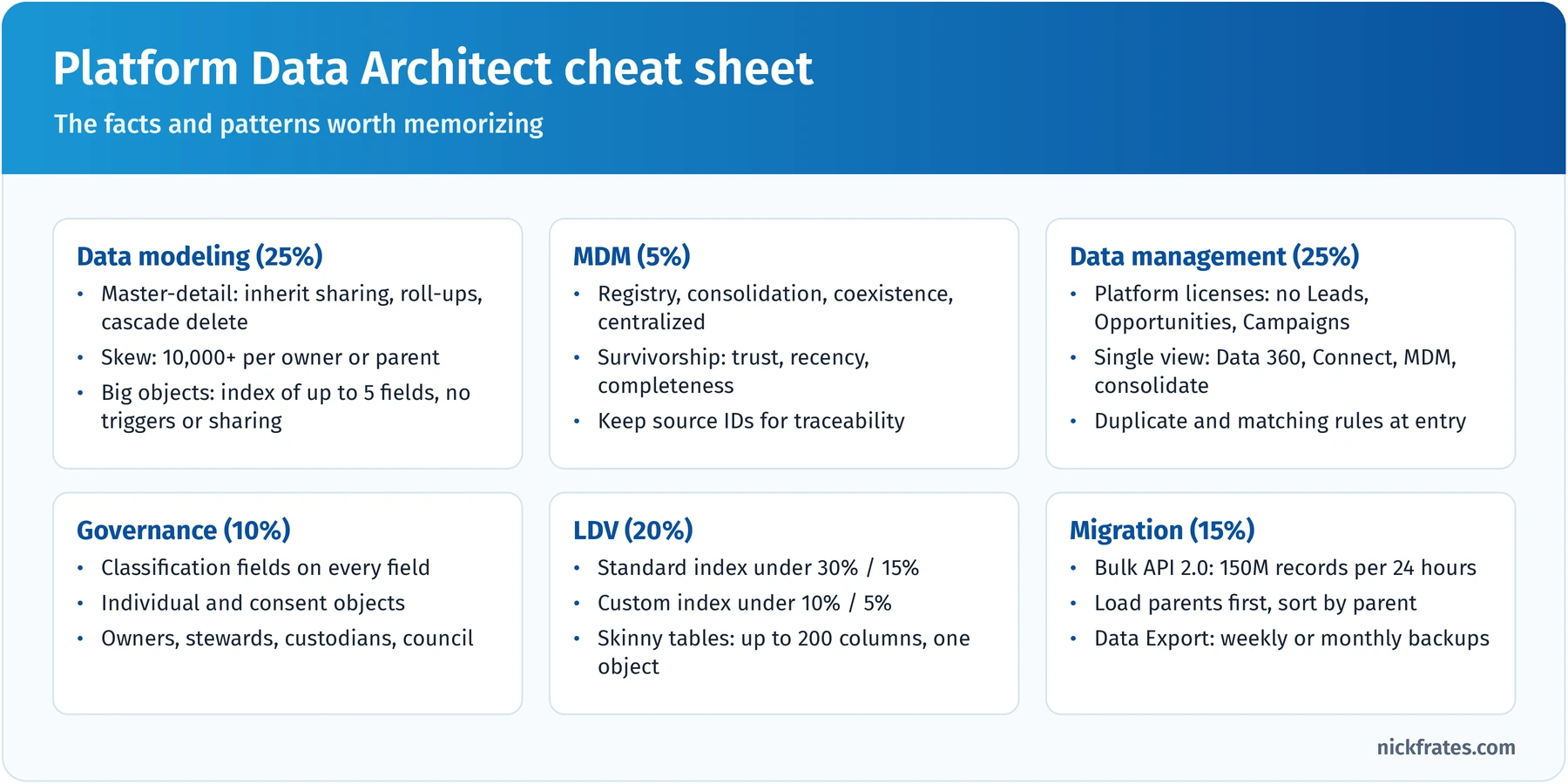
Print it, or make it your phone's lock screen for exam week.
Frequently asked questions
Is Platform Data Architect the same as Data Architect? Yes. Salesforce renamed Data Architect to Platform Data Architect in July 2025 as part of standardizing certification names. The exam content didn't change, existing holders kept the credential under the new name, and it isn't affected by the 2026 renames or the February 2027 retirements.
How hard is the exam? The 58% passing score sounds friendly, but the scenarios are long and two answers often look plausible. If you haven't run a large migration or tuned a slow org, spend extra time on LDV and the hands-on checklist.
Is there a prerequisite? No. Salesforce recommends Platform App Builder, Platform Developer and Platform Developer II, but none is required. My Platform Developer study guide is a good warm-up for the platform concepts.
How many questions and how long? 60 scored questions plus up to 5 unscored questions in 105 minutes.
How much does it cost? US$400 to register and US$200 to retake, plus applicable taxes.
Does it cover Data 360? The outline predates Data 360 and doesn't name it, but its single-view and virtualization objectives are where Data 360 fits in a modern design. For Data 360 itself, see my Data 360 Consultant study guide.
How do I keep the certification? Complete the annual Platform Data Architect maintenance badge on Trailhead before the due date.
What should I take next? Platform Sharing and Visibility Architect pairs naturally with this exam, and together with Platform App Builder and Platform Developer they earn Application Architect. The certification study guides hub can help you plan the path.
Cert Lab by Nick Frates
See which sections still cost you points
Lessons, section checks and flashcards for every exam section, so you find the weak spots before exam day. Also working toward Platform Developer II? Try the Platform Developer II Cert Lab.
Get the Platform Data Architect Cert Lab, $9.99 →Related study guides
- Salesforce Platform Developer (PD1) study guide for Apex, SOQL and governor limits.
- Development Lifecycle and Deployment Architect study guide for environments, sandboxes and release management.
- Salesforce Data 360 Consultant study guide for unified customer profiles, identity resolution and activation.
- Salesforce Advanced Administrator study guide for security, data management and automation depth.
- Salesforce Platform App Builder study guide for data modeling fundamentals.
- The Science of Studying for Salesforce Certifications for how to study.
- All Salesforce certification study guides.
Want to go deeper on automation? Data architects spend a lot of time on what happens when records are saved: normalizing values, bypassing automation during migrations, and moving old records to an archive. Flow is how most of that gets built now that Workflow Rules and Process Builder are past end of support. My Salesforce Flows course walks through record-triggered, screen, scheduled and platform event flows with real-world challenges.
Hope this helps!
Best,
Nick