This is a deep study guide for the Salesforce Certified Platform Integration Architect exam (exam code Plat-Arch-204). It follows the official exam outline section by section, with plain-English explanations, original diagrams, quick-reference tables, a worked architecture example and 25 practice questions with answers and explanations.
Updated for 2026: checked against the current official exam guide, which still says the questions align to the Summer '23 release. The platform has moved since then (External Client Apps, the new Named Credential model, retiring OAuth flows), so this guide teaches the exam's concepts and flags where today's Salesforce works differently. The outline, weights and passing score below are what you'll actually be tested on.
| Section | Weight | Approx. questions |
|---|---|---|
| Evaluate the Current System Landscape | 8% | ~5 |
| Evaluate Business Needs | 11% | ~7 |
| Translate Needs to Integration Requirements | 22% | ~13 |
| Design Integration Solutions | 28% | ~17 |
| Build Solution | 23% | ~14 |
| Maintain Integration | 8% | ~5 |
| Exam fact | Detail |
|---|---|
| Official name | Salesforce Certified Platform Integration Architect (called Integration Architect until July 2025) |
| Exam code | Plat-Arch-204 |
| Format | 60 scored multiple-choice/multiple-select questions, plus up to 5 unscored questions |
| Time | 105 minutes |
| Passing score | 67% |
| Registration fee | US$400 (JPY¥60,000), plus applicable taxes |
| Retake fee | US$200 (JPY¥30,000), plus applicable taxes |
| Prerequisite | None |
| Release alignment | Summer '23, according to the exam guide |
| Delivery | Proctored, onsite at a test center or online; no reference materials allowed |
| Maintenance | One maintenance module on Trailhead each year |
| Counts toward | Salesforce Certified System Architect, together with Platform Developer, Platform Development Lifecycle and Deployment Architect, and Platform Identity and Access Management Architect |
| Official resources | Exam guide, credential page and the official prep Trailmix |
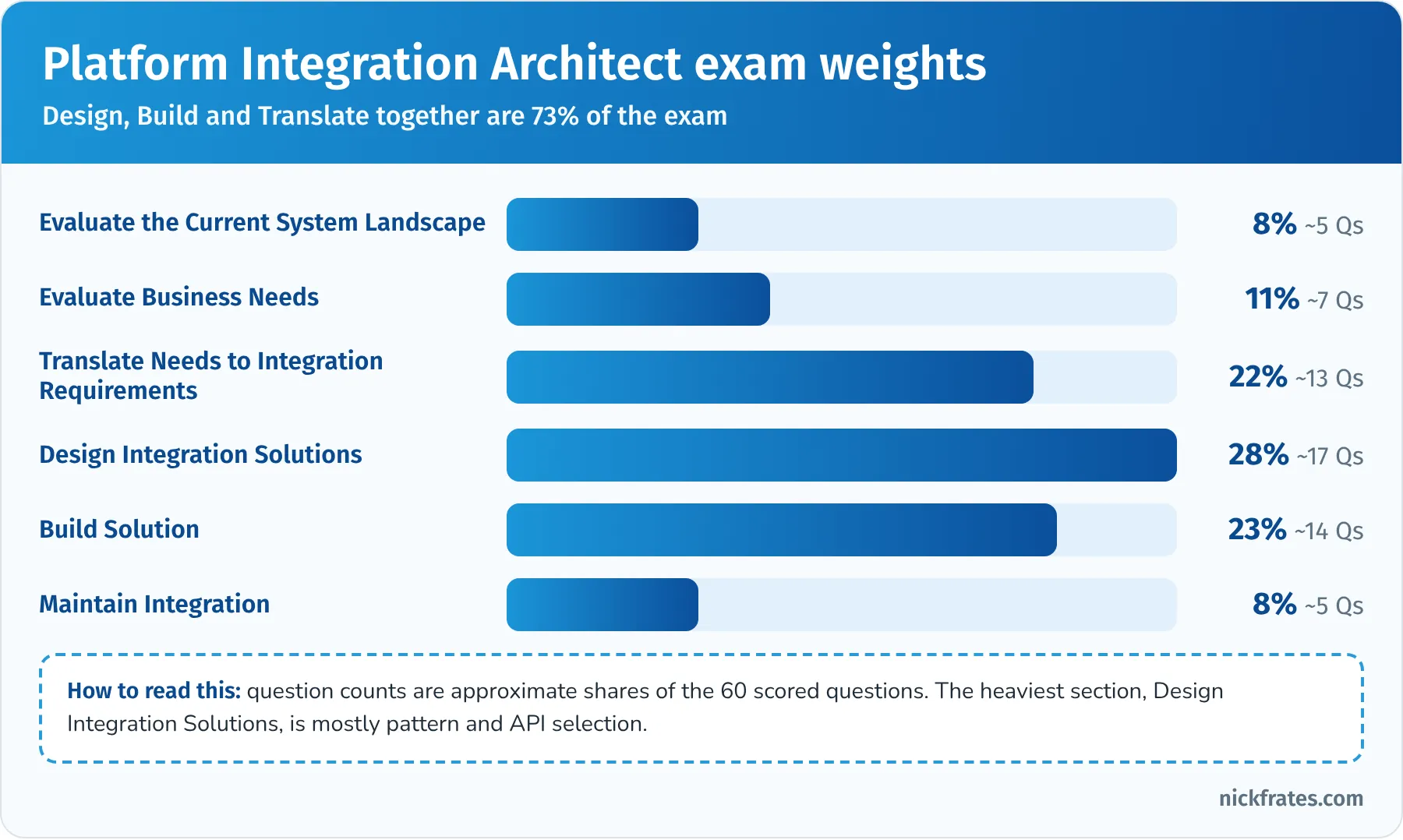
Design, Build and Translate together are almost three quarters of the exam.
Contents
- Who this certification is for
- What changed for 2026
- How to use this guide
- The six integration patterns in one picture
- Evaluate the Current System Landscape (8%)
- Evaluate Business Needs (11%)
- Translate Needs to Integration Requirements (22%)
- Design Integration Solutions (28%)
- Build Solution (23%)
- Maintain Integration (8%)
- Deep dive: Platform Events, Change Data Capture and Outbound Messaging
- Worked example: an end-to-end integration architecture
- Hands-on checklist
- Common exam traps
- Flashcard terms
- Quick-reference cheat sheet
- Frequently asked questions
- Related study guides
Who this certification is for
Salesforce describes the candidate as someone who assesses integration requirements and designs secure, scalable solutions for integrating the Salesforce Platform, and who can explain the design trade-offs to both business and technical stakeholders. In plain terms: the person in the room who decides how Salesforce talks to the ERP, the website, the data warehouse and everything else, and who can defend that decision.
The exam guide describes the typical background:
- 1 to 2 years of Salesforce Platform integration architecture experience.
- 2 to 3 years of hands-on Salesforce administration and/or development experience.
- At least 1 year supporting or implementing data-centric enterprise integration solutions.
Typical job titles include technical architect, system architect, integration architect, solution architect, programmer analyst and application manager.
The guide also says what you are not expected to know, which is just as useful when you plan your study time:
- Non-Salesforce technology or database concepts.
- How to configure specific integration tools (you won't be asked to click through MuleSoft).
- Master data management (MDM) tools.
- Lightning development or any programming language.
So this is not a coding exam. You need to know what each integration option does, when it fits, and what limits and trade-offs come with it. You'll see Apex terms like Queueable and Continuation, but as design choices, not syntax.
Who finds it hardest? Admins usually find the API, event and security vocabulary heavy. Developers usually know the APIs but miss the consulting side: requirements, data classification, regulatory constraints and monitoring. Architects from other platforms know integration well but miss Salesforce-specific limits and features (Platform Events, Change Data Capture, Salesforce Connect, Named Credentials). This guide spends time on all three.
What changed for 2026
- New name, same exam. In July 2025, when Salesforce moved its certifications to the new Trailhead Academy certification experience (launched July 21, 2025), Integration Architect was renamed Platform Integration Architect. It's the same credential and the same exam (Plat-Arch-204), and existing holders didn't need to re-earn it. Older material may still say Integration Architect, or even Integration Architecture Designer.
- The outline is still the Summer '23 outline. The exam guide says questions align to the Summer '23 release. The six sections and weights above are current.
- The platform kept moving. Several integration features changed after Summer '23. The exam may still use older terms, but you should know the current state too, because a good architect designs for where the platform is going:
| Topic | What older material says | What's true in 2026 |
|---|---|---|
| Inbound app registration | Create a connected app | New connected app creation has been restricted by default since Spring '26; new inbound integrations use External Client Apps. Salesforce has said support for connected apps ends by Summer '27. |
| Outbound credentials | Named Credential holds URL and auth together | Since Winter '23 a Named Credential holds the endpoint and an External Credential holds the authentication and principals. Legacy named credentials are deprecated. |
| OAuth username-password flow | Quick way to connect a script | Retires February 20, 2027, along with the user-agent and hybrid user-agent flows |
| OAuth device flow | Option for limited-input devices | Restricted beginning November 30, 2026 |
| Refresh tokens | Valid until revoked | From November 4, 2026, production refresh tokens expire after 30 days without use |
| Session ID in outbound messages | Listener uses it to call back | Removed in February 2026; use OAuth for callbacks |
| SOAP API login() | Common for scripts | Disabled by default in new orgs since Spring '26; versions 31.0 to 64.0 lose it in Summer '27 |
| Salesforce to Salesforce | Org-to-org record sharing | Fully retired in Spring '27; cross-org adapter authentication must move to named credentials |
- Why it matters for the exam. The underlying principles haven't changed: least privilege, no shared passwords, tokens over sessions, credentials kept out of code. If an answer uses a dedicated integration user, a modern OAuth flow and Named Credentials, it's almost always better than one that passes a username, password or session ID around.
How to use this guide
This is a scenario exam. Most questions describe a landscape, a requirement and a constraint, then ask which pattern, API or design the architect should recommend. Memorizing API names isn't enough; you need to know which option fits which requirement and what breaks if you pick the wrong one.
- Get a free Developer Edition org or a Trailhead Playground. Publish a platform event, enable Change Data Capture on one object, make a callout through a Named Credential and call the REST API from Postman. Hands-on time makes the scenario questions much easier.
- Read Salesforce's Integration Patterns and Practices guide at least once. The pattern names in the exam come straight from it.
- Read one section of this guide at a time. Each ends with a key takeaway and practice questions.
- Read every answer explanation, including why the wrong answers are wrong. The distractors on this exam are usually real features used in the wrong place.
- In the last week, do the worked example, the exam traps and the cheat sheet, and time yourself: 60 questions in 105 minutes is 1 minute 45 seconds per question.
If you want the learning-science reasons for this order (retrieval practice, spacing, interleaving), read The Science of Studying for Salesforce Certifications.
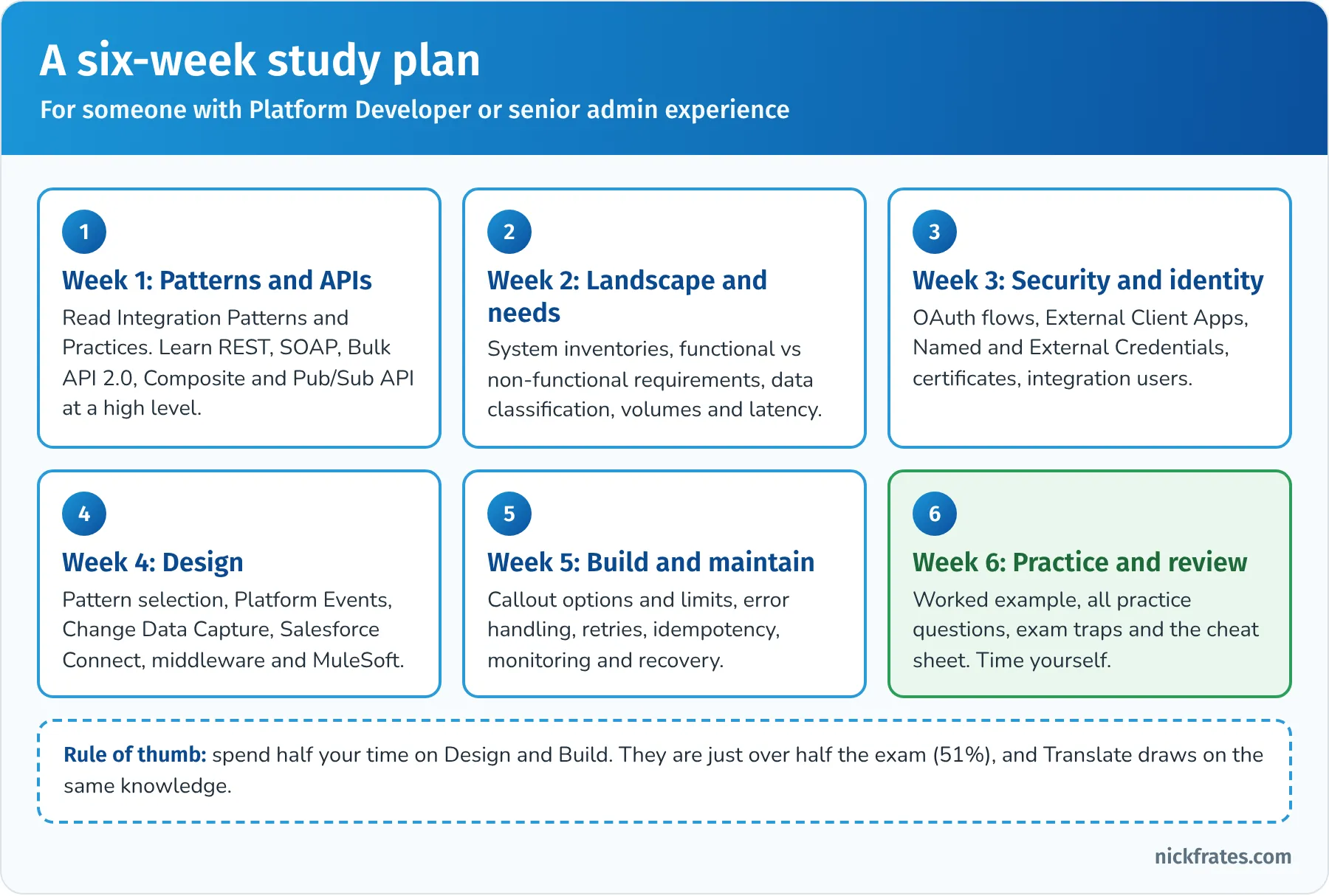
A six-week plan for someone with Platform Developer or senior admin experience.
The six integration patterns in one picture
Almost every question on this exam can be answered faster if you first name the integration pattern. Salesforce's Integration Patterns and Practices guide defines six, and the exam uses the same names:
| Pattern | What happens | Timing | Typical Salesforce mechanisms |
|---|---|---|---|
| Remote Process Invocation: Request and Reply | Salesforce calls a remote system and waits for the result before continuing | Synchronous | Flow HTTP callout or External Services, Apex callouts, Continuation for long waits from the UI |
| Remote Process Invocation: Fire and Forget | Salesforce sends a message and continues; the remote system acknowledges receipt but processing happens later | Asynchronous | Platform Events, Outbound Messaging, async Apex callouts (Queueable or future) |
| Batch Data Synchronization | Large sets of data are created or refreshed in one system from another, on a schedule or in near real time | Asynchronous | Bulk API 2.0 with ETL or middleware, Change Data Capture when Salesforce is the source |
| Remote Call-In | A remote system creates, reads, updates or deletes data in Salesforce | Synchronous or asynchronous | REST API, SOAP API, Composite resources, Bulk API 2.0, Apex REST or SOAP services, publishing events through the API |
| UI Update Based on Data Changes | The Salesforce user interface updates automatically when data changes | Near real time | Platform Events or Change Data Capture with a Lightning component using empApi (Streaming API) |
| Data Virtualization | Salesforce users view and use external data without storing it in Salesforce | Real time, on demand | Salesforce Connect (external objects), or Request and Reply callouts for a single screen |
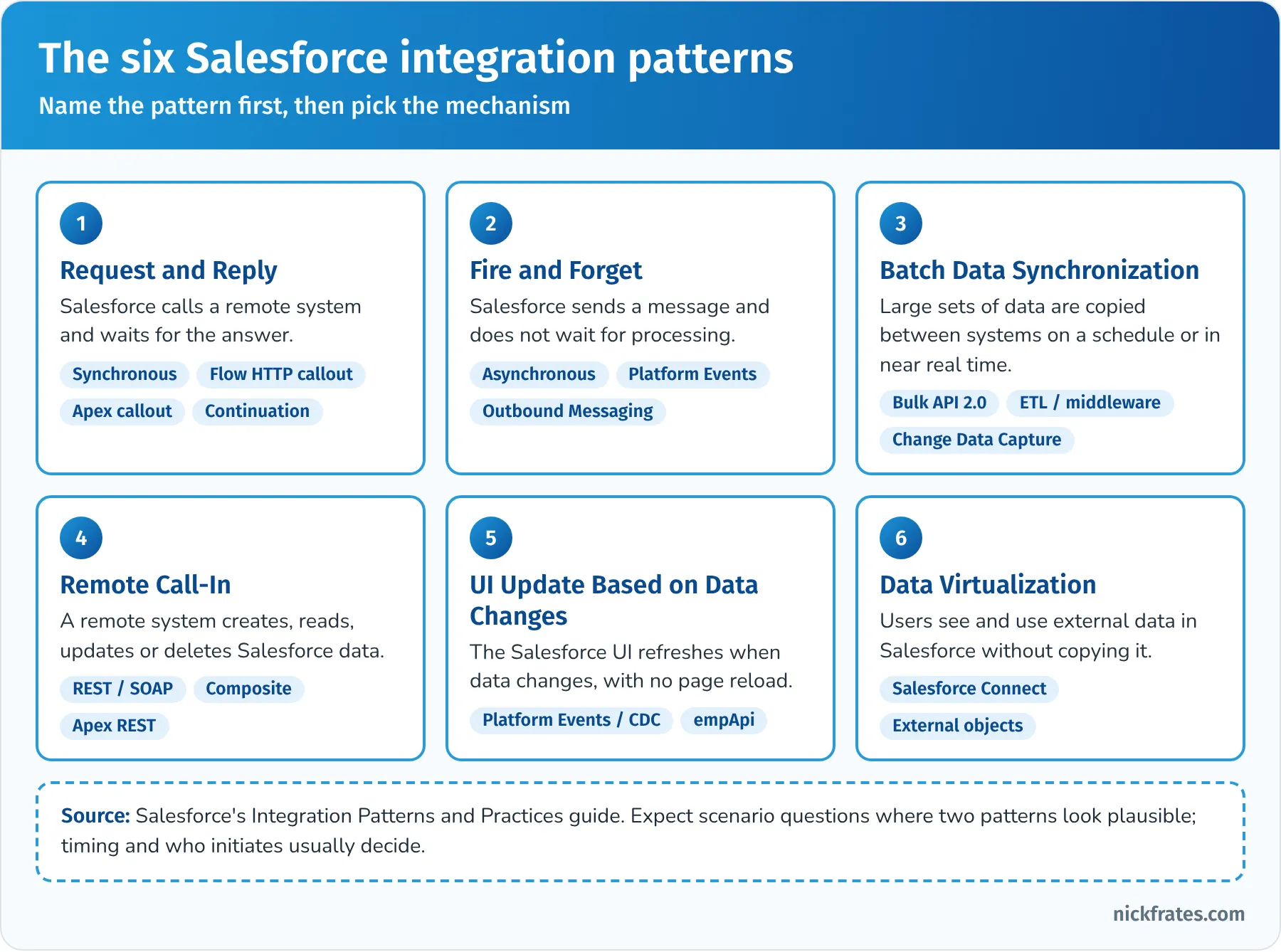
Name the pattern first, then pick the mechanism.
Two ideas from the patterns guide come up again and again:
- Timing. Synchronous means the caller waits (and holds a user or a transaction while it waits). Asynchronous means the caller hands off and moves on. If the requirement says "the user must see the confirmation number before leaving the page," that's synchronous. If it says "the ERP should receive the order," that's usually asynchronous.
- Who initiates. Remote Process Invocation is Salesforce calling out. Remote Call-In is the outside world calling Salesforce. Many wrong answers on the exam point the arrow the wrong way.
Key takeaway: if you can name the pattern and the direction in the first ten seconds of a question, you can usually eliminate half the answers.
Evaluate the Current System Landscape (8%)
This section tests whether you look before you design. The official objectives:
- Given a set of business requirements, identify the current system landscape and determine what standards, limitations, boundaries and protocols exist.
- Given an existing system landscape, analyze for constraints and/or pain points to satisfy a business requirement.
- Given a set of requirements, evaluate the authentication and authorization needs based on the system landscape.
What a system landscape is. It's the map of every system involved: Salesforce orgs, ERP, billing, marketing, e-commerce, data warehouse, identity provider, middleware, and the connections between them. For each connection, a good architect writes down the direction, the protocol, the frequency, the data, the owner and what's broken today.
Landscape shapes you should recognize. Questions often describe where systems live:
- Cloud to cloud: Salesforce and another SaaS app. Both sides are on the internet, usually with REST APIs and OAuth.
- Cloud to ground: Salesforce calls a system in a private data center. Expect firewalls, IP allowlisting, mutual TLS, a reverse proxy or API gateway, or middleware with an on-premise agent.
- Ground to cloud: an on-premise system pushes data into Salesforce. It needs outbound internet access and a way to authenticate to Salesforce (an External Client App and an integration user).
- Org to org: two Salesforce orgs share data. Options include the REST or Bulk API between orgs, Salesforce Connect's cross-org adapter, events, or middleware. Salesforce to Salesforce, the old record-sharing feature, is fully retired in Spring '27, so don't design new solutions on it.
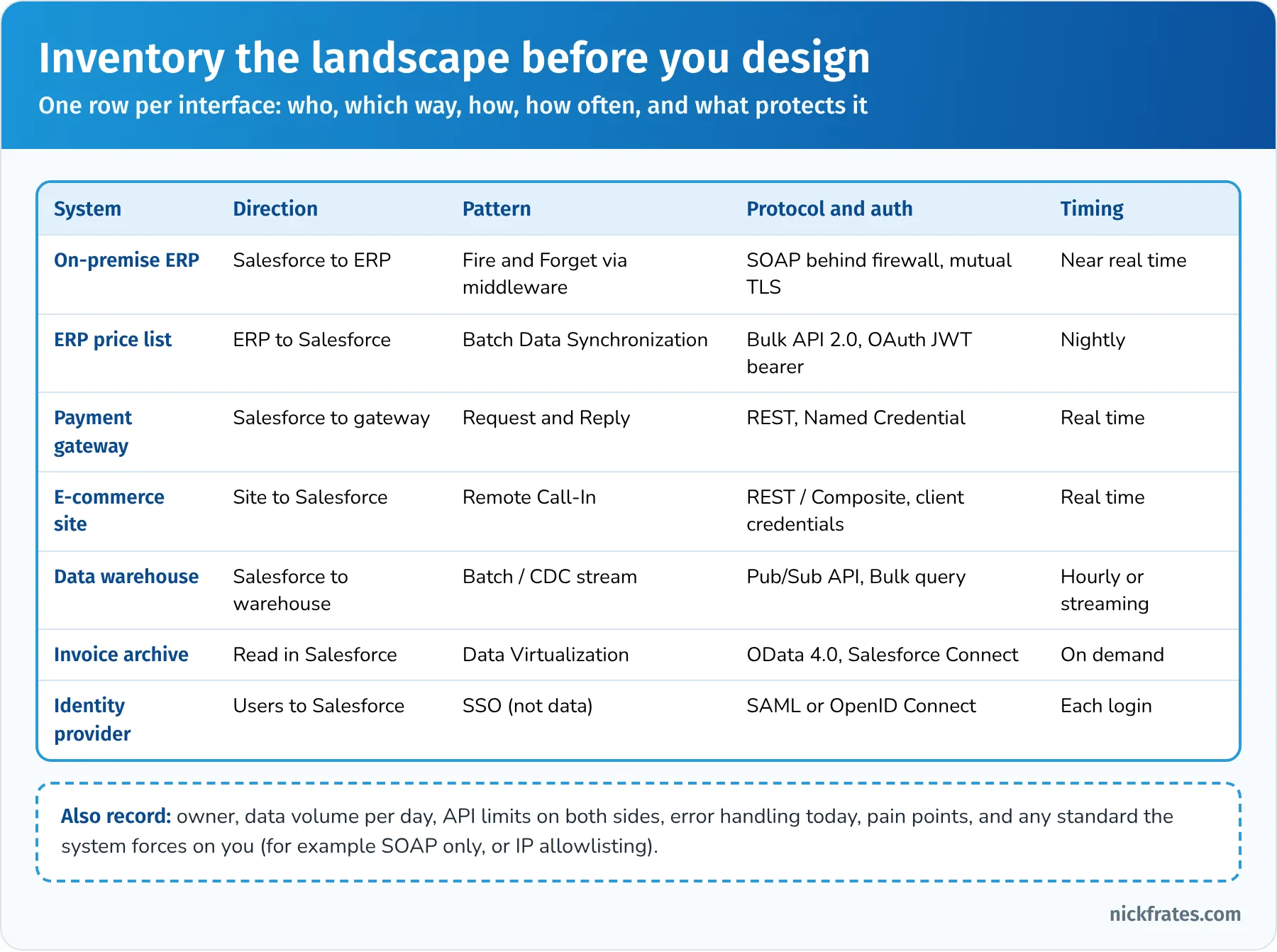
One row per interface. The inventory is where good designs start.
Standards, protocols and boundaries. The landscape often forces choices before you've designed anything:
| Constraint you find | What it means for the design |
|---|---|
| The legacy system only speaks SOAP | Use Apex SOAP callouts (WSDL to Apex) or Outbound Messaging from Salesforce, or put middleware in front to translate. Salesforce supports WSDL 1.1, SOAP 1.1 and HTTP for generated Apex classes. |
| The system sits behind a corporate firewall | Allowlist Salesforce's IP ranges or use a gateway; consider mutual TLS, Private Connect where it applies, or middleware with an on-premise runtime |
| The system can only be called a few times per minute | Queue and throttle: Fire and Forget through middleware, or batch it, instead of one callout per record change |
| The system has no API at all, only file drops | Batch Data Synchronization through an ETL or middleware tool that reads files and loads Salesforce with Bulk API 2.0 |
| Salesforce daily API allocation is already 80% used | Reduce calls with Composite resources or Bulk API 2.0, switch polling to events, or buy more capacity |
| Another team owns the target system and its release schedule | Agree on an interface contract and versioning; decouple with events or middleware so either side can change without breaking the other |
Salesforce limits you should know by heart. Limits are boundaries in the landscape too. These come up in every section:
| Limit | Value to remember |
|---|---|
| Daily API requests | A rolling 24-hour allocation based on edition and licenses (Enterprise Edition starts at 100,000 plus an amount per user license). Check usage in System Overview or the REST /limits resource. |
| Concurrent long-running API requests | 25 requests lasting 20 seconds or longer at a time in production and sandbox orgs (5 in Developer Edition) |
| Apex callouts per transaction | 100 |
| Callout timeout | 10 seconds by default, configurable up to 120 seconds; 120 seconds total across the transaction |
| Callouts in triggers | Not allowed synchronously; use Queueable (with Database.AllowsCallouts) or future(callout=true) |
| Callout after DML | Not allowed in the same transaction before commit ("uncommitted work pending") |
| Records per REST or SOAP write call | 200 (sObject Collections, SOAP create or update) |
| Composite request | Up to 25 subrequests in one call |
| Bulk API and Bulk API 2.0 | Up to 150,000,000 records per rolling 24 hours |
| Platform event and CDC retention | 72 hours for replay |
Pain points. The second objective asks you to analyze the current state for problems. Common ones in exam scenarios: nightly batch jobs that leave sales with stale data, point-to-point integrations that break whenever one system changes, duplicate records because two systems create the same customer, integrations running under a real person's login, hard-coded passwords, and nobody noticing failures until a customer complains. Each pain point usually maps to a better pattern or practice you'll see later in this guide.
Authentication and authorization in the landscape. The third objective asks what identity setup the landscape already has and needs. Questions to ask:
- Is there a corporate identity provider (IdP) for single sign-on? Users then authenticate with SAML or OpenID Connect, and integrations may be able to exchange tokens.
- Which systems call into Salesforce? Each needs an External Client App (or an existing connected app) and a dedicated integration user with only the permissions it needs.
- Which systems does Salesforce call? Each needs a Named Credential and External Credential, and the target system's own auth method (OAuth, API key in a header, AWS Signature v4, client certificate).
- Do calls act as one shared system identity or as each individual user? That decides between a named principal and per-user principals, and between client credentials and user-based OAuth flows.
Key takeaway: in this section the right answer documents what exists, respects the constraints it finds, and sorts out identity before choosing a pattern.
Practice questions: Evaluate the Current System Landscape
Question 1. A manufacturer wants Salesforce to create orders in its on-premise ERP. The ERP exposes only a SOAP interface, sits behind the corporate firewall and accepts connections only from approved IP addresses over mutual TLS. What should the architect identify first?
- A. That the ERP must be rewritten to expose REST
- B. The number of Salesforce licenses needed
- C. The ERP's protocol, network and security constraints, and whether Salesforce can meet them directly or needs a gateway or middleware
- D. A Salesforce Connect adapter for the ERP
Answer: C. Landscape questions start by documenting standards, boundaries and protocols. Salesforce can make SOAP callouts with a client certificate, but IP allowlisting and firewall rules may push the design toward a gateway or middleware. Why not the others: rewriting the ERP is out of scope and unnecessary (A); licenses don't address the constraint (B); Salesforce Connect is for viewing external data, and the question is about creating orders (D).
Question 2. An architect reviews an org where three external systems call Salesforce using the same System Administrator's username and password. Two of the systems poll Salesforce every minute for changes. Which two issues should the architect flag as pain points? (Choose two.)
- A. The systems should use the Metadata API instead
- B. Shared admin credentials violate least privilege and make auditing and revocation hard
- C. External systems are not allowed to call Salesforce
- D. Polling every minute wastes API calls and adds latency compared with an event-driven design
Answer: B and D. Each integration should have its own integration user, its own app registration and minimal permissions, and polling should usually be replaced by Change Data Capture or platform events. Why not the others: the Metadata API is for configuration, not records (A); external systems call Salesforce all the time through its APIs (C).
Evaluate Business Needs (11%)
This section is about understanding the business before the technology. The official objectives:
- Given a use case, identify functional and non-functional requirements needed for integration.
- Based on a given integration requirement, identify and classify data into Confidential/Secure/Public.
- Given a use case, identify key factors for CRM success that should be included as integration requirements.
- Given a use case, identify the business growth and regulatory factors that can impact choice of integration solutions.
Functional versus non-functional requirements. Functional requirements describe what the integration must do: "create an order in the ERP when an opportunity closes," "show the customer's invoices on the account page." Non-functional requirements describe how well it must do it. Non-functional requirements decide most of the design, so learn to spot them:
- Volume: how many records or messages per hour, day or peak.
- Latency and response time: does someone wait for the answer, and for how long is acceptable?
- Availability and recovery: what happens when the other system is down? Can messages be lost?
- Security and compliance: what data is moved, who may see it, where must it stay?
- Scalability: expected growth over the next few years.
- Maintainability and monitoring: who supports it, how failures are noticed and fixed.
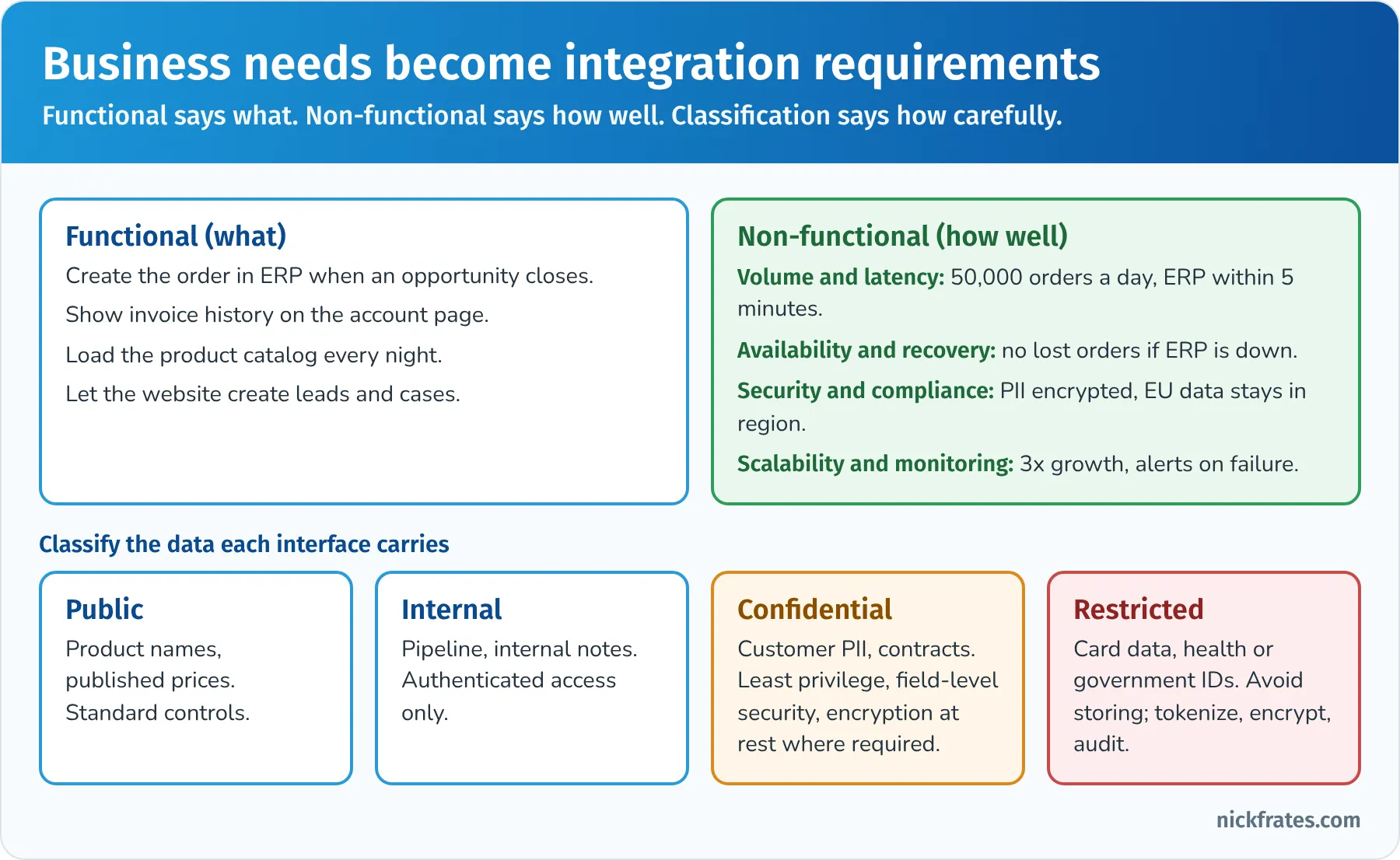
Functional says what. Non-functional says how well. Classification says how carefully.
Classifying data. The exam guide uses the words Confidential, Secure and Public. In Salesforce, fields have data classification metadata, including Data Sensitivity Level (values such as Public, Internal, Confidential, Restricted and Mission Critical) and Compliance Categorization (such as PII, HIPAA, GDPR, PCI and CCPA). Classification drives the integration design:
| Classification | Examples | What it means for integration |
|---|---|---|
| Public | Product names, published price lists, store locations | Standard authentication and TLS; can be cached or shared widely |
| Internal | Pipeline, internal notes, forecasts | Authenticated access only; limit which systems receive it |
| Confidential | Customer names, emails, phone numbers, contracts | Least-privilege integration users, field-level security, encryption at rest where required (Shield Platform Encryption), masking in sandboxes, and only the fields each system needs |
| Restricted or highly sensitive | Payment card numbers, health records, national IDs | Avoid storing in Salesforce when possible; tokenize, keep in the system of record and display through Data Virtualization or a callout; strong audit trail |
A classic exam move: the scenario says a system "needs customer data," and the best answer sends only the fields it needs, not the whole record.
Key factors for CRM success. This objective sounds vague, but it means: build integration requirements that support how the business measures success. Examples: sales reps need order status in Salesforce within minutes, not tomorrow; service agents need a single view of the customer without switching apps; leadership needs one trusted revenue number, so there must be one system of record for each data entity. Governance is part of this too. A good integration program has executive sponsorship, a prioritized backlog, clear data ownership and a release process.
System of record. For every shared entity (customer, product, price, order, invoice), decide which system is the master. Integrations then flow from the master outward. Two systems both "owning" the customer is the root cause of most duplicate and conflict problems on the exam.
Business growth and regulatory factors. Growth changes volumes, adds systems and may add orgs or regions. Regulations limit where data can live and how long it's kept:
- GDPR (EU), LGPD (Brazil), PIPL (China) and similar laws affect where personal data is stored and processed, consent, and the right to erasure. If a customer asks to be forgotten, every system that received a copy must delete it too, which argues for copying less data.
- HIPAA (US healthcare) and PCI DSS (payment cards) push toward encryption, minimal storage and strong audit trails.
- Data residency may require a specific Hyperforce region, or keeping data in a regional system and virtualizing it.
- Acquisitions and new markets can add orgs and ERPs, which favors reusable APIs and middleware over more point-to-point connections.
Salesforce's own advice is that solutions should be based on the company's interpretation of the law, so in a scenario, the architect involves the customer's legal or compliance team rather than deciding alone.
Key takeaway: the best answers in this section ask about volume, latency, sensitivity and growth before naming a technology, and they move the minimum data necessary.
Practice questions: Evaluate Business Needs
Question 3. A bank wants Salesforce to show customers' current account balances on the contact page. Balances live in the core banking system, change constantly, and the compliance team doesn't want balances stored in Salesforce. Which requirement is most important to capture for the design?
- A. A non-functional requirement that balance data must not be persisted in Salesforce and must be current when viewed
- B. A functional requirement to copy balances into a custom field every night
- C. A requirement for a new dashboard
- D. A requirement to give all users the View All Data permission
Answer: A. "Don't store it" and "must be current" are non-functional requirements that point to Data Virtualization (Salesforce Connect) or a Request and Reply callout on demand. Why not the others: a nightly copy breaks both the compliance rule and freshness (B); a dashboard doesn't address the need (C); broader permissions make security worse (D).
Question 4. A healthcare company is integrating a patient scheduling system with Salesforce. The scheduling system needs to know each patient's preferred contact time. Which approach best reflects data classification principles?
- A. Send the entire Contact record, including medical notes, so the scheduling system has full context
- B. Make the contact fields public so integration is easier
- C. Store the integration password in a custom setting so admins can rotate it
- D. Send only the fields the scheduling system needs, run the integration as a dedicated user that can see only those fields, and record the data classification on the fields
Answer: D. Minimum necessary data, least-privilege access and classification metadata are the expected pattern for sensitive data. Why not the others: oversharing medical data is a compliance risk (A); passwords don't belong in custom settings (C); making sensitive fields public is the opposite of the requirement (B).
Question 5. A retailer plans to expand into the EU next year, with customer volume expected to triple. Which two factors should the architect include as integration requirements now? (Choose two.)
- A. Data residency and privacy rules, such as GDPR erasure requests that must reach every system holding personal data
- B. The color scheme of the EU website
- C. Expected growth in message and API volumes, so the chosen patterns and limits still work at three times today's load
- D. Removing all monitoring to reduce cost
Answer: A and C. Regulatory and growth factors both change the integration choice. Why not the others: branding isn't an integration requirement (B); removing monitoring increases risk (D).
Translate Needs to Integration Requirements (22%)
This section turns business needs into technical requirements you can design against. The official objectives:
- Given an existing system landscape diagram, create an inventory of the systems and integration patterns.
- Given a use case and business process, evaluate system and process constraints.
- Given a use case, identify integration security, authentication and authorization requirements.
- Given a use case, identify performance needs (volumes, response times, latency) and propose appropriate integration solutions that will meet business requirements.
Inventory systems and patterns. Given a landscape diagram, list every interface with its pattern. A simple inventory format: source, target, data, trigger (event, schedule or user action), pattern, mechanism, volume, latency target, auth and owner. The landscape diagram earlier in this guide is a good model. On the exam, you might be asked to identify which pattern an existing connection uses, or which interface is the weak point.
System and process constraints. System constraints are technical limits: the ERP accepts 10 requests per second, the API allocation is nearly used, the callout must finish in under 120 seconds, the external system has no REST API. Process constraints come from the business: orders can only be posted to finance after credit approval, the warehouse processes shipments in two daily waves, or a regulator needs a daily file. A constraint often decides between patterns: if the ERP can't handle spikes, you queue messages and process them at a controlled rate instead of calling it on every record save.
Security, authentication and authorization requirements. For every interface, capture: who is calling, as whom (a system or a person), with what permissions, how credentials are stored and rotated, and how traffic is protected. Translate those into concrete requirements:
| Requirement in the scenario | What to specify |
|---|---|
| A back-end system calls Salesforce with no user present | External Client App with the OAuth client credentials flow (runs as a designated integration user) or the JWT bearer flow (certificate-based, pre-authorized user) |
| Users of a partner web app act in Salesforce as themselves | OAuth web server (authorization code) flow, with PKCE; user-level permissions apply |
| A mobile or single-page app connects to Salesforce | Authorization code flow with PKCE; avoid the user-agent flow, which retires February 20, 2027 |
| The company already authenticates users with its own IdP and wants apps to reuse that trust | SAML bearer assertion flow or the token exchange flow, plus SSO for interactive users |
| Salesforce calls a third-party REST API with an OAuth client ID and secret | Named Credential plus External Credential using OAuth 2.0 client credentials; named principal; permission set grants access to the principal |
| Each Salesforce user must call an external API with their own identity | External Credential with per-user principals, so each user authorizes once and tokens are stored per user |
| The external system requires a client certificate | Upload or generate the certificate in Certificate and Key Management and reference it in the Named Credential (mutual TLS) |
| Integration accounts must have minimal access | Salesforce Integration user license with the Minimum Access – API Only Integrations profile, plus permission sets for just the objects and fields needed |
Each Enterprise, Unlimited and Performance Edition org includes five Salesforce Integration user licenses, and each Developer Edition org includes one (see Salesforce's Standard User Licenses documentation). The license is designed for exactly this API-only system access.
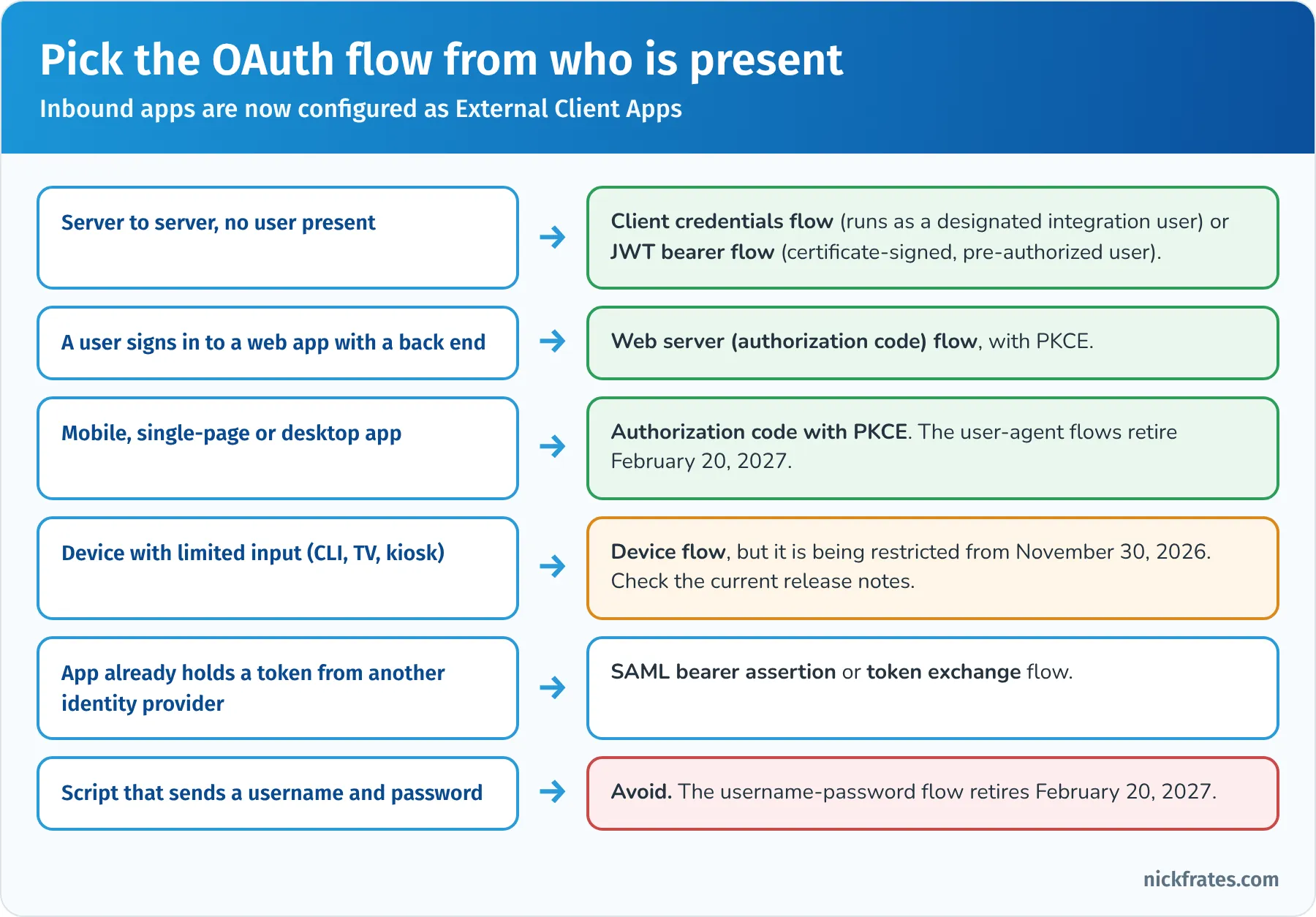
Pick the OAuth flow from who is present, not from what's easiest to set up.
Performance needs: volumes, response times and latency. This objective is where a lot of questions live. Match the numbers to the mechanism:
- A user waits for an answer (credit check, address validation, real-time price): synchronous Request and Reply. Keep the payload small and set a sensible timeout. If the remote call can take longer than a few seconds and starts from a Lightning page, consider a Continuation so the server thread isn't held.
- Small volumes, near real time, nobody waiting: Fire and Forget with Platform Events or Outbound Messaging, or a Queueable callout.
- Large volumes, near real time: Change Data Capture or high-volume platform events, consumed by middleware through the Pub/Sub API.
- Large volumes, latency tolerant: Batch Data Synchronization using Bulk API 2.0. As a rule of thumb, Salesforce suggests considering Bulk API for loads above a few thousand records, because REST and SOAP writes top out at 200 records per call.
- Huge or constantly changing data that users only need to look at: don't copy it. Use Salesforce Connect.
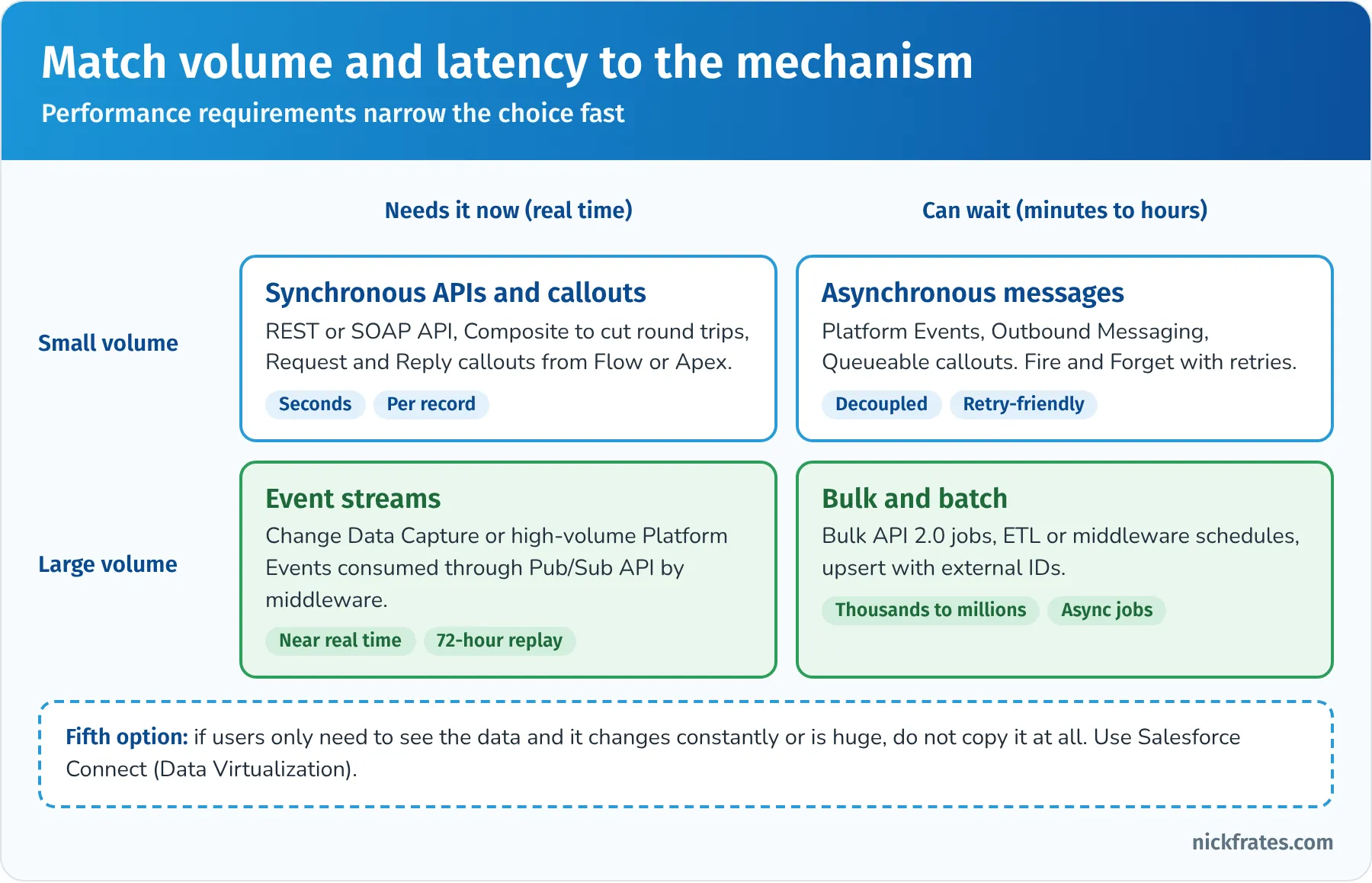
Volume and latency narrow the choice fast.
Translating a requirement, step by step. Take "Sales reps must see the order's shipping status." Questions to ask: how fresh must it be (live, or within an hour)? How many orders and how often do statuses change? Does anyone need to report on status in Salesforce? If reps need live status on one order and nobody reports on it, a callout or Salesforce Connect works. If managers need reports and dashboards on status across thousands of orders, the data needs to be in Salesforce, so the ERP should push status changes (Remote Call-In or events through middleware) into a field or custom object.
Key takeaway: in this section the right answer converts vague needs into numbers (volume, latency, availability) and named security requirements (flow, principal, permissions), and those then point to the pattern.
Practice questions: Translate Needs to Integration Requirements
Question 6. An e-commerce platform must create several thousand orders in Salesforce each night, and the order data arrives as one large file at 1 a.m. Users don't need the data until 7 a.m. Which mechanism best fits the performance requirement?
- A. A REST API call for each order as the file is read
- B. Bulk API 2.0 ingest jobs, using upsert on an external ID
- C. Outbound Messaging
- D. A Lightning component that polls the e-commerce platform
Answer: B. Large, latency-tolerant loads are what Bulk API 2.0 is built for, and upserting on an external ID makes reruns safe. Why not the others: one REST call per order wastes API requests and is slower (A); Outbound Messaging sends data out of Salesforce, not in (C); polling from the UI doesn't load data in bulk (D).
Question 7. A logistics company's back-end service needs to read and update Salesforce cases every few minutes. No person is involved, and the security team forbids storing any user's password in the service. Which authentication approach should the architect specify?
- A. OAuth username-password flow with a dedicated user
- B. A shared session ID copied from a browser
- C. An External Client App using the OAuth client credentials flow or JWT bearer flow, running as a dedicated integration user with minimal permissions
- D. The OAuth user-agent flow
Answer: C. Both flows are designed for server-to-server access without a password, and a dedicated integration user enforces least privilege. Why not the others: the username-password flow uses a password and retires on February 20, 2027 (A); copying session IDs is insecure and fragile (B); the user-agent flow is for browser-based apps with a user present and is also retiring (D).
Question 8. An insurance agent clicks a button on a quote in Salesforce to get a real-time premium from a rating engine. The engine usually responds in 2 seconds but can take up to 40 seconds at peak. The agent must see the premium before continuing. What should the architect recommend?
- A. A nightly batch that pre-calculates premiums
- B. A platform event that the rating engine subscribes to, with the premium emailed later
- C. An outbound message to the rating engine
- D. A synchronous Request and Reply callout from the Lightning component using a Continuation, with a timeout and a clear error message for the user
Answer: D. The user waits for the result, so this is Request and Reply; a Continuation lets a long-running callout from the UI wait without holding a server thread. Why not the others: premiums depend on quote details entered now (A); outbound messages and platform events are Fire and Forget and don't return the premium to the waiting user (B and C).
Question 9. Salesforce must call a payment provider's REST API. The provider issues an OAuth client ID and secret to the company, and every call should use the same company identity. How should the architect specify the credential setup?
- A. A Named Credential for the endpoint and an External Credential using OAuth 2.0 client credentials with a named principal, granted through a permission set
- B. Store the client secret in a custom metadata type and build the token request in Apex
- C. A remote site setting only
- D. Per-user principals so every user enters the client secret
Answer: A. That's the current Named Credential model: endpoint in the named credential, auth and principal in the external credential, access through permission sets. Why not the others: secrets in metadata or code are hard to protect and rotate (B); a remote site setting allows the endpoint but doesn't handle authentication (C); per-user principals fit when each user has their own identity at the provider, not a shared company credential (D).
Question 10. A company's landscape diagram shows the ERP sending a nightly CSV to an SFTP server, which a scheduled job loads into Salesforce. Sales now wants inventory levels updated within 15 minutes of a change, at about 5,000 changes per hour at peak. What should the architect propose?
- A. Keep the nightly file but run it hourly using single-record REST calls
- B. Ask reps to phone the warehouse
- C. Have the ERP, or middleware watching it, publish inventory changes that are written to Salesforce in near real time, batching updates through Composite or Bulk API 2.0 to stay within limits
- D. Use Salesforce Connect so inventory is never stored, even though sales also needs inventory reports and dashboards in Salesforce
Answer: C. The new latency requirement rules out nightly batch, and the volume suggests event-driven change capture with efficient, batched writes. Why not the others: hourly single-record calls miss the 15-minute target and waste API calls (A); phoning isn't an integration (B); Salesforce Connect could work for viewing, but the reporting requirement means the data needs to be in Salesforce (D).
Design Integration Solutions (28%)
This is the largest section and the heart of the exam. The official objectives:
- Given a use case, identify the integration pattern that meets business requirements.
- Given a use case, define the components which create a solution that meets business requirements.
- Given a use case, identify the trade-offs, limitations and constraints that meet the proposed solution.
- Given a use case that includes technical requirements, constraints or drivers, specify the appropriate Salesforce API(s) for the proposed solution.
- Given a use case that includes technical requirements, constraints or drivers, determine the standards, components, techniques and security mechanism that should be used.
Choosing the pattern. Use the decision path below. Three questions, in order: who starts it, does the caller wait, and what happens to the data?
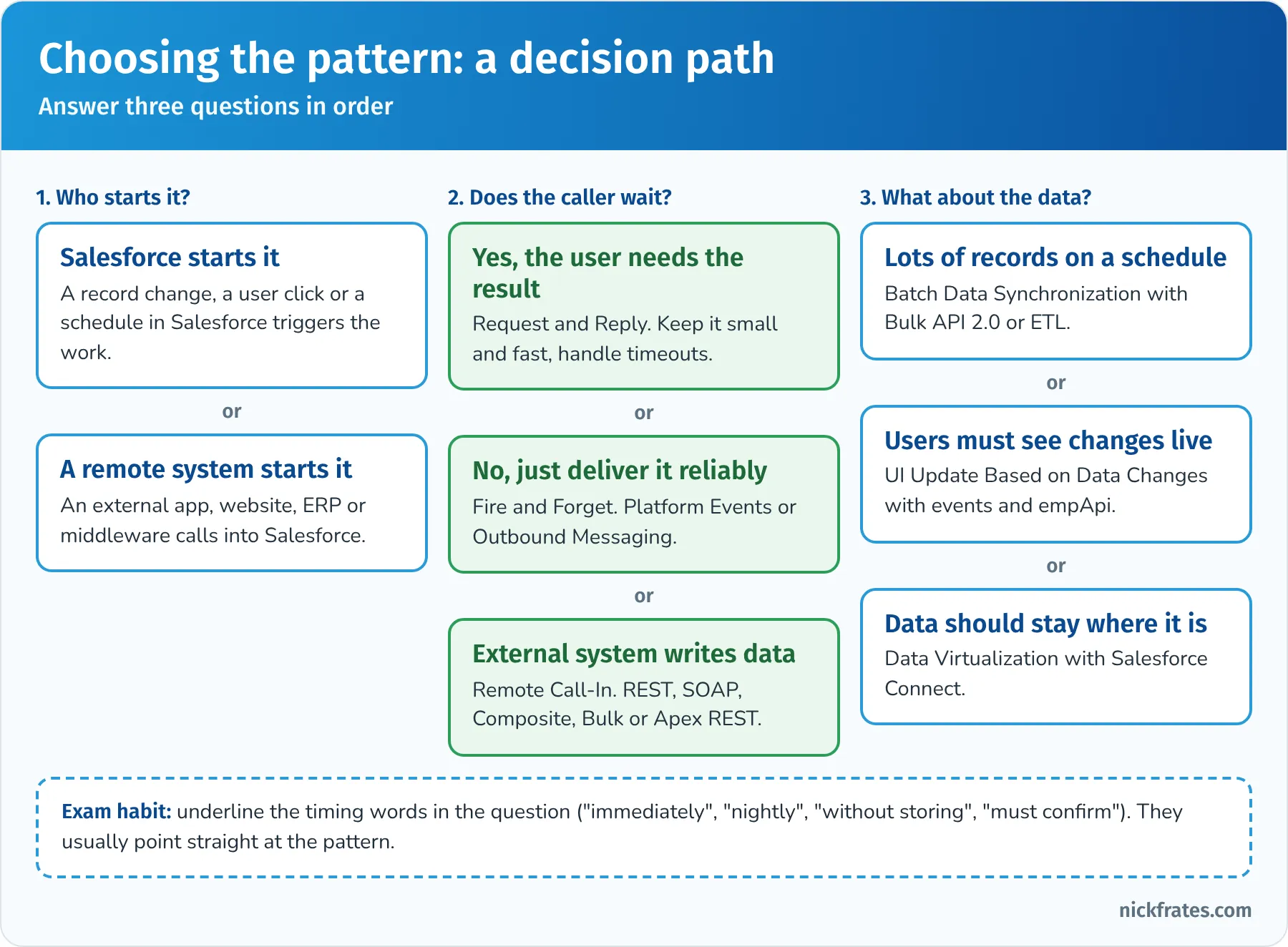
Timing words in the question usually point straight at the pattern.
Components of each pattern. The patterns guide rates solutions for each pattern. The table summarizes the best fits and the usual alternatives:
| Pattern | Best-fit solutions | Also possible, with trade-offs |
|---|---|---|
| Request and Reply | Flow HTTP callout or External Services action; Apex callout from a Lightning component, with Continuation for long waits | Apex callout from a trigger only asynchronously, which then isn't truly Request and Reply for the user |
| Fire and Forget | Platform Events published from Flow or Apex, consumed by middleware; Outbound Messaging for a simple SOAP listener | Queueable or future Apex callouts, but then you build your own retries and tracking |
| Batch Data Synchronization | Middleware or ETL with Bulk API 2.0; Change Data Capture when Salesforce is the source of changes | Scheduled Apex callouts for small volumes; Remote Call-In for each record (doesn't scale) |
| Remote Call-In | REST, SOAP or Composite API for standard operations; Apex REST or SOAP services for custom logic in one transaction; Bulk API 2.0 for volume | Publishing platform events through the API so the work happens asynchronously in Salesforce |
| UI Update Based on Data Changes | Platform Events or Change Data Capture with a Lightning component subscribing through empApi | Polling from the component (wasteful) |
| Data Virtualization | Salesforce Connect with the OData 2.0, OData 4.0 or 4.01, cross-org or custom (Apex Connector Framework) adapter | Request and Reply callouts that display data in a component without storing it |
Request and Reply in more detail. The caller waits, so the remote system must be fast and available. Design points:
- The callout happens in the user's transaction, so errors must be shown to the user and the transaction must not commit half-finished work. Don't commit changes until a successful response comes back, or design compensation.
- Callouts can't run after uncommitted DML in the same transaction. Order the work: call out first, then save, or split into separate transactions.
- Synchronous callouts aren't allowed from triggers. If a record save must call out, it becomes asynchronous (Queueable or future), which is really Fire and Forget.
- If many users will hit the remote system at once, check its capacity and Salesforce's concurrent long-running request limit.
Fire and Forget in more detail. The patterns guide prefers Platform Events for new designs: Salesforce publishes an event, and one or more subscribers process it. The publisher doesn't need to know who the subscribers are, which decouples the systems. Platform events can be published after commit (only if the transaction succeeds, which is what you want for business events) or immediately (even if the transaction rolls back, useful for logging). Outbound Messaging is the declarative alternative for a simple SOAP listener, with built-in retries. Either way, the remote system processes the message later and must deal with duplicates.
Batch Data Synchronization in more detail. Decide the system of record, then how changes are detected: Change Data Capture for Salesforce-side changes, timestamps or change tables in the source system, or full refreshes for small reference data. Load with Bulk API 2.0, upsert on external IDs, and process parents before children. Schedule big loads outside business hours to avoid locking and contention with users. For complex transformation and many targets, use middleware or an ETL tool rather than custom code.
Remote Call-In in more detail. The remote system needs an External Client App, an integration user and the right API. Prefer standard APIs over custom Apex endpoints unless the caller needs several operations to succeed or fail together with custom logic. The remote system owns error handling: it must read the response, retry transient failures and avoid creating duplicates (upsert with an external ID is your friend).
Data Virtualization in more detail. Salesforce Connect maps external data to external objects (API names end in __x). Users see them in list views, related lists, record pages, search and some reports, and you can relate them with external lookup and indirect lookup relationships. The data is fetched live, so it's always current and never stored. Trade-offs: every view is a call to the external system (which must be fast and available), and external objects have feature limits compared with standard objects, such as no Apex triggers and restricted reporting and formula behavior. Use it when data is large, changes often, must stay in the source system, or is only occasionally needed.
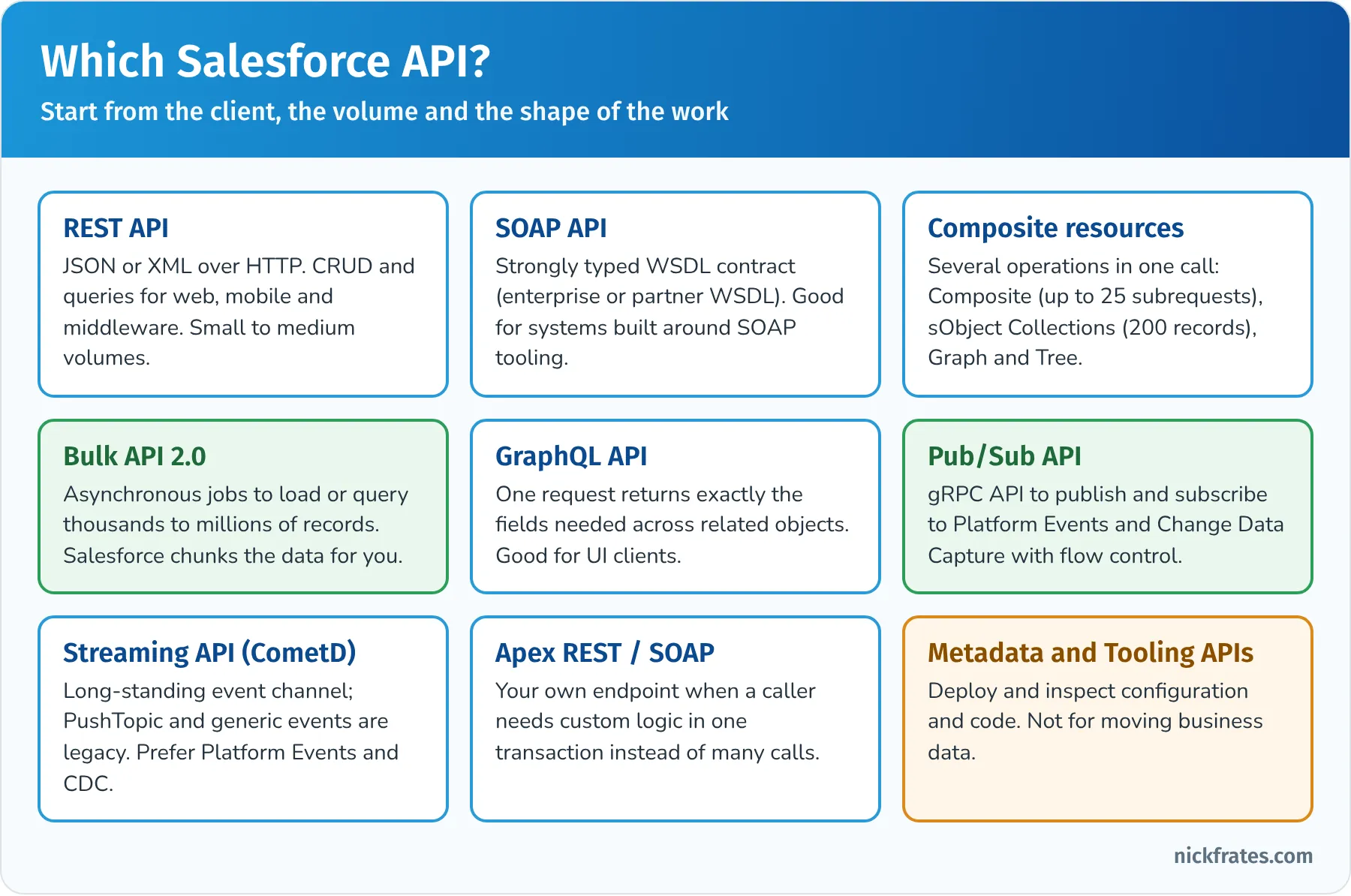
Start from the client, the volume and the shape of the work.
Specifying the right Salesforce API. One of the most testable skills on the exam:
| API | Use it when | Watch out for |
|---|---|---|
| REST API | Web, mobile or middleware clients need CRUD and queries in JSON over HTTP | One record or a handful per call; counts against daily API requests |
| SOAP API | The client works best with a strongly typed WSDL contract (enterprise WSDL for one org's schema, partner WSDL for a generic client) | Heavier payloads; login() is being phased out, so use OAuth |
| Composite resources | A client needs several related operations in one round trip: Composite (up to 25 subrequests, optionally all-or-none), sObject Collections (up to 200 records), sObject Tree (parent and child records together) or Composite Graph (larger related sets) | Design the order of operations and failure behavior |
| Bulk API 2.0 | Thousands to millions of records to load, update, delete or query asynchronously | Asynchronous by nature; results and failures come back per job; plan for locking |
| GraphQL API | A client (often a UI) needs exactly certain fields across related records in one request | Mostly a read-optimized API; check current mutation support for writes |
| Pub/Sub API | A client publishes or subscribes to platform events or Change Data Capture over gRPC, with flow control | Client must manage replay IDs and its own processing rate |
| Streaming API (CometD) | Existing CometD clients and empApi in Lightning components | PushTopic and generic events are legacy; use platform events and CDC for new designs |
| Apex REST or SOAP services | A client needs custom logic and several steps in one transaction behind one endpoint | You own the code, tests, versioning and limits |
| Metadata API and Tooling API | Deploying or inspecting configuration and code | Not for business data |
| User Interface API | Building a custom UI that respects Salesforce layouts and field-level security | For UI clients, not bulk integration |
Trade-offs, limitations and constraints. Every design gives something up. Examples the exam likes:
- Real time versus resilience. Synchronous calls give immediate answers but fail when the other system is down. Asynchronous messaging survives outages but the user doesn't get an answer now.
- Copy versus virtualize. Copying data enables reporting, automation and offline use, but duplicates storage and creates sync and compliance work. Virtualizing keeps data current and in place, but depends on the source system's availability and speed.
- Declarative versus code. Flow HTTP callouts, External Services and Outbound Messaging can be maintained by admins; Apex gives full control over parsing, retries and complex logic. If the company has no developers, the declarative option often wins.
- Point to point versus middleware. Direct connections are quick for one or two systems but multiply as systems grow. Middleware adds cost and another platform to run, but centralizes transformation, routing, retries and monitoring.
- Limits. API allocations, callout limits, event allocations and storage all constrain designs. A design that works for 1,000 records a day may fail at 1,000,000.
Standards, components, techniques and security mechanisms. The fifth objective is about making the design concrete: which protocol (REST/JSON, SOAP/XML, gRPC, OData), which message format, which calling mechanism (Flow, Lightning component, trigger plus Queueable, scheduled job, middleware), and which security mechanism (OAuth flow, Named Credential, certificate, encryption). For example, "trigger a remote process when a user clicks a button" could be a Flow screen with an HTTP callout action, or a Lightning web component calling Apex, each using a Named Credential.
Where middleware and MuleSoft fit. Salesforce owns MuleSoft, and the exam expects you to know when an integration layer is the right recommendation, not how to configure it. MuleSoft promotes API-led connectivity: System APIs unlock systems of record, Process APIs orchestrate business logic across them, and Experience APIs shape data for each channel. Recommend middleware (MuleSoft or another ESB or iPaaS) when there are many systems, heavy transformation, orchestration across steps, protocol bridging (for example SOAP or files to REST), guaranteed delivery, or a need to reuse the same APIs for several consumers. For one or two simple interfaces, native Salesforce features are often enough.
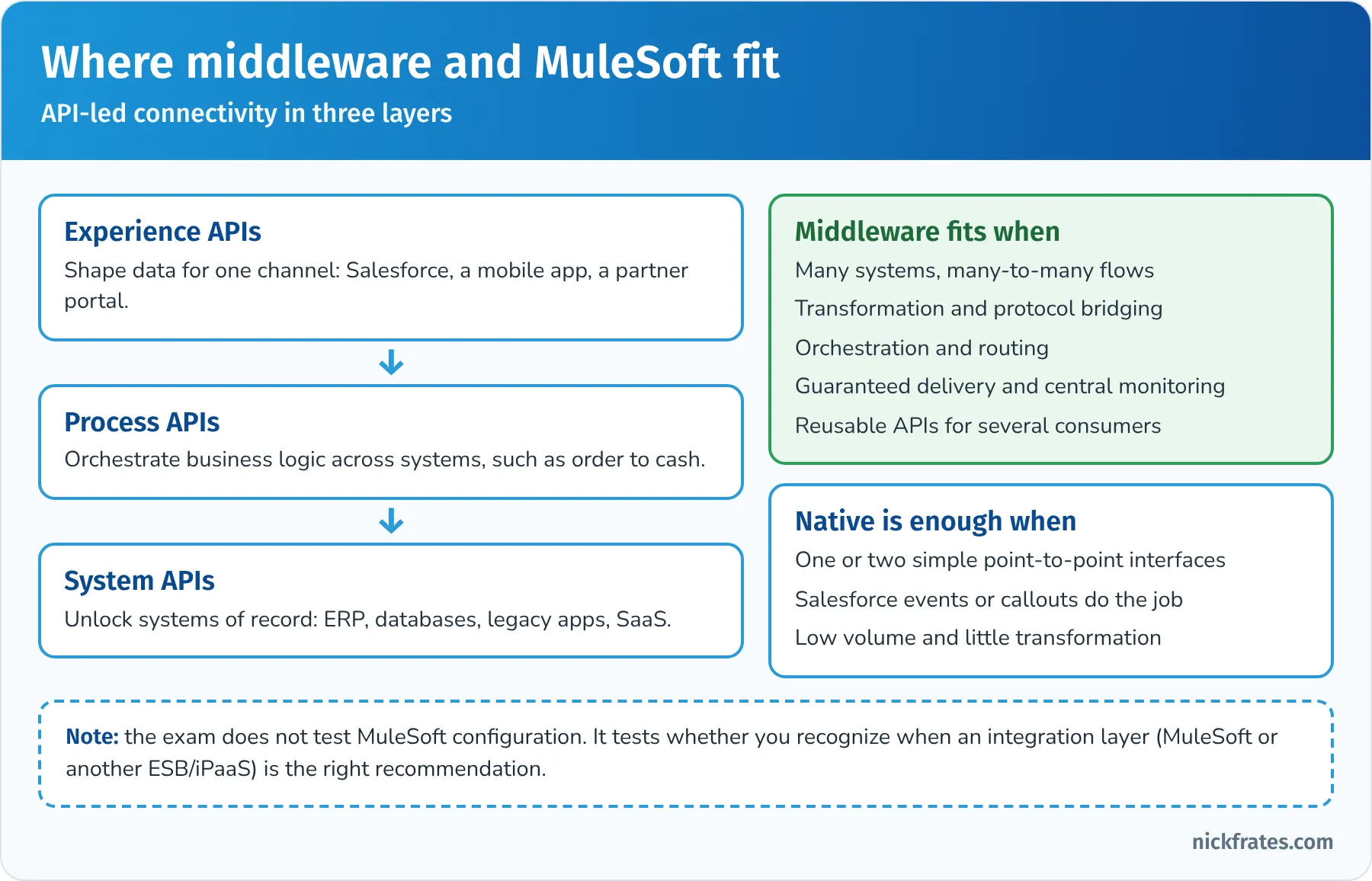
The exam tests when to recommend an integration layer, not how to configure one.
A few other platform options worth recognizing in answer choices: Heroku Connect syncs Salesforce data with a Heroku Postgres database in both directions; Event Relay sends platform events and change events to Amazon EventBridge; Private Connect provides a private network path between Salesforce on Hyperforce and AWS. You won't need their setup details, but you should know what problem each solves.
Key takeaway: in this section the right answer names the pattern, picks the simplest mechanism that meets the non-functional requirements, and accepts the trade-off the scenario cares least about.
Practice questions: Design Integration Solutions
Question 11. When an opportunity is Closed Won, Salesforce must send the order to the ERP. The ERP is sometimes unavailable for maintenance, the sales rep doesn't need to wait for the ERP's response, and two other systems (billing and provisioning) will also need the same order information next year. Which design fits best?
- A. A synchronous Apex callout from an after-update trigger
- B. Publish an Order Closed platform event after commit; middleware and future systems subscribe and process it, with retries on the subscriber side
- C. A nightly report emailed to the ERP team
- D. Salesforce Connect external objects for orders
Answer: B. This is Fire and Forget with several future consumers, which is exactly what platform events are for; publishing after commit avoids sending orders for transactions that roll back. Why not the others: synchronous callouts aren't allowed from triggers and would fail during ERP maintenance (A); a report isn't an integration (C); Salesforce Connect reads external data, it doesn't send orders (D).
Question 12. Service agents need to see a customer's last 24 months of invoices from the billing system on the account page. There are millions of invoices, they change daily, nobody reports on them in Salesforce, and the billing system exposes an OData 4.0 endpoint. What should the architect recommend?
- A. Nightly Bulk API 2.0 load of all invoices into a custom object
- B. Email-to-Case
- C. Outbound Messaging from the account
- D. Salesforce Connect with the OData 4.0 adapter, an external object for invoices, and an indirect lookup to the account using the shared customer number
Answer: D. Large, frequently changing, view-only data with an OData endpoint is the textbook case for Data Virtualization. An indirect lookup relates the external object to accounts through a unique external ID field on Account. Why not the others: copying millions of invoices costs storage and sync effort with no reporting need (A); Outbound Messaging sends data out (C); Email-to-Case is a service channel (B).
Question 13. A mobile app needs to create an account, two contacts and an opportunity in one user action, and the business wants all of them created or none. The development team wants to avoid custom Apex. Which API approach is best?
- A. The Composite resource with allOrNone set to true, referencing the new account's ID in later subrequests
- B. Four separate REST API calls
- C. Bulk API 2.0
- D. Outbound Messaging
Answer: A. Composite runs several dependent subrequests in one call and can roll them all back if one fails, with no custom code. Why not the others: separate calls cost round trips and can leave partial data (B); Bulk API is asynchronous and meant for volume (C); Outbound Messaging is outbound only (D).
Question 14. A dispatcher console must refresh automatically when a field technician's status changes in Salesforce, without the dispatcher reloading the page. What should the architect recommend?
- A. A Lightning web component that polls the REST API every five seconds
- B. A scheduled report
- C. Publish a platform event (or use Change Data Capture) when the status changes, and have the Lightning web component subscribe with empApi
- D. Outbound Messaging to the dispatcher's browser
Answer: C. This is UI Update Based on Data Changes: events pushed to a subscribed component. Why not the others: polling wastes API calls and adds delay (A); reports aren't live UI updates (B); outbound messages go to SOAP endpoints, not browsers (D).
Question 15. A company integrates Salesforce with 12 systems, including a mainframe that accepts only fixed-width files, an ERP with SOAP services and several REST-based SaaS apps. Many flows need data transformed and routed to more than one target, and IT wants central monitoring and reusable APIs. What should the architect recommend?
- A. Point-to-point Apex callouts from Salesforce to each system
- B. Salesforce Connect for all 12 systems
- C. Outbound Messaging to every system
- D. An integration platform such as MuleSoft, with system, process and experience APIs, handling transformation, routing, retries and monitoring
Answer: D. Many systems, protocol bridging, transformation, routing and central monitoring are the strongest signals for middleware. Why not the others: point-to-point code would be brittle and hard to monitor at this scale (A); Outbound Messaging only sends SOAP and doesn't transform or route (C); Salesforce Connect is for viewing external data, not orchestrating flows (B).
Question 16. A data warehouse must receive every change to Salesforce accounts, contacts and opportunities within minutes. The warehouse team uses middleware that can subscribe to event streams, and they want to catch up automatically after short outages. Which solution best fits?
- A. A nightly full export with the Data Export service
- B. Change Data Capture on the three objects, consumed by the middleware through the Pub/Sub API, storing the last processed replay ID to resume after outages
- C. A REST query every minute for records modified in the last minute
- D. Outbound Messaging
Answer: B. CDC publishes record changes automatically, and replay IDs let the subscriber resume within the 72-hour retention window. Why not the others: nightly exports miss the latency target (A); frequent polling wastes API calls and can miss changes during outages (C); outbound messaging has no replay and needs a separate configuration per object and trigger (D).
Question 17. An admin team with no Apex developers needs Salesforce to call a shipping carrier's REST API from a screen flow to get delivery estimates. The carrier publishes an OpenAPI specification. What's the most maintainable approach?
- A. Register the API with External Services (or use a Flow HTTP callout action) using a Named Credential, then call the generated action in the flow
- B. Write an Apex class with hand-built HTTP requests
- C. Ask the carrier to use Outbound Messaging
- D. Use the Metadata API
Answer: A. External Services turns an OpenAPI spec into typed, declarative actions that admins can maintain, and the Named Credential handles the endpoint and authentication. Why not the others: Apex works but the team can't maintain it (B); Outbound Messaging sends from Salesforce, not from the carrier, and doesn't return estimates to a flow (C); the Metadata API is for configuration (D).
Build Solution (23%)
This section moves from design to implementation choices. The official objectives:
- Given a use case that includes technical requirements, constraints or drivers, identify the considerations when designing and implementing API(s), both Salesforce as an API provider and Salesforce as an API consumer.
- Given a use case, identify the considerations when choosing the right option in making an outbound call to an external system.
- Given a use case, describe what should be considered when building a scalable solution.
- Given a use case, determine error handling for different integration options.
- Given a use case, create a security solution for inbound or outbound integrations.
- Given a use case, identify the factors needed to build resilience in an integration solution for system updates.
Salesforce as an API provider. When other systems call Salesforce, consider:
- Which API. Standard REST, SOAP, Composite or Bulk API 2.0 first. Build an Apex REST (@RestResource) or Apex SOAP (webservice methods) service only when callers need custom logic or several steps in one transaction behind a single endpoint.
- Limits. Every call counts toward the daily API allocation, long-running calls count toward the concurrent limit, and Apex services run under normal governor limits.
- Contract and versioning. Pin clients to an API version and plan upgrades; Salesforce retires very old API versions over time (versions 21.0 through 30.0 were retired in Summer '25). For custom Apex endpoints, version the URL mapping (for example /v1/orders) so you can change it without breaking callers.
- Bulk-safe logic. Triggers and flows fire for API writes too. A trigger written for one record at a time will fail when a client sends 200 records in one call.
- Identity. Each caller gets its own External Client App and integration user, with scopes and permissions limited to what it needs.
Salesforce as an API consumer. When Salesforce calls out, consider the endpoint and auth (Named Credentials), the response size and time, governor limits on callouts, how to parse the response (generated classes from External Services or WSDL2Apex, or JSON parsing in Apex), and what happens if the call fails.
Choosing the outbound option. The second objective is a favorite. Here are the options side by side:
| Option | Best when | Considerations |
|---|---|---|
| Flow HTTP callout or External Services | Admins need to maintain the integration; the API has an OpenAPI spec or simple JSON | Needs a Named Credential; Flow fault paths handle errors; schema changes need re-registration |
| Apex REST or SOAP callout | Complex logic, custom parsing, retries or chaining | 100 callouts per transaction, timeout up to 120 seconds, no callout after uncommitted DML, async from triggers |
| Continuation | A Lightning or Visualforce page waits on a long-running callout | Up to three callouts in one continuation; the page waits but no server thread is held |
| Platform event to a subscriber | Decoupled delivery, possibly to several systems; the subscriber does the actual call | Subscriber handles retries and duplicates; event allocations apply |
| Outbound Messaging | A simple, declarative notification to a SOAP listener on a record change | Listener must return an acknowledgment; retries for up to 24 hours; may arrive more than once or out of order; no session ID since February 2026 |
| Middleware | Transformation, orchestration, protocol bridging or many targets | Extra platform to run and license; centralizes error handling and monitoring |
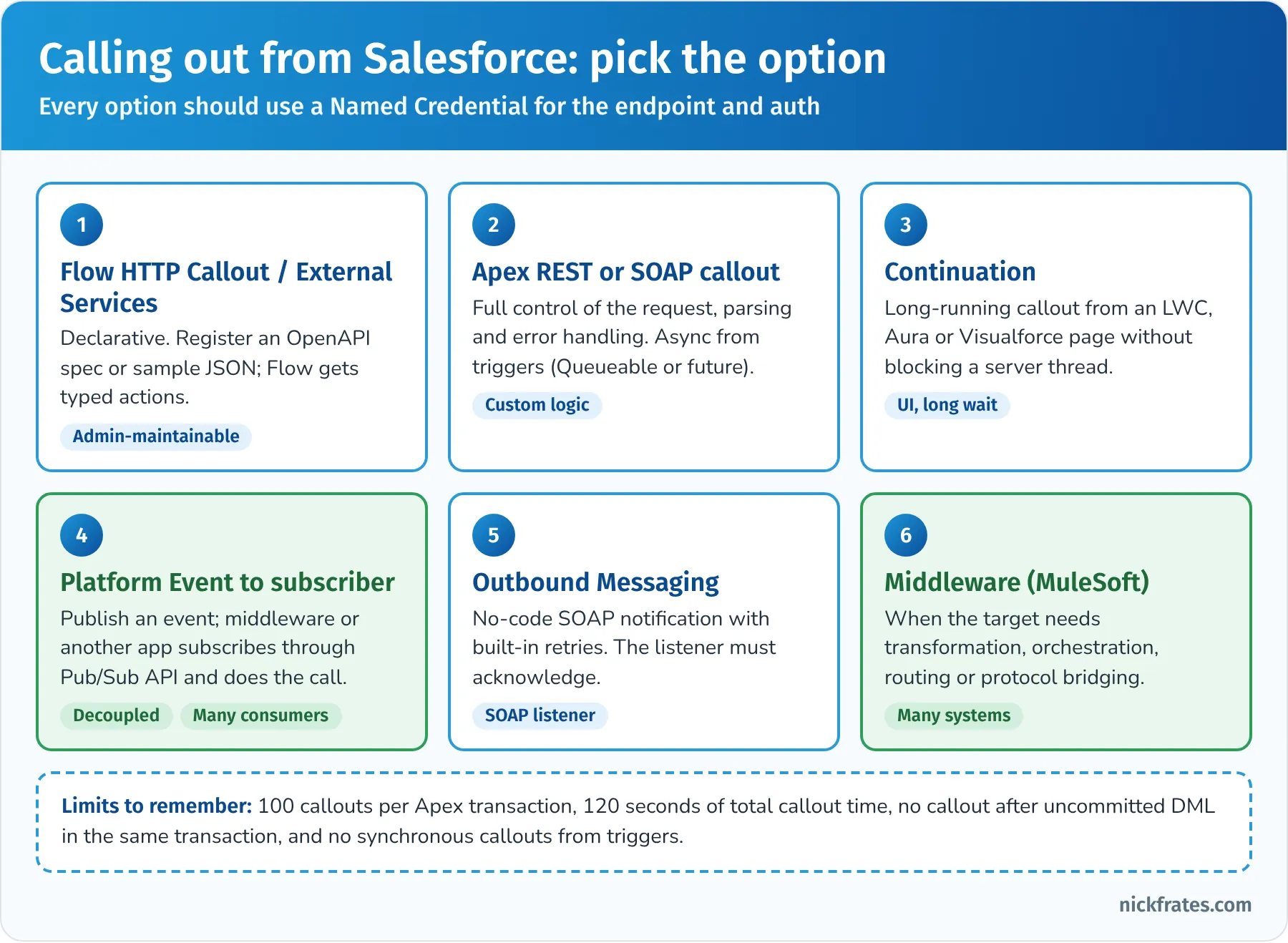
Every option should use a Named Credential for the endpoint and authentication.
Named Credentials and External Credentials. Since Winter '23, outbound authentication is split into pieces, and the exam's "security mechanism" answers increasingly assume this model:
- A Named Credential stores the endpoint URL and transport settings. Apex references it as callout:Name/path, and Flow actions reference it by name. No remote site setting is needed.
- An External Credential stores the authentication protocol (such as OAuth 2.0, AWS Signature Version 4 or custom headers) and its principals.
- A named principal is one shared identity for everyone; per-user principals let each user authenticate as themselves.
- Permission sets (or profiles) grant users access to a principal. If a user's permission sets don't include the principal, their callout fails.
- User External Credential records store the encrypted tokens.
Legacy named credentials, which combined everything in one record, are deprecated. If a question offers storing credentials in custom settings, custom metadata or code, that's almost always the wrong answer.
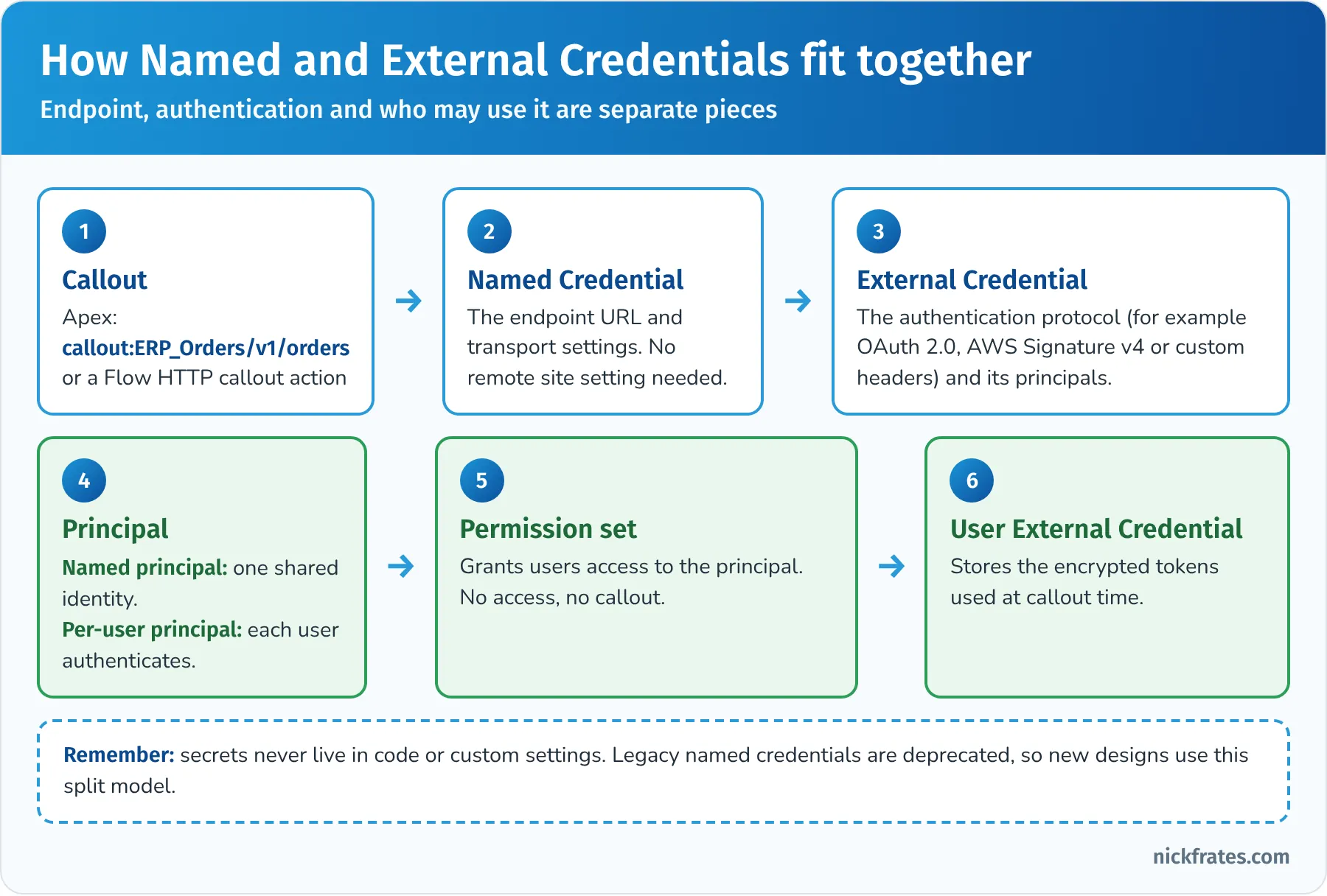
Endpoint, authentication and who may use it are separate pieces.
Building for scale. A scalable integration keeps working when volume grows. Considerations:
- Bulkify everything. Process records in collections, not one at a time. Combine callouts where the API allows it.
- Prefer asynchronous processing for volume. Bulk API 2.0 for loads, events for streams, Queueable or Batch Apex for heavy processing. Salesforce added more async headroom recently (for example Elastic Async Apex Jobs, in beta in Winter '27), but design so you don't depend on it.
- Avoid lock contention. Loading many child records under the same parent (for example thousands of contacts on one account) can cause record lock errors. Sort loads by parent ID, reduce parallelism for problem objects, and avoid "data skew" where one parent or owner has more than about 10,000 children or records.
- Use external IDs and upsert so reloads and retries don't create duplicates and you don't have to query for Salesforce IDs first.
- Index selective filters and archive old data. Large data volumes slow queries, sharing recalculation and reports.
- Watch event and API allocations and plan purchases for growth.
Error handling for different integration options. Each option fails differently, and the exam expects you to know who handles what:
| Integration option | How errors surface | Who handles them |
|---|---|---|
| Synchronous Apex callout | Exceptions, HTTP status codes and timeouts in the transaction | Salesforce (the caller): show the user a clear message, roll back or compensate, log it |
| Flow HTTP callout or External Services | The action fails and the flow follows its fault path | The flow's fault path: log, notify, show a screen message |
| Queueable or future callout | Failure in the async job | Your code: catch, log, retry with a capped count (for example by chaining another Queueable), alert |
| Platform event Apex trigger | Exception in the subscriber | Throw EventBus.RetryableException to retry the batch (the trigger can run up to 10 times, the initial run plus nine retries, before it moves to the error state); use setResumeCheckpoint to resume after the last good event |
| Outbound Messaging | Listener doesn't acknowledge | Salesforce retries for up to 24 hours; failed messages can be monitored in Setup; listener must be idempotent |
| REST, SOAP or Bulk API called in | Error codes per record or per job | The remote client: read results, retry what's retryable, fix data errors, upsert to stay idempotent |
| Bulk API 2.0 job | Failed and unprocessed record results per job | The client or middleware: download failed results, fix, resubmit |
| Change Data Capture subscriber | Gap events, overflow events, or replay IDs older than retention | The subscriber: on gaps or lost position, re-sync affected records from the source |
| Salesforce Connect | The external system is slow or down, so views fail | Design for availability of the source; handle errors in the UI; consider caching only if the data rules allow it |
If you've built Flow integrations, my Salesforce Flow Error Handling 101: Fault Paths Explained walks through the fault path patterns in detail.
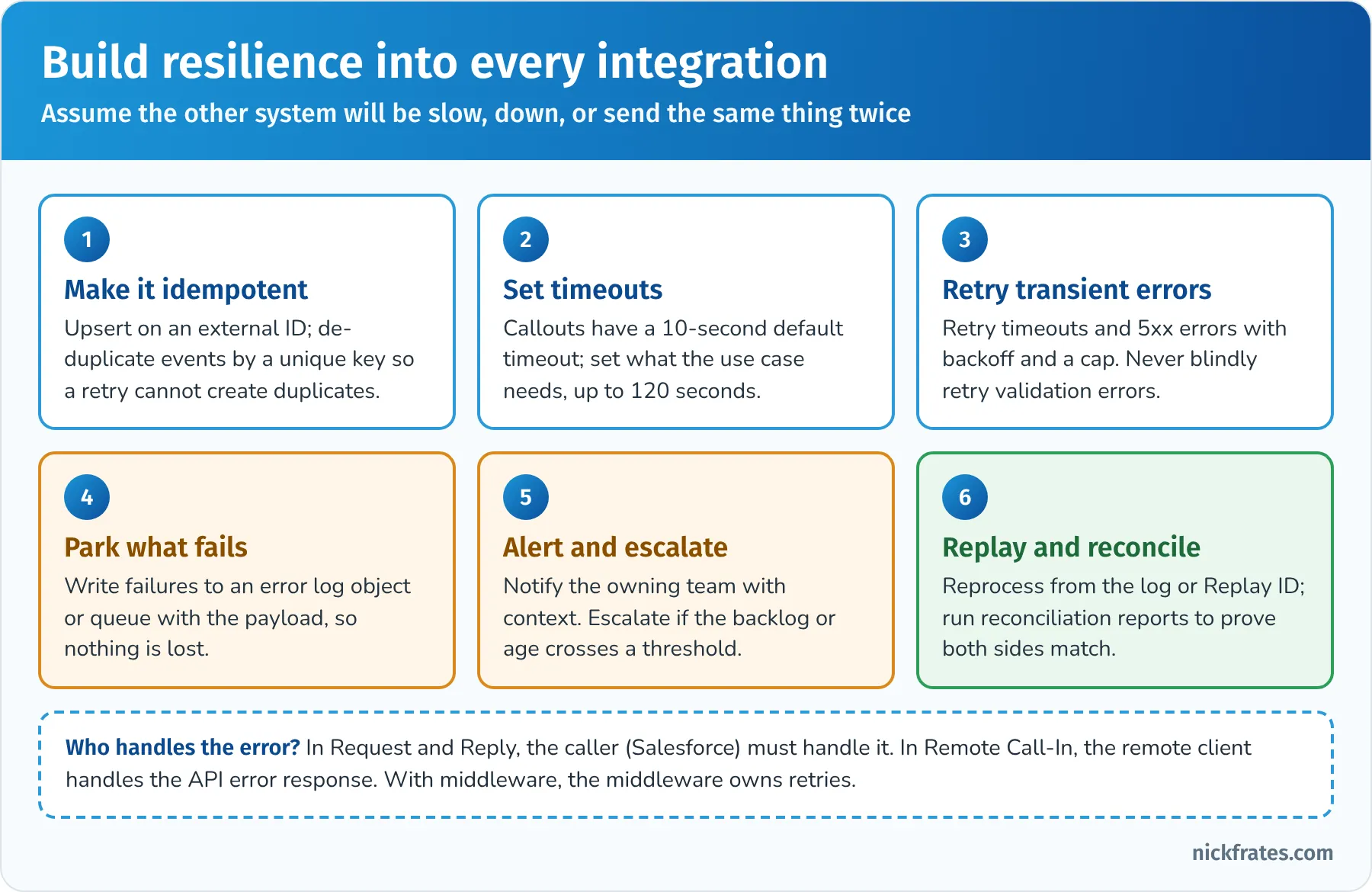
Assume the other system will be slow, down, or send the same thing twice.
Security solutions for inbound and outbound integrations. Think in layers:
- Network: all traffic over TLS; mutual TLS when the other side requires client certificates (Salesforce can present a client certificate on callouts, and can require client certificates on inbound API calls for users with the right permission); IP allowlisting through login IP ranges on the integration user's profile or app policies; Private Connect for private connectivity with AWS.
- Authentication: External Client Apps with modern OAuth flows; certificates for JWT bearer; short-lived access tokens; refresh tokens that expire after inactivity (30 days in production from November 4, 2026).
- Authorization: a dedicated integration user per system (ideally on the Salesforce Integration license with the API-only profile), permission sets for just the objects and fields needed, minimal OAuth scopes.
- Data: field-level security, sharing, Shield Platform Encryption for sensitive data at rest, and sending only what each system needs.
- Monitoring: login history, Event Monitoring and Transaction Security policies to detect and block unusual API behavior.
- Outbound: Named and External Credentials, no secrets in code, client certificates where required, and OAuth to the target system.
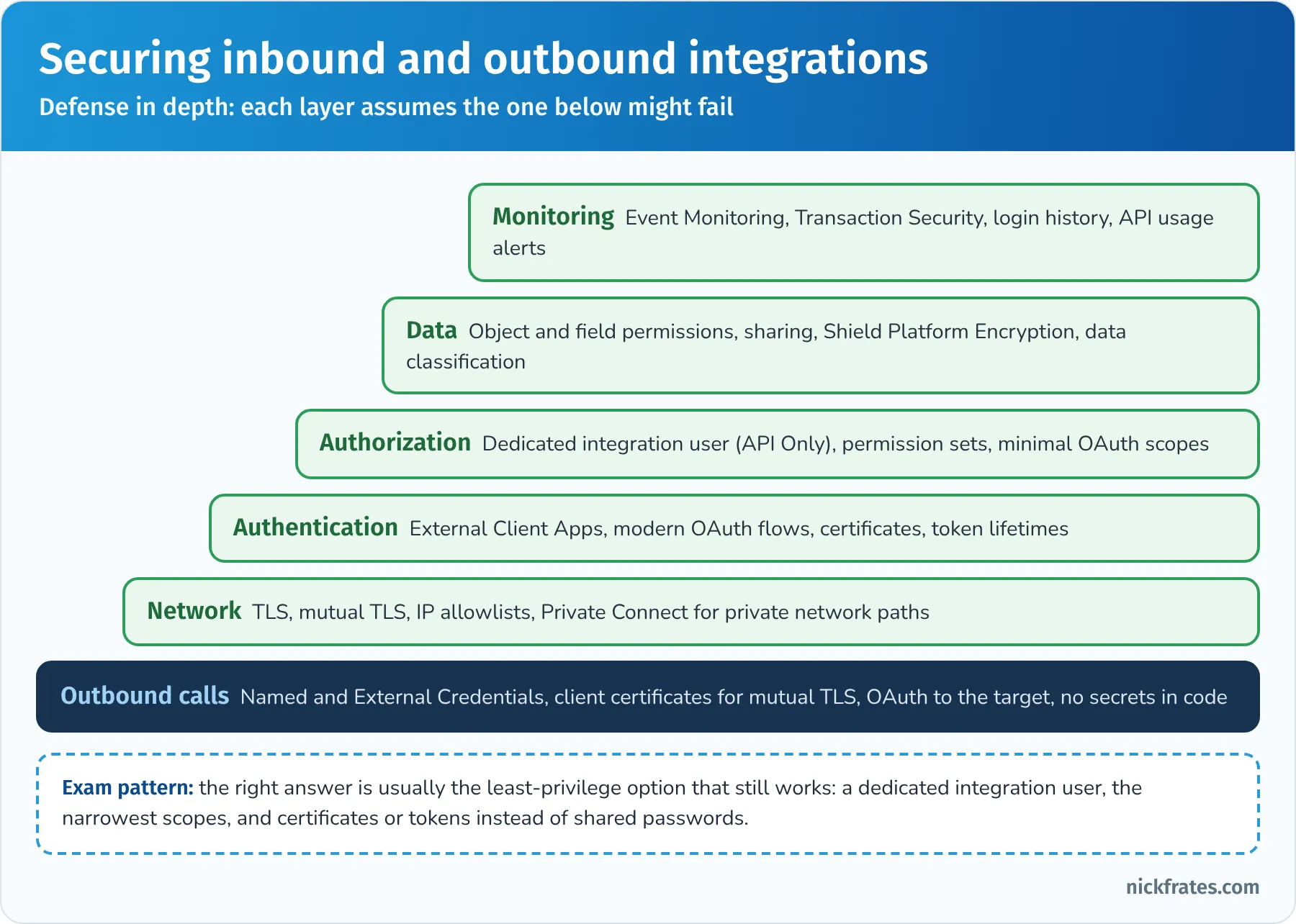
Defense in depth: each layer assumes the one below might fail.
Resilience for system updates. The last objective is about designing integrations that survive change and failure:
- Request and Reply: handle timeouts and errors in the caller, don't commit until the response is good, and give users a way to retry. Salesforce's patterns guide stresses recovery, timeliness and state management here.
- State tracking with keys. Store the remote system's ID on the Salesforce record (and the Salesforce ID in the remote system) so later updates find the right record and retries don't duplicate.
- Reliable messaging. For Fire and Forget, rely on retries and replay (platform event replay IDs, outbound message retries, middleware queues), and make every receiver idempotent.
- Versioning. Pin API versions, version custom endpoints, and test integrations in a full or partial sandbox before each Salesforce release and each release of the other system. Salesforce releases three times a year, and sandboxes get preview releases first.
- Configurable endpoints. Named Credentials let you point a sandbox at the test system and production at the real one without code changes.
- Graceful degradation. If the ERP is down, queue orders and tell users they'll sync later instead of blocking the sale.
Key takeaway: in this section the right answer uses the platform's own safety features (Named Credentials, fault paths, retryable exceptions, replay, upsert) instead of building custom versions of them.
Practice questions: Build Solution
Question 18. A record-triggered flow must notify an external fulfillment service whenever an order is activated. The admin tries a synchronous callout in the same transaction as the record update and gets errors. What's the most appropriate fix?
- A. Ask Salesforce to remove the limit
- B. Increase the callout timeout to 120 seconds
- C. Move the callout into a before-save trigger
- D. Make the callout in the flow's asynchronous path (or publish a platform event that a subscriber processes), so the callout runs after the record is committed
Answer: D. Callouts can't run synchronously in the record save transaction; an asynchronous path or an event decouples the callout from the save. Why not the others: the timeout isn't the problem (B); a before-save trigger is still synchronous in the same transaction (C); the limit protects the multi-tenant platform (A).
Question 19. An Apex platform event trigger posts each event to an external API. When the API is briefly unavailable, events are lost. What should the developer do?
- A. Catch the exception and do nothing
- B. Switch to Outbound Messaging for all objects
- C. When a transient failure occurs, throw EventBus.RetryableException so the batch is retried, and use setResumeCheckpoint so successfully processed events aren't reprocessed
- D. Publish the events immediately instead of after commit
Answer: C. Retryable exceptions and resume checkpoints are the built-in way to make platform event triggers resilient to transient errors. Why not the others: swallowing the error loses data (A); Outbound Messaging is a different design and doesn't fix this subscriber (B); publish behavior controls when events are sent, not how subscriber failures are handled (D).
Question 20. A nightly Bulk API 2.0 job loads 2 million contacts. About 60,000 fail each night with record lock errors, almost all on a few large accounts with tens of thousands of contacts each. Which two actions should the architect recommend? (Choose two.)
- A. Switch to one REST call per contact
- B. Turn off all validation rules permanently
- C. Sort the data by parent account ID before loading, so records for the same account are processed together
- D. Address the data skew by spreading contacts across more accounts or restructuring the hierarchy, since accounts with very many children cause lock contention
Answer: C and D. Sorting by parent reduces lock conflicts between parallel chunks, and fixing account data skew removes the root cause. Why not the others: single-record calls waste API requests and don't fix locking (A); disabling validation permanently trades a load problem for a data quality problem (B).
Question 21. A company has hard-coded an external API key in an Apex class. Security wants the key out of code, rotated quarterly by admins, and only usable by the integration's permission set. What should the architect recommend?
- A. Move the key to a custom label
- B. A Named Credential with an External Credential that sends the key as a custom header, with a named principal granted to the integration's permission set
- C. Store the key in a long text field on a custom object
- D. Email the key to the admins each quarter
Answer: B. External Credentials can hold custom authentication headers securely, admins can rotate them in Setup, and access is controlled through the principal and permission sets. Why not the others: custom labels and custom fields are not secret stores (A and C); emailing secrets is insecure (D).
Question 22. An ERP calls Salesforce's REST API to upsert accounts. Occasionally the ERP times out waiting for a response and retries, creating duplicate accounts. What's the best fix?
- A. Have the ERP upsert on an external ID field holding the ERP's customer number, so a retried request updates the existing record instead of creating a new one
- B. Increase Salesforce's daily API limit
- C. Add a nightly duplicate-cleaning job only
- D. Switch to Outbound Messaging
Answer: A. Upserting on an external ID makes the operation idempotent, which is the core of safe retries. Why not the others: the limit isn't the problem (B); cleanup treats the symptom (C); Outbound Messaging is for Salesforce sending data, not receiving it (D).
Question 23. An external partner portal will call a custom Apex REST service. Security requires that only the partner's servers can call it, that the integration can only read and update cases, and that credentials can be revoked without affecting other integrations. Which design meets this?
- A. A shared System Administrator login used by all partners
- B. Give the partner a session ID that never expires
- C. Make the Apex class global and remove authentication
- D. An External Client App for the partner using the JWT bearer or client credentials flow, a dedicated integration user with an API-only profile and a permission set for cases only, and IP restrictions for the partner's servers
Answer: D. A dedicated app and user per partner allow independent revocation, least privilege and network restrictions. Why not the others: a shared admin login is the opposite of least privilege (A); removing authentication exposes data (C); long-lived session IDs are insecure and can't be scoped (B).
Maintain Integration (8%)
This section covers running integrations in production. The official objectives:
- Given an integration maintenance use case, identify performance monitoring needs for integration requirements.
- Given a use case, identify the appropriate error handling, escalation and recovery procedures for a failed integration.
- Given a use case, identify reporting needs for integration monitoring.
Performance monitoring. Decide what to watch based on the requirements: API usage against the allocation, response times of callouts, event publishing and delivery volumes, job run times, error rates and backlog age. The tools:
| Need | Tool |
|---|---|
| API usage today and trends | System Overview, Company Information (API requests in the last 24 hours), the REST /limits resource, API Usage Notifications (alerts when usage crosses a threshold), and the API usage reports in Setup |
| Detailed history of API calls, logins and callouts | Event Monitoring event log files (for example API Total Usage, REST API, Apex Callout and Login events); a small set is available without the Shield add-on, the full set needs it |
| Near-real-time detection and blocking | Real-Time Event Monitoring (streams events such as API and login events) with Transaction Security policies that can block or require action |
| Platform event and CDC usage | Platform event usage metrics (PlatformEventUsageMetric) and the subscriber status in Setup, including trigger retries and error state |
| Async jobs and loads | Apex Jobs page, Bulk Data Load Jobs page and job results |
| Flow integrations | Flow fault paths, flow error emails and failed flow interviews |
| Business-level health | A custom integration log object or middleware dashboards, reported in Salesforce dashboards |
| Org-wide health and scale | Scale Center and Salesforce's performance tooling, where your edition and support plan include them |
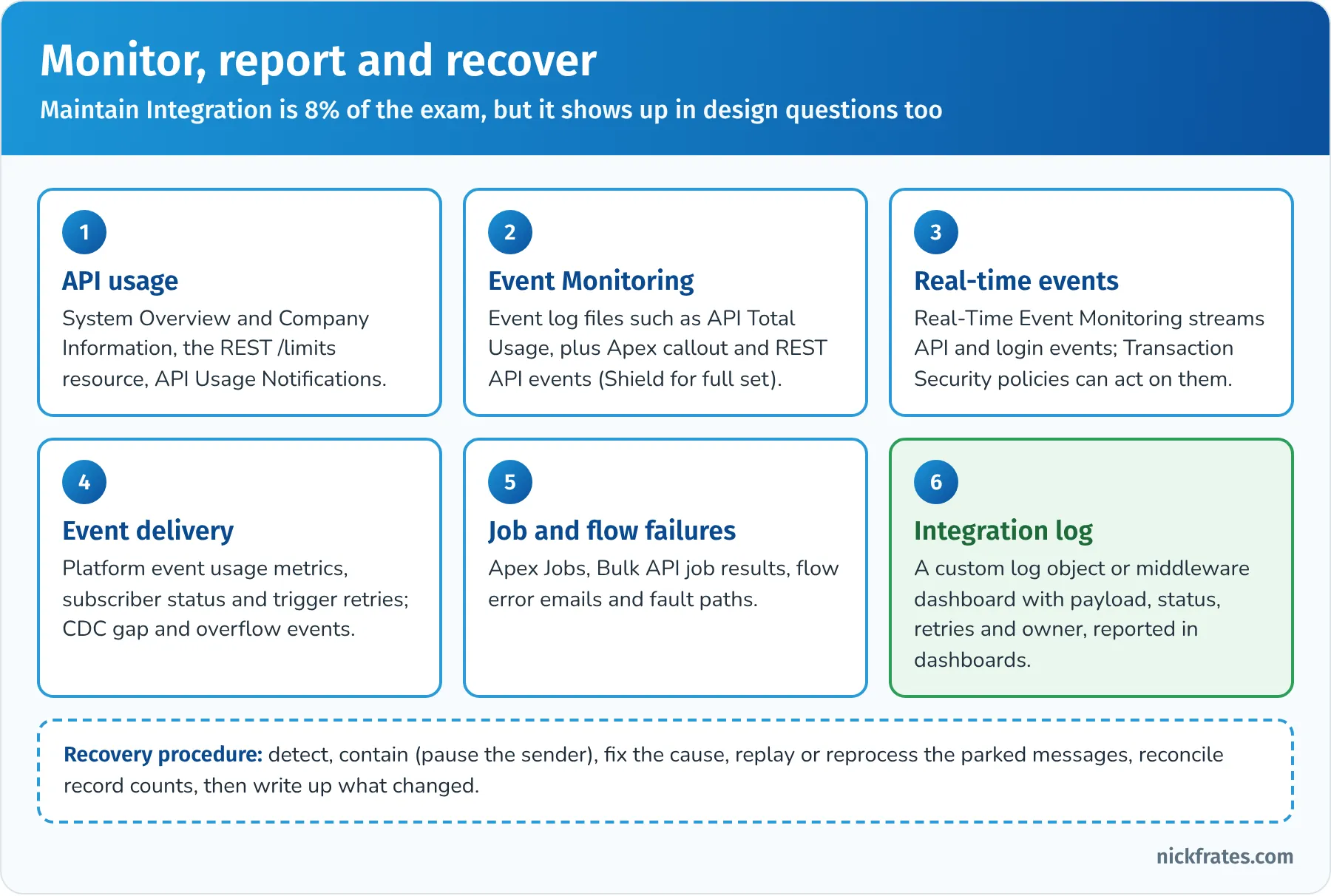
Maintain Integration is only 8% of the exam, but monitoring shows up in design answers too.
Error handling, escalation and recovery. The strategy depends on the pattern, but a good procedure has the same shape:
- Detect: alerts on failures, backlog size or age, and unusual API usage.
- Contain: pause the sender or stop retries if the failure is systemic, so you don't flood the target or burn API calls.
- Escalate: route to the owning team with the payload, error and correlation ID. Define who owns each interface before go-live.
- Fix: correct the data, configuration, credentials or code.
- Recover: replay events (within 72 hours), reprocess parked messages from the log, or resubmit failed Bulk API records.
- Reconcile: compare record counts or totals between systems to prove nothing was lost or duplicated.
- Learn: update the runbook and monitoring.
For Request and Reply, the caller handles errors. For Fire and Forget through middleware, the middleware owns retries and dead-letter queues. For Remote Call-In, the remote client handles errors returned by Salesforce.
Reporting needs. Who needs what? Operations needs real-time failure alerts and backlog dashboards. Business owners need daily success rates and data freshness ("orders synced in the last hour"). Security needs login and API anomaly reports. Capacity planners need API and event usage trends. Many teams build an integration log custom object (interface name, direction, status, record ID, payload reference, error, retry count, timestamps) so standard reports and dashboards can answer these questions in Salesforce.
Key takeaway: in this section the right answer measures against the requirements, alerts the right owner, and recovers with replay and reconciliation rather than manual guesswork.
Practice questions: Maintain Integration
Question 24. The security team wants to be alerted, and ideally to block the action, when an integration user suddenly exports an unusually large number of records through the API. What should the architect recommend?
- A. A weekly review of the Setup Audit Trail
- B. A validation rule on Account
- C. Real-Time Event Monitoring with a Transaction Security policy on API events that blocks or notifies when the record count exceeds a threshold
- D. Increasing the API allocation
Answer: C. Real-Time Event Monitoring streams API events, and Transaction Security policies can notify or block based on conditions such as rows processed. Why not the others: the audit trail tracks setup changes, not data exports, and weekly is too slow (A); validation rules fire on saves, not on queries (B); more allocation doesn't detect anything (D).
Question 25. Orders flow from Salesforce to the ERP through platform events and middleware. The ERP was down for 10 hours, and the middleware's subscriber stopped processing. The ERP is back. What's the best recovery approach?
- A. Ask sales reps to re-enter every order from the last 10 hours
- B. Restart the subscriber from the last replay ID it successfully processed, so missed events (still within the 72-hour retention window) are delivered, then reconcile order counts between Salesforce and the ERP
- C. Delete the platform event definition and recreate it
- D. Run a full nightly export of all orders ever created
Answer: B. Replay from the stored replay ID recovers missed events within retention, and reconciliation proves nothing was lost or duplicated. Why not the others: manual re-entry is slow and error-prone (A); deleting and recreating the event definition doesn't replay anything and can break subscribers (C); a full export of all orders is unnecessary and heavy when replay covers the gap (D).
Deep dive: Platform Events, Change Data Capture and Outbound Messaging
Event-driven options show up in Design, Build and Maintain questions, and they're easy to mix up. Here is how they differ.
Platform Events. You define the event like a custom object, with an API name ending in __e and the fields you need. Events are published from Apex (EventBus.publish), Flow or any API (REST, SOAP, Pub/Sub). Subscribers include Apex triggers, platform event-triggered flows, Pub/Sub API clients, CometD clients and Lightning components using empApi. New event definitions are high-volume events, which are retained for 72 hours so subscribers can replay them using a replay ID. Things to know:
- Publish behavior: Publish After Commit (default for business events; the event is only sent if the transaction commits) or Publish Immediately (sent even if the transaction rolls back; good for logging failures).
- Allocations: there are limits on how many events you can publish per hour and how many can be delivered to external subscribers (CometD, Pub/Sub API, empApi) per 24 hours, which depend on edition and add-ons. Include them in capacity planning.
- Subscriber processing: Apex triggers receive events in batches (up to 2,000 by default; configurable from 1 to 2,000 with PlatformEventSubscriberConfig), run as the Automated Process user unless you configure a different running user, and can retry with EventBus.RetryableException.
- Ordering and duplicates: design subscribers to be idempotent. Use a unique key in the payload (or the event's UUID field) to ignore duplicates.
Change Data Capture. CDC publishes change events automatically when records are created, updated, deleted or undeleted, for the standard and custom objects you select (a limited number of objects without an add-on). You don't write publishing code. Each event has a header with the change type, the entity name, the record IDs, the changed fields, a transaction key and the commit timestamp, plus the new values of changed fields. Use CDC to keep an external copy of Salesforce data in sync. Special cases: gap events (when Salesforce couldn't produce full change details, so the subscriber should re-read the record) and overflow events (when one transaction changes a very large number of records). Like platform events, change events are kept for 72 hours and support replay.
Outbound Messaging. A declarative SOAP message containing selected fields from one object, sent to one endpoint URL when a flow or workflow action fires. Salesforce queues the message and retries until the listener acknowledges it, for up to 24 hours. Messages can be delivered more than once and out of order, so the listener must be idempotent. Since February 2026, outbound messages can no longer include a session ID; if the listener needs to call back into Salesforce, it needs its own OAuth credentials. Outbound Messaging is simple and reliable for one SOAP listener, but it can't transform data or fan out to several systems.
Legacy streaming. PushTopic events (based on a SOQL query) and generic events still work through the Streaming API, but Salesforce treats them as legacy and recommends Change Data Capture and platform events for new work.
| Need | Choose |
|---|---|
| Tell other systems that a business event happened (order placed, payment failed) | Platform Event |
| Keep an external database or warehouse in sync with Salesforce record changes | Change Data Capture |
| Notify a single SOAP listener with no code | Outbound Messaging |
| Refresh a Lightning page when data changes | Platform Event or CDC with empApi |
| Let external systems trigger work in Salesforce asynchronously | External system publishes a platform event; an Apex trigger or flow subscribes |
| Subscribe from a modern external client with flow control | Pub/Sub API (gRPC) for platform events and CDC |
| Send Salesforce events to AWS services | Event Relay to Amazon EventBridge |
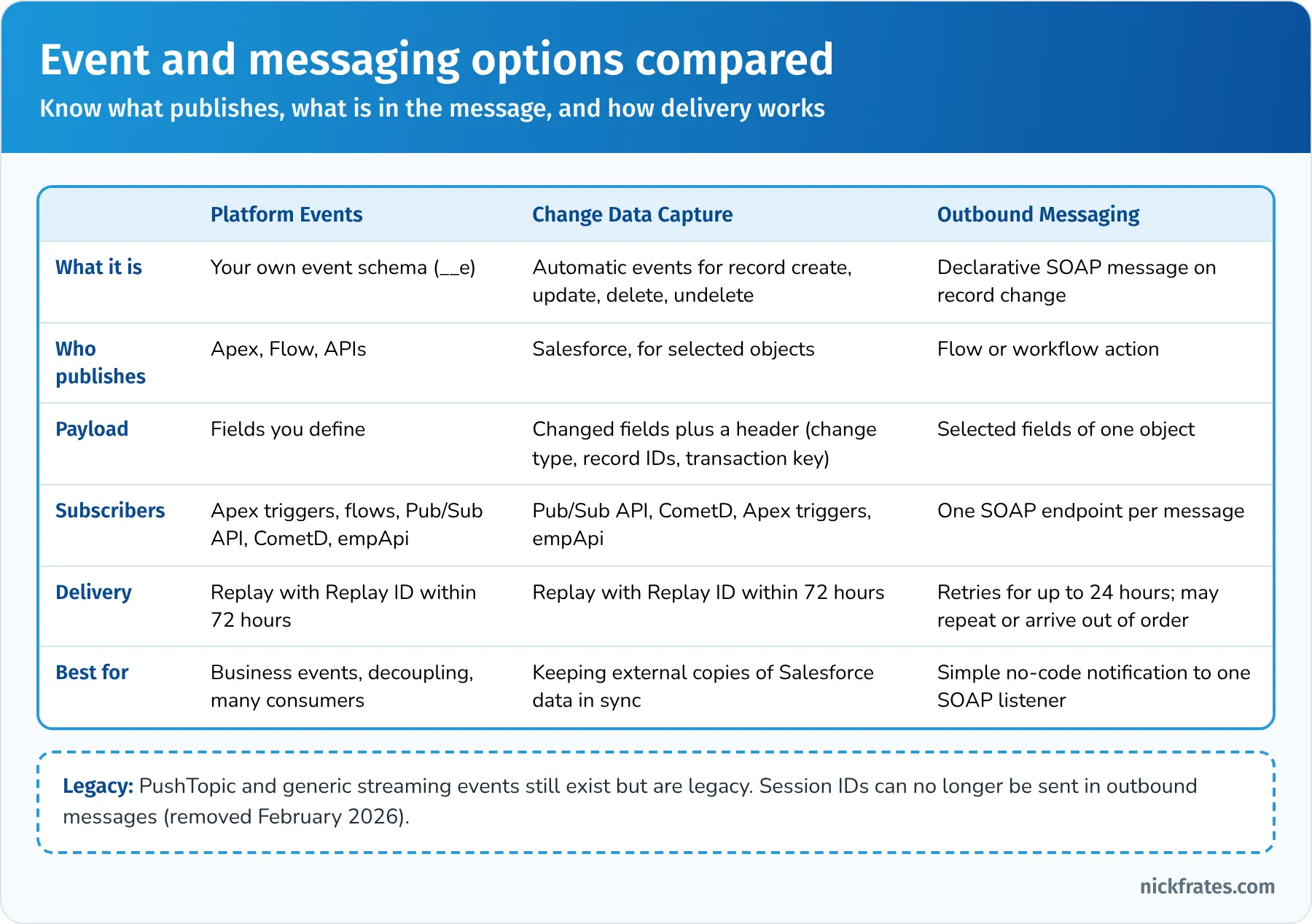
Know what publishes, what's in the message, and how delivery works.
Key takeaway: Platform Events are for business events you design, CDC is for record changes you want to mirror, and Outbound Messaging is a simple SOAP notification. All three need idempotent receivers.
Worked example: an end-to-end integration architecture
Let's put the whole outline together with a fictional customer.
The customer. Summit Outdoor Gear sells camping equipment online and through 40 stores in the US and Canada. It's moving sales and service to Salesforce. Its landscape: SAP ERP on premise (orders, inventory, prices), a cloud e-commerce platform, a billing system with an OData 4.0 API, a cloud data warehouse, a corporate identity provider and a newly purchased MuleSoft license. Expected volumes: 30,000 web orders a day, 150,000 at holiday peak.
Landscape and business needs (Evaluate sections). The architect inventories seven systems and every existing interface: today, SAP sends nightly CSV files, and the website emails orders to a shared mailbox. Pain points: stale inventory, duplicate customers, and no one notices failed files. Requirements are written with numbers: web orders in Salesforce within 2 minutes, orders in SAP within 5 minutes, credit check answers within 10 seconds, no lost orders during SAP maintenance, and customer PII classified as Confidential. Canada's privacy law and future EU expansion are flagged to the legal team.
Identity (Translate). Each calling system gets its own External Client App and integration user on the Salesforce Integration license: MuleSoft uses the JWT bearer flow with a certificate; the e-commerce platform uses client credentials. Employees sign in through SSO with the corporate IdP. Outbound calls use Named Credentials with External Credentials.
Web orders into Salesforce (Remote Call-In). The e-commerce platform calls the Composite API to upsert the person account (on an external customer ID) and create the order and order items in one all-or-none request. At holiday peak, MuleSoft buffers orders and writes them in batches to stay within API and locking limits.
Orders to SAP (Fire and Forget). When an order is activated, a flow publishes an Order Activated platform event after commit. MuleSoft subscribes through the Pub/Sub API, transforms the order into SAP's format and posts it. If SAP is down, MuleSoft queues the messages and retries; on longer outages it resumes from the last replay ID.
Credit check (Request and Reply). For B2B accounts, a screen flow calls the credit agency through a Flow HTTP callout action with a Named Credential and a 10-second timeout. The fault path shows a friendly message and creates a task for finance if the service is unavailable.
Prices and inventory (Batch Data Synchronization). SAP's price list is loaded nightly with Bulk API 2.0 upserts on product external IDs, sorted by parent to avoid locks; failed records are reprocessed from the job's failure file. Inventory changes stream from SAP through MuleSoft every few minutes.
Invoices (Data Virtualization). Billing invoices appear on the account page through Salesforce Connect with the OData 4.0 adapter, related to accounts with an indirect lookup. Nothing is copied, so no sync and no extra PII.
Warehouse feed (Batch Data Synchronization with CDC). Change Data Capture on accounts, orders and cases streams to the data warehouse through MuleSoft. Gap events trigger a re-read of the record.
Maintain. Every interface writes to an integration log object; a dashboard shows failures, backlog age and orders synced in the last hour. API Usage Notifications alert at 70% of the daily allocation. A Transaction Security policy alerts on unusually large API exports. The runbook defines owners, escalation, replay and monthly reconciliation of order counts between Salesforce and SAP.
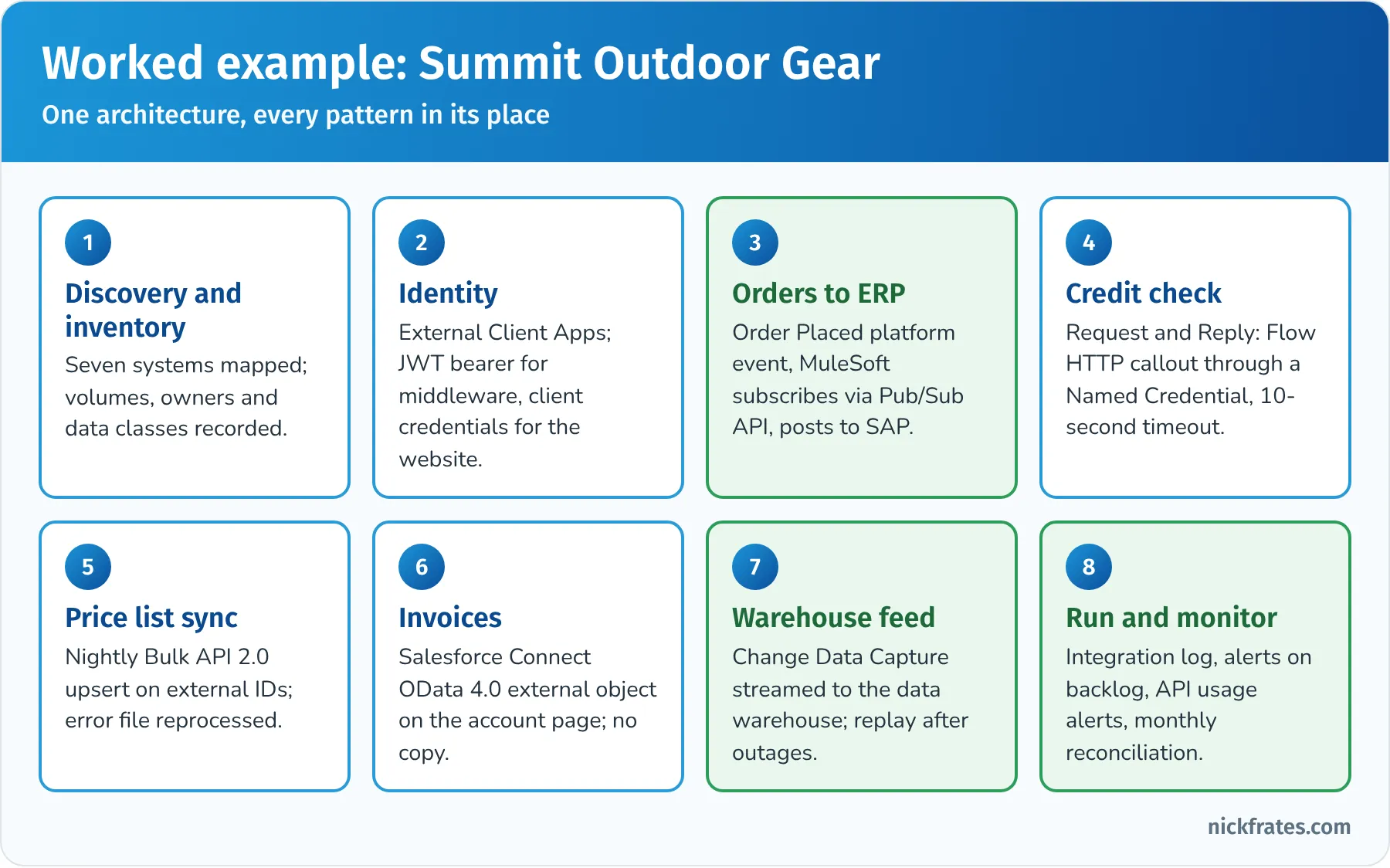
One architecture, every pattern in its place.
Hands-on checklist
Build these in a free Developer Edition org or Trailhead Playground. Each one maps to likely exam questions.
- Use the REST API from Postman or the Salesforce CLI: query records, create one, then upsert using an external ID field.
- Send a Composite request that creates an account and a contact referencing the new account's ID, with allOrNone set to true.
- Load a CSV with a Bulk API 2.0 ingest job (Data Loader can use Bulk API 2.0) and review the successful and failed results.
- Create an External Client App and connect with the OAuth client credentials flow using a dedicated integration user.
- Create a Named Credential and External Credential to a public test API, grant the principal through a permission set, and call it from a Flow HTTP callout action.
- Define a platform event, publish it from a flow, and subscribe with a platform event-triggered flow or an Apex trigger.
- Enable Change Data Capture on Account, update a record, and watch the change event in a subscriber (for example a Lightning component using empApi).
- Configure an outbound message from a record-triggered flow to a test endpoint and check the outbound message queue in Setup.
- If you have access to an OData sample service, set up Salesforce Connect and an external object.
- Open Setup and review System Overview, API Usage Notifications and the Event Monitoring options available in your org.
Common exam traps
- Pointing the arrow the wrong way. Outbound Messaging, callouts and External Services send from Salesforce. REST, SOAP, Bulk and Composite APIs receive calls into Salesforce.
- Synchronous callouts from triggers. Not allowed. Use async Apex, an asynchronous flow path, or events.
- Callouts after DML. Not allowed before commit in the same transaction.
- Copying data that should be virtualized. If it's huge, changes constantly, must stay in the source, and nobody reports on it, think Salesforce Connect.
- Virtualizing data that must be reported on. If users need reports, roll-ups or automation on it, it probably needs to be in Salesforce.
- Polling instead of events. Repeated queries for "what changed" waste API calls; use CDC or platform events.
- Passwords and session IDs. Username-password OAuth, SOAP login() scripts and session IDs in outbound messages are all on their way out. Choose client credentials, JWT bearer or authorization code with PKCE.
- Secrets in code or settings. Use Named and External Credentials.
- Shared admin integration users. One dedicated, least-privilege integration user per system.
- Retries without idempotency. Retries create duplicates unless the receiver upserts on an external ID or de-duplicates by a unique key.
- Ignoring the 72-hour window. Event replay only covers retention; longer outages need a re-sync.
- Middleware for everything, or nothing. One simple interface rarely justifies a new platform; twelve systems with transformation usually do.
- Treating PushTopic as the modern answer. It still works but is legacy; platform events and CDC are preferred.
Flashcard terms
- Request and Reply: Salesforce calls a remote system and waits for the result (synchronous).
- Fire and Forget: Salesforce sends a message and continues; processing happens later (asynchronous).
- Batch Data Synchronization: bulk creation or refresh of data between systems.
- Remote Call-In: a remote system creates, reads, updates or deletes Salesforce data.
- UI Update Based on Data Changes: the Salesforce UI updates automatically from events.
- Data Virtualization: external data shown in Salesforce without storing it.
- Platform event: a custom event (__e) published and subscribed to for decoupled messaging.
- Change Data Capture: automatic change events for selected objects' record changes.
- Replay ID: the position of an event in the stream, used to resume within 72 hours.
- Pub/Sub API: gRPC API for publishing and subscribing to platform events and change events.
- empApi: the Lightning module that subscribes a component to streaming events.
- Outbound Messaging: declarative SOAP notification with up to 24 hours of retries.
- External Services: registers an OpenAPI spec so Flow can call the API declaratively.
- Continuation: asynchronous callout pattern for long-running requests from a Lightning or Visualforce page.
- Named Credential: the callout endpoint; references an External Credential.
- External Credential: the authentication protocol and principals for callouts.
- Named principal / per-user principal: one shared identity versus each user's own identity.
- External Client App: the current way to register inbound OAuth apps, replacing new connected apps.
- Client credentials flow: server-to-server OAuth that runs as a designated integration user.
- JWT bearer flow: server-to-server OAuth using a signed certificate assertion for a pre-authorized user.
- PKCE: proof key that protects the authorization code flow, especially for mobile and single-page apps.
- Salesforce Connect: external objects (__x) backed by OData, cross-org or custom adapters.
- Indirect lookup: relates an external object to a Salesforce parent through a unique external ID field.
- Composite resource: several API operations in one request, optionally all-or-none.
- Bulk API 2.0: asynchronous API for large data loads and queries.
- Idempotent: safe to repeat; repeating the same request doesn't change the result.
- Data skew: too many child or owned records on one parent or owner, causing locks and slow sharing.
- API-led connectivity: MuleSoft's approach of system, process and experience APIs.
Quick-reference cheat sheet
| Topic | Remember |
|---|---|
| Format | 60 scored + up to 5 unscored, 105 min, 67% to pass, US$400, retake US$200 |
| Prerequisite | None; counts toward System Architect |
| Largest sections | Design 28%, Build 23%, Translate 22% |
| Patterns | Request and Reply, Fire and Forget, Batch Data Synchronization, Remote Call-In, UI Update Based on Data Changes, Data Virtualization |
| Records in | REST/SOAP for small volumes, Composite to cut round trips, Bulk API 2.0 for thousands to millions |
| Events | Platform events for business events, CDC for record changes, 72-hour replay, idempotent subscribers |
| Outbound | Flow HTTP callout or External Services, Apex callouts, Continuation for UI waits, Outbound Messaging for SOAP |
| Callout limits | 100 per transaction, 10 s default timeout up to 120 s, async from triggers, no callout after DML |
| Data in place | Salesforce Connect, external objects (__x), external and indirect lookups |
| Inbound auth | External Client Apps; client credentials or JWT bearer for servers; authorization code + PKCE for users |
| Outbound auth | Named Credential (endpoint) + External Credential (auth, principals) + permission set |
| Retiring | Username-password, user-agent and hybrid flows (Feb 20, 2027); device flow restricted from Nov 30, 2026 |
| Security | Dedicated API-only integration users, minimal scopes, mutual TLS, IP restrictions, Shield encryption |
| Scale | Bulkify, async for volume, upsert on external IDs, sort by parent, avoid data skew |
| Maintain | Event Monitoring, Real-Time Event Monitoring + Transaction Security, API Usage Notifications, integration log |
| Middleware | Many systems, transformation, orchestration, routing, guaranteed delivery |
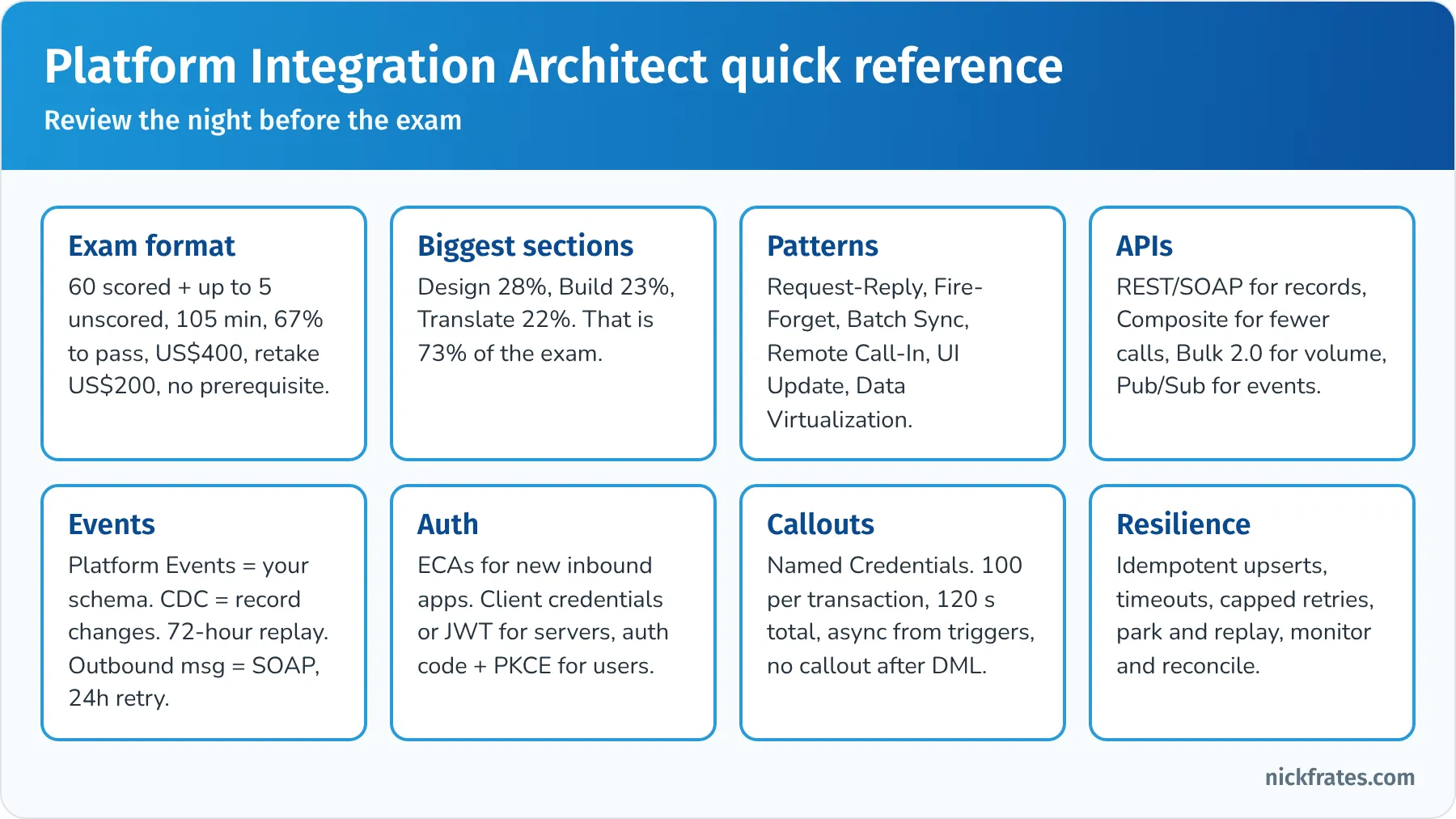
Review this the night before the exam.
Frequently asked questions
Is Platform Integration Architect the same as Integration Architect? Yes. Salesforce renamed Integration Architect to Platform Integration Architect in July 2025, when certifications moved to Trailhead Academy. It's the same credential and exam (Plat-Arch-204), and existing holders didn't need to re-earn it.
How hard is the exam? It's an architect exam, so it's mostly long scenarios with several plausible answers. The 67% passing score is lower than many exams, but the questions reward real design experience. People who have built integrations and read the Integration Patterns and Practices guide find it fair.
Are there prerequisites? No. You can register without any other certification. In practice, Platform Developer-level knowledge of Apex limits and transactions helps a lot, and my Platform Developer I study guide covers that ground.
How many questions and how long? 60 scored questions plus up to 5 unscored questions in 105 minutes.
How much does it cost? US$400 to register and US$200 to retake, plus applicable taxes.
Do I need to know MuleSoft? You need to know when an integration platform like MuleSoft is the right recommendation and what API-led connectivity means. The exam guide says configuration of integration tools isn't expected. MuleSoft has its own separate certifications if you want to go deeper.
Does the exam cover External Client Apps and the new OAuth changes? The exam guide aligns to Summer '23, before those changes, so questions may say "connected app." Learn the concepts (OAuth flows, scopes, integration users) and you'll handle either term. In real projects, use External Client Apps and modern flows.
How do I keep the certification? Complete the annual Platform Integration Architect maintenance module on Trailhead before the due date.
What should I take next? Platform Integration Architect is one of the four credentials that make up System Architect, along with Platform Developer, Platform Development Lifecycle and Deployment Architect, and Platform Identity and Access Management Architect. Platform Data Architect is a natural companion on the Application Architect side. The certification study guides hub can help you plan the path.
Related study guides
- Salesforce Platform Data Architect study guide for data modeling, large data volumes and data migration.
- Salesforce Platform Developer II study guide for advanced Apex, async processing and integration code.
- Salesforce JavaScript Developer study guide for the JavaScript behind Lightning web components and API clients.
- Salesforce Platform Developer I study guide for Apex, governor limits and transactions.
- Salesforce Development Lifecycle and Deployment Architect study guide, another System Architect credential.
- Salesforce Data 360 Consultant study guide for unified customer data and data streams.
- Agentforce Specialist study guide for agents, actions and grounding.
- The Science of Studying for Salesforce Certifications for how to study.
- All Salesforce certification study guides.
Want to go deeper on Flow? More and more integration work happens in Flow now: HTTP callout actions, External Services, platform event-triggered flows and fault paths. My Salesforce Flows course walks through record-triggered, screen, scheduled and platform event flows with real-world challenges.
Hope this helps!
Best,
Nick